How to easily manage multilingual review and approval in PageProof
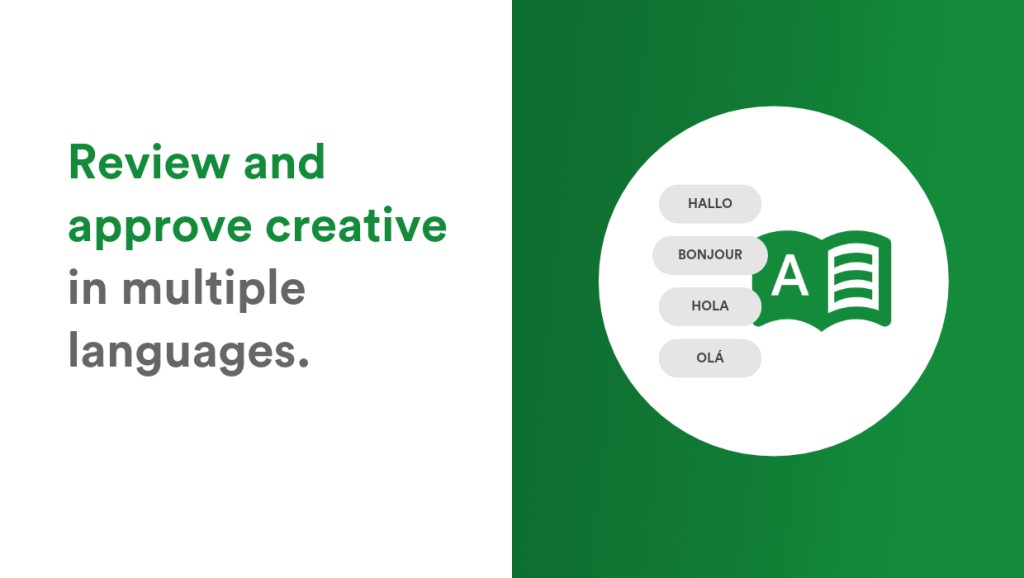
Marketing and creative campaigns often include many assets, each adapted for different languages, markets, and regions. Every version needs to be accurate, on-brand, and delivered on time, which makes managing reviews across languages and reviewers a complex task.
PageProof helps marketing and creative teams bring multilingual review and approval into one place. The platform is available in 14 languages, with email notifications also available in select languages, and features like multilingual spell check and automated approval workflows that route proofs to regional reviewers help keep every version moving.
Here’s a look at the features that make this happen.
Spell check in seven dictionaries
PageProof’s built-in spell check now supports German, French, Spanish, and Portuguese (Portugal and Brazil), alongside US and UK English.
Each language has its own spelling, accents, and conventions, so checking content against the right dictionary is essential.
When activated, spell check scans the visible text on your proof and highlights any words that may be misspelled. Hover over any highlighted word to see up to three suggestions, then click to:
- Choose a suggested correction
- Type your own change into a comment
- Ignore the word in this proof, or ignore every occurrence of it
- Add the word to your personal dictionary so it isn’t flagged again
To start, click the spell check icon in the magic tools, or press S on your keyboard. Spell check works on PDF, InDesign, Illustrator, Word, PowerPoint, and Excel files.
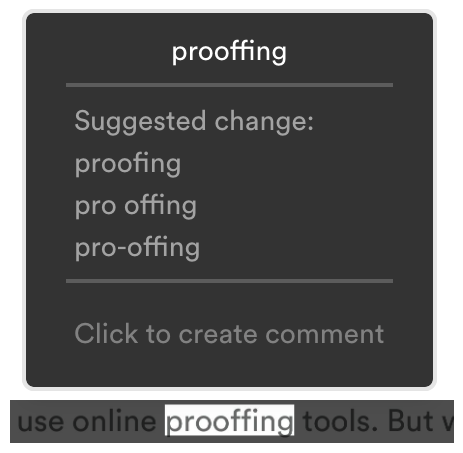
Hover over a highlighted word to see suggested corrections, then click to create a comment.
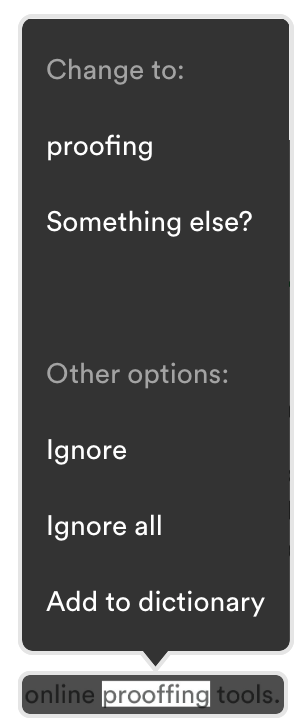
Click a highlighted word to choose a correction, suggest something else, ignore it, or add it to your dictionary.
Each reviewer chooses their own spell check dictionary
Reviewers can set their preferred dictionary from their profile. To do this, click your avatar, select Profile, and choose your preferred language for spell check. This means a reviewer in Lisbon can check the Portuguese version of a campaign while a colleague in Madrid reviews the Spanish one, each using the dictionary that matches their content.
Keep brand names and terminology consistent with PI agents
Every brand has words that standard dictionaries don’t recognize, such as product names, campaign taglines, and the brand name itself. Adding these to your personal dictionary means they won’t be flagged in future proofs.
To check more than spelling, you can set up a PageProof Intelligence®(PI) agent. It’s a custom AI-powered reviewer that checks proofs against your rules, guidelines, and requirements. It can analyze things such as:
- Brand guidelines
- Packaging specifications
- Legal or compliance requirements
- Accessibility standards
Once applied, the PI agent reviews your proof and suggests markup, helping reviewers quickly spot potential issues and move work to approval with confidence.
PI agents can be configured in any language, so each market’s version of an asset can be checked against the same standards.
If requirements differ per market, you can set up a separate PI agent for each region, with its own rules for whatever that market requires, such as local legal copy, terminology, or specific requirements.
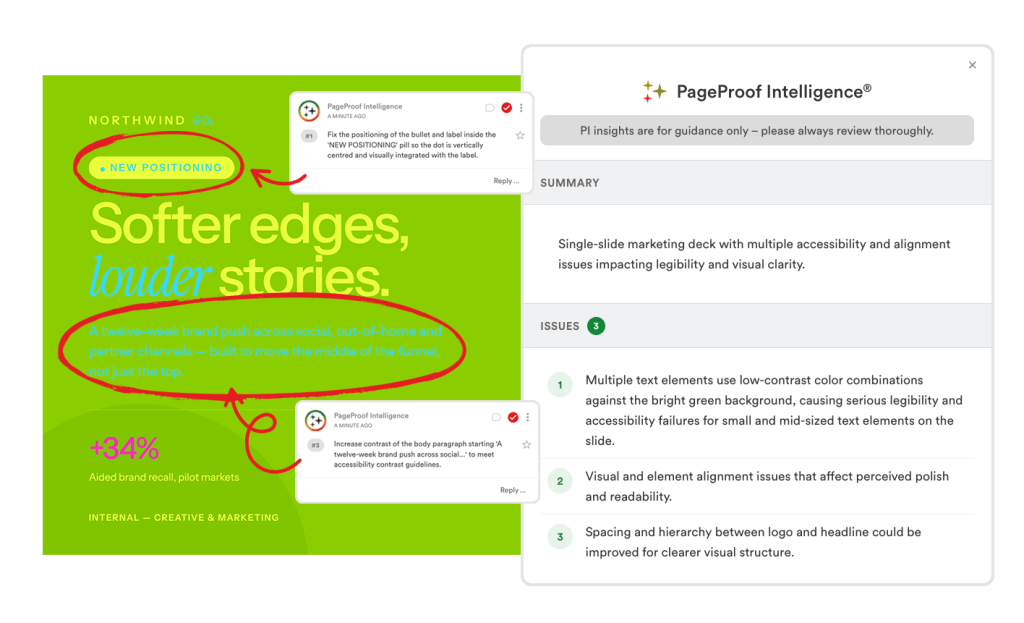
A PI agent flags accessibility issues on a marketing slide, including low-contrast text and alignment, with suggested markup on the proof.
Route each language to the right reviewers with workflows
If reviewers in different markets each need to sign off on an asset, you likely have a defined workflow to follow.
For example, a product launch in Germany might need the local marketing team to review first, then the regional regulatory team, before the global brand team gives final approval.
Here’s how that workflow could be set up:
Step 1: Local marketing team
The German marketing team reviews the proof for language and tone. The marketing lead is set as a mandatory reviewer, so the proof waits for their decision before moving on. Other team members are added as reviewers to comment without holding up the workflow.
Step 2: Regional regulatory team
A member of the regulatory team is set as a gatekeeper. They check legal copy and compliance requirements, then decide whether the proof moves to the next step or returns to the proof owner with to-dos.
Step 3: Global brand team
The global brand manager is set as the final approver. They decide whether the proof is approved as is, or returned to the proof owner with to-dos.
Anyone who needs to stay informed can be added as view-only, so they can see the proof without commenting or leaving a decision.
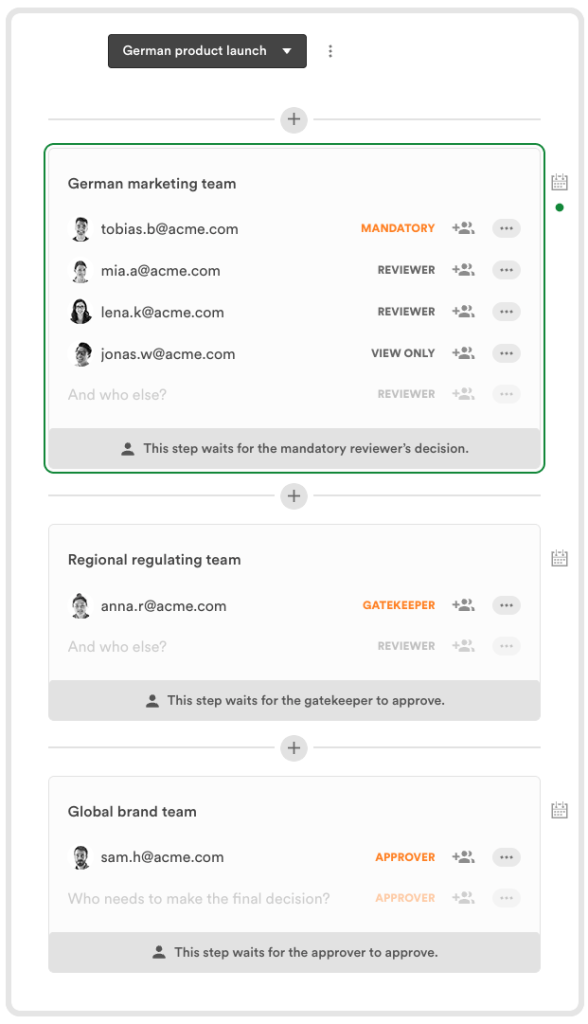
An example three-step workflow for a German product launch.
Work in your preferred language
PageProof’s interface is available in 14 languages, so reviewers can work in the language they’re most comfortable with.
For example, during the German product launch, the local marketing team can review the proof with PageProof set to German, while the global brand manager reviews the same proof in English. Each person sees the interface in their own language, and email notifications follow their preference too*, so proof invites and reminders arrive in German for the local team.
To change your language setting, click your avatar, select the globe icon, and choose from the list of available languages.
*Email notifications are available in English, French, German, Dutch, Spanish, and Italian.
Maintain a full record of every approval
When an asset is reviewed across several markets, it’s important to know who approved each version, and when. PageProof’s audit trail records every action taken on a proof, showing who did what and when.
If each language version of an asset is created as its own proof, each one has its own audit trail.
For the German product launch example, the audit would show when the local marketing team completed their review, when the regulatory gatekeeper sent the proof back with to-dos, when the new version was uploaded, and when the global brand manager gave final approval. It also shows how long the proof took to reach final approval.
Comment and checklist audits record the feedback itself, so you can see which items were checked and which comments were actioned. Enterprise customers can also view a full, detailed history of each proof and export the audit, giving compliance teams a complete record whenever they need it.
Proof multilingual content with confidence
The more markets a campaign reaches, the more languages, reviewers, and requirements your approval process needs to accommodate. Without a single place to manage it, keeping every version accurate and on schedule only gets harder as your brand grows.
PageProof gives marketing and creative teams one platform to review and approve content in every language, so you can expand into new markets knowing each version has been checked properly and signed off by the right people.
Book a demo to see how PageProof can support your multilingual review and approval process.
Like what you see?
Learn how leading teams speed up approvals, simplify creative reviews, and collaborate securely at scale.