Seamless Canva workflows with the PageProof app for Canva
Why we built the PageProof app for Canva
Designers, social content creators, and marketers using Canva need an easy way to gather stakeholder feedback without breaking their creative flow. Jumping between email threads or internal communication tools slows teams down.
The PageProof integration for Canva, solves these problems by bringing structured review and clear approvals directly into your design space. So feedback stays connected to the design, stakeholders stay aligned, and your creative momentum never stalls. You will love the time you save, reducing your rework and making gathering approvals completely stress-free.
How PageProof for Canva works
The PageProof app makes it easy for you to send your Canva designs for review, view and action comments, and manage approvals – all without leaving Canva.
1. Create a proof directly from Canva
Create proofs and new versions directly from your Canva files and send them into a PageProof workflow with automated reminders, reviewer checklists, and complete visibility of progress.
2. View and action comments inside Canva
When feedback comes in, open the PageProof app panel in Canva to see comments and markups in context. In the app panel, you can reply to comments, download attachments, place comment text directly onto your design, and mark items as done to stay organized.
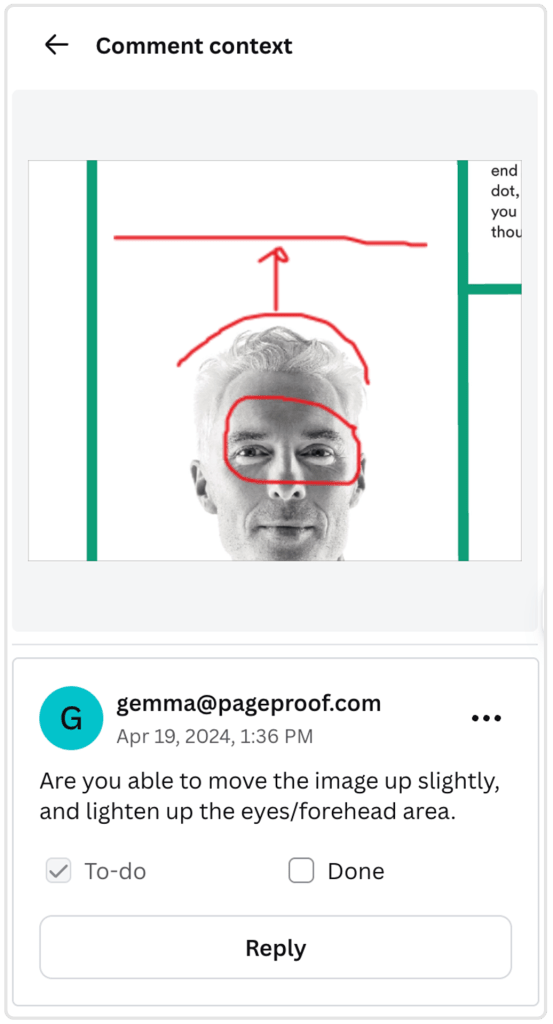
3. Upload a new version
Once the changes are complete, upload a new version right from Canva. Every proof, version, and comment is automatically tracked in PageProof’s secure audit trail, keeping your creative process clear and connected from start to finish.
Powerful proofing tools built in
Alongside structured comments and approvals, PageProof brings advanced proofing capabilities into your Canva workflow.
Use compare mode to spot differences between versions. Smart Compare automatically highlights visual and technical differences between proofs, while a handy slider lets you easily see what’s been updated.
The link scanner automatically surfaces all links within an asset including external URLs, internal document links, and email addresses – so you can verify them without manually hunting through your file. The automatic barcode scanner locates barcodes and QR codes so you can ensure they’re accurate and functional.
Effortless proof creation. Fast approvals.
With the PageProof integration inside Canva, you can:
- Create new proofs and versions directly from your Canva designs
- See feedback and comments in context alongside your design
- Download attachments, reply to comments, place comment text, and action feedback without switching tools
- Mark comments as done to keep your workflow clear and organized.
From social media graphics to videos and presentations, the app keeps your designs moving smoothly from first draft to final approval – faster and with less rework.
Get the PageProof app for Canva from the Canva Apps Marketplace.