5 ways to use PI Agents to speed up design review and approval
At PageProof, we’re seeing new and exciting ways PageProof Intelligence® (PI) Agents, the variety of ways teams are using them — and the results they’re achieving — has been remarkable.
Whether it’s catching a brand inconsistency before a reviewer even opens the file, flagging language that shouldn’t make it into a final asset, or creating dedicated agents for different brands, regions, or business units — each checking against its own unique requirements — PI Agents are helping teams move from draft to sign-off with fewer surprises and less manual checking along the way.
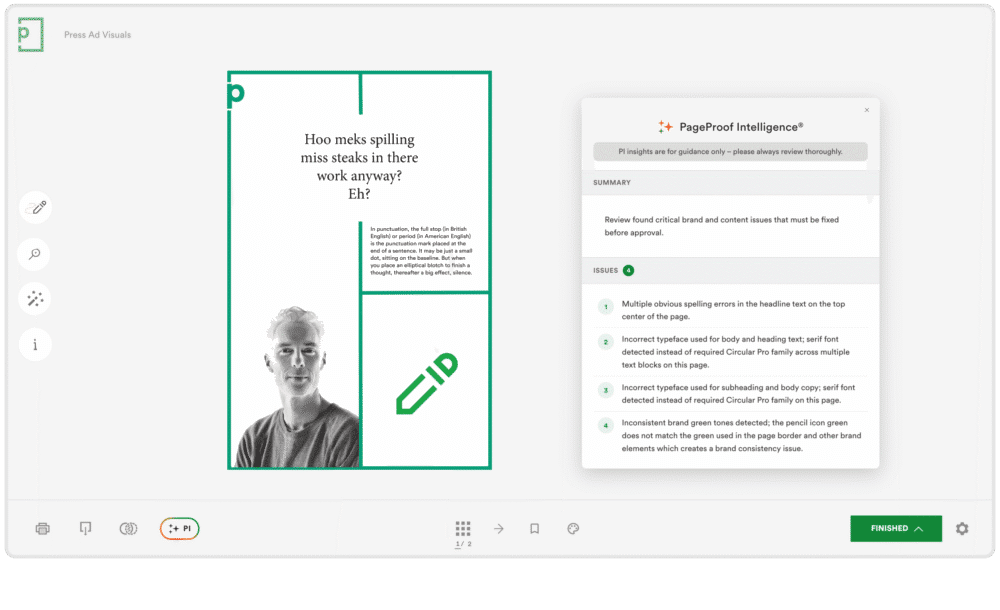
A PI agent automatcially validates the proof against brand guidelines, product specs, legal terms, and so much more.
What is a PI Agent?
A PI Agent is a custom AI-powered review process, powered by PageProof Intelligence®, trained to check a proof on whatever brand documents, rules, and requirements matter to your organization.
It can analyze a proof against things like:
- Brand guidelines
- Packaging specifications
- Legal or compliance requirements
- Accessibility standards
- Approved or banned language and terminology
- Any other rules or documents you choose to train it on.
Once applied, the PI Agent reviews the proof and suggests markup, helping reviewers spot potential issues quickly and move work to approval with confidence.
Here’s what that looks like across five common use cases:
1. Catch brand inconsistencies before a human even opens the file
Brand inconsistencies can be easy to introduce: a designer grabs the wrong font from a template, a color gets picked from the wrong swatch, a logo gets stretched slightly out of ratio. These small inconsistencies can be easy to miss, and require a lot of manual, detail-by-detail checking to catch.
A PI Agent trained on your brand guidelines checks for these types of issues automatically, before a reviewer opens the proof.
In the video below, you can see this in action, with PageProof Intelligence® putting comments directly on a proof — flagging that a pencil icon needs adjusting, that a headline needs rewriting, and that the font currently used, Minion Pro, needs to be replaced with the brand typeface, Circular Pro.
2. Keep language and terminology on-brand automatically
Many brands have language guidelines, and specific terms or phrases they want to use, and some they don’t. Issues such as a product name spelled incorrectly, or a term that legal has flagged as not to be used, can easily slip through when a reviewer is proofreading copy and checking it manually against a style guide.
A PI Agent can be trained on your style and language guidelines, checking copy against these automatically. Tell it what should never appear in your work, and the agent will flag any violation, the same way it flags a wrong font or an off-brand color, as a built-in check running alongside the rest of the review.
For example, an agent trained on a packaging company’s guidelines could flag every instance where a product was referred to by an old or discontinued name instead of its current, approved name.
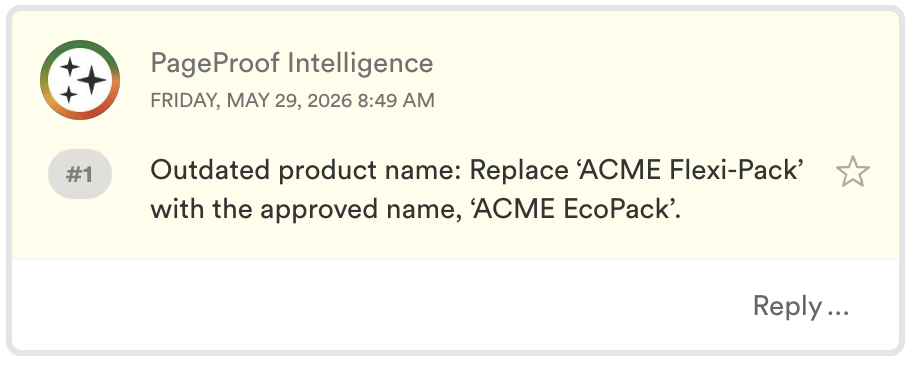
Example spelling issues that PI Insights has found for a proof.
3. Build a dedicated agent per brand, product line, or team
If your marketing team works with more than one brand, product line, or team, one set of review rules is unlikely to cover them all. A style guide that’s correct for Brand A might be wrong for Brand B.
For example, think of a beverage company owns two very different drink brands like Sprite and Fanta, each with its own distinct fonts, color palette, tone of voice, and packaging compliance requirements.
Rather than configuring one agent to try and cover everything, you can create a separate PI Agent for each brand:
- One trained on Sprite’s brand guidelines
- One trained on Fanta’s brand guidelines.
To use either agent, you simply add its tag to the proof during setup. For example, PI-Sprite for a Sprite proof, and PI-Fanta for a Fanta proof.

Adding the “pi-fanta” tag to a proof, assigns it to that agent’s specific rules during setup.
4. Catch accessibility issues that are tricky to spot
Accessibility issues, such as insufficient color contrast, text sizes that are too small to meet guidelines, missing alt text considerations, can sometimes go unnoticed.
A PI Agent can be trained on your accessibility requirements and check every proof against them automatically, flagging issues like contrast or sizing problems as part of the same review — giving reviewers that specialist-level check on every proof, before they start their review.
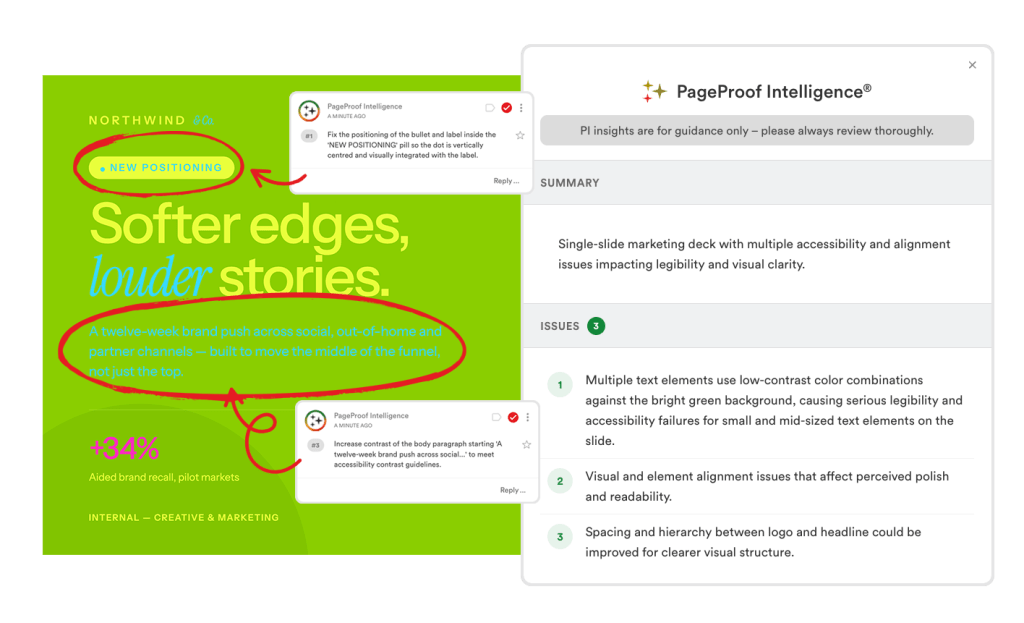
A summary of acessibility issues a PI Agent has detected.
5. Review and comment in any language
Global brands often run their review processes in multiple languages. A proof going out for a French audience needs to be checked and commented by someone who can review it in French, whereas a proof going out in Brazil needs the same in Portuguese. Coordinating that usually means routing work to specific regional reviewers, or having someone translate feedback back and forth so the rest of the team can follow what was flagged.
A PI Agent can be prompted to operate entirely in a different language, not just translating its output afterward, but doing the actual review and commenting in that language from the start.
In the clip below from the recent PageProof Academy session on PageProof Intelligence, you can see PageProof co-founder Marcus Radich, prompting the agent to “do everything in French,” and from that point on, its full analysis and every comment were written in French: a headline flagged as needing a rewrite, a font substitution flagged, a color inconsistency flagged — all in French, matching the language of the market the proof was intended for.
The five use cases above are just a starting point. Any set of rules, guidelines, or requirements your team currently checks manually is a candidate for a PI Agent.
Before a reviewer opens the proof, the agent has already reviewed it — flagging inconsistencies, surfacing violations, and pointing reviewers to exactly where their judgement is needed.
Fewer surprises. Less manual checking. More confident approvals, from the very first round.
Like what you see?
Learn how leading teams speed up approvals, simplify creative reviews, and collaborate securely at scale.


