Fresh new features: May 2021

We always love sharing details of new product features each month. For May we welcome a range of powerful features that will benefit reviewers in any team, as well as website designers, and project managers.
May’s highlights include the new nudge zoom in compare mode, a new release of the Adobe add-on, extended comment formatting styles, and proof share links. Read on to learn more.
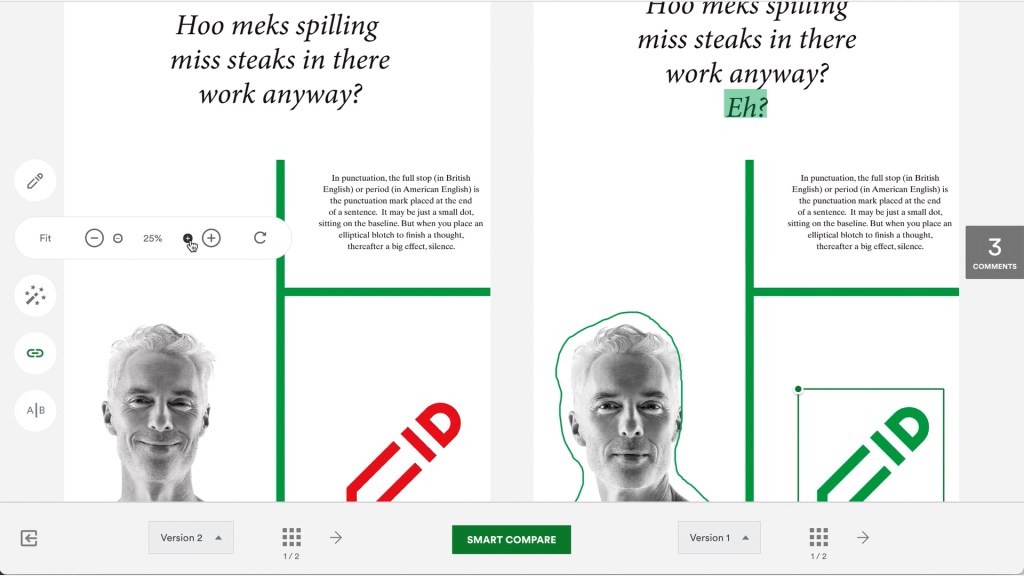
Nudge zoom in compare mode
When comparing proofs in both side-by-side mode and smart compare mode, enjoy the ability to nudge the zoom which bumps the zoom on proofs by 5% increments.
Tip: use the shift + up/down arrow as the shortcut key for this functionality.
Exciting updates in Adobe add-on v1.11.10
Our newest PageProof Adobe add-on now supports multiple artboards which Adobe Illustrator users will love. This version, 1.11.10, also supports adding proofs to a collection, and our latest rich text formatting options for comments too. Discover what else our Adobe add-on offers.
New styling formats for comments
Superscript, subscript, bullet-point lists, and numbered lists! Our rich text formatting has been extended to give you these new options. When you’re creating or editing your comment, double-click to apply styling.

Share proof links easily with anyone
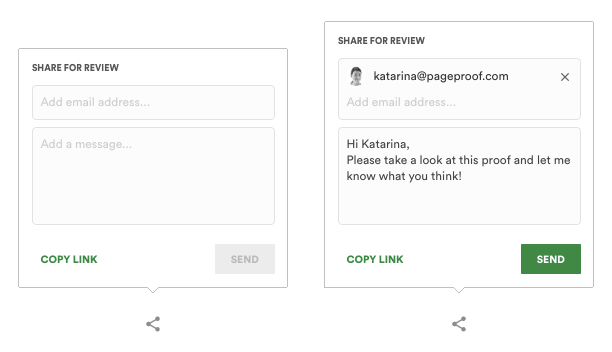
Proof share links are a great way to share the proof with anyone outside of a workflow. If the share link is turned on for a proof, the unique URL found at the top of the proofing screen can be copied and shared with others quickly and easily, or just look for the new share icon on the proofing screen to send to email address/es along with a message.
Team admins can head over to team settings to turn on whether proof share links are available for their team’s proofs.
Our fresh new features videos are posted on YouTube every month. Ensure you’re up to date with all the latest enhancements by subscribing to our YouTube channel.
Chat with us today, if you’d like a walk-through of these new features and more.
Chat with us