Feature Friday: Q3 2026 roundup
Q3 is here! And every Friday, we will continue to spotlight a PageProof feature that transforms how teams review and approve their work.
We are excited to share new features of all sizes — sometimes the smaller features have the biggest impact on your workflow.
Open proof links directly in the desktop app
You can now open PageProof links directly in the desktop app instead of your web browser.
If you’re already working from the PageProof Desktop app on Mac or Windows, chasing a link back into a browser tab adds another step to your workflow. Now it doesn’t have to.
Simply enable Open PageProof links in the desktop app in your Profile preferences, and from then on, whenever you click a PageProof link, whether it’s in an email, a Slack message, or another tool, it will launch straight into the desktop app instead of your browser.

The setting toggle for opening PageProof links directly in the desktop app.
Why you’ll love it
- Open PageProof links directly in the desktop app
- Stay in your native desktop workflow
- Switch between reviewing and approving without bouncing back to your browser
- Available in both the Mac and Windows desktop apps
Built for how you already work
If you’re a Mac user, the PageProof Desktop app already lets you keep PageProof in your dock and drag files straight onto it to create a proof, with built-in support for reviewing live website proofs, no browser extension required.
If you’re on Windows, the PageProof app brings that same full-featured experience to your desktop, laptop, or tablet, with complete feature parity to pageproof.com and the same no-extension website proofing.
This update ties both experiences together: once you’re in the desktop app, you stay there.
Haven’t downloaded the desktop app yet? Get it for Mac or Windows today.
Redesigned dashboard sidebar
Next up this quarter is a refresh to one of the most-used parts of PageProof: the dashboard sidebar. We’ve rebuilt the sidebar with a cleaner design and simpler navigation, making it quicker and easier to find what you need, no matter how much is on your dashboard.
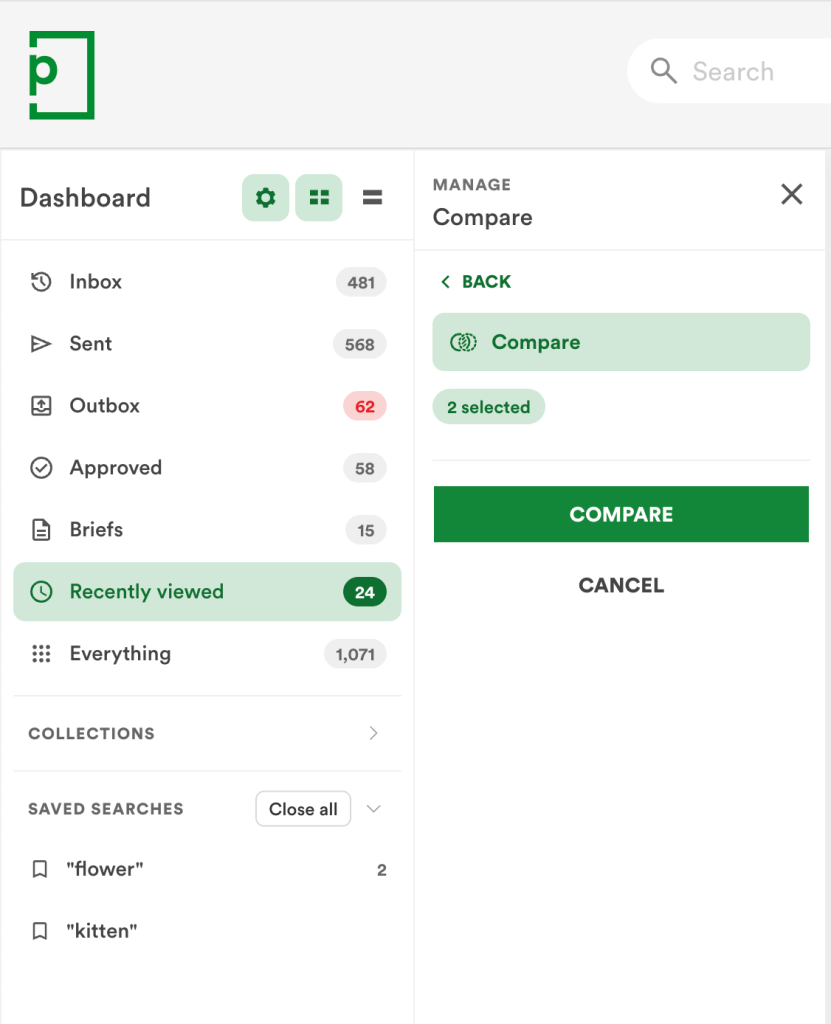
The updated PageProof dashboard sidebar.
What’s improved:
- Cleaner, more intuitive navigation — the sidebar is easier to scan at a glance, so you spend less time hunting and more time reviewing.
- Better organization of dashboard areas — related sections are grouped more logically, making it clearer where to look for what you need.
- Easier bulk actions — select proofs from multiple areas of the dashboard at once and action them together, instead of repeating the same steps one area at a time.
- Accessibility improvements throughout — refinements to structure and navigation that make the dashboard easier to use for everyone.
Small changes to navigation add up fast when you’re moving between dozens of proofs a day, and this redesign is the first step in a broader refresh of how the dashboard works.
Coming soon
This is just the beginning. More dashboard improvements are on the way, including:
- A new folder and subfolder structure for collections, so related proofs can be organized and nested the way your team actually works.
- Bulk archive for collections, making it faster to clear out completed work without archiving proofs one by one.
- The ability to favorite your most-used collections and saved searches, so the things you reach for daily are always just a click away.
Keep an eye on future Feature Fridays as these land.
Comment history audit
This week’s feature is built specifically for teams that need a complete, defensible record of every piece of feedback on a proof: the Comment history audit.
Where the existing Comment status audit tracks changes to a comment’s status, the Comment history audit goes further, recording the full lifecycle of every comment on a proof.
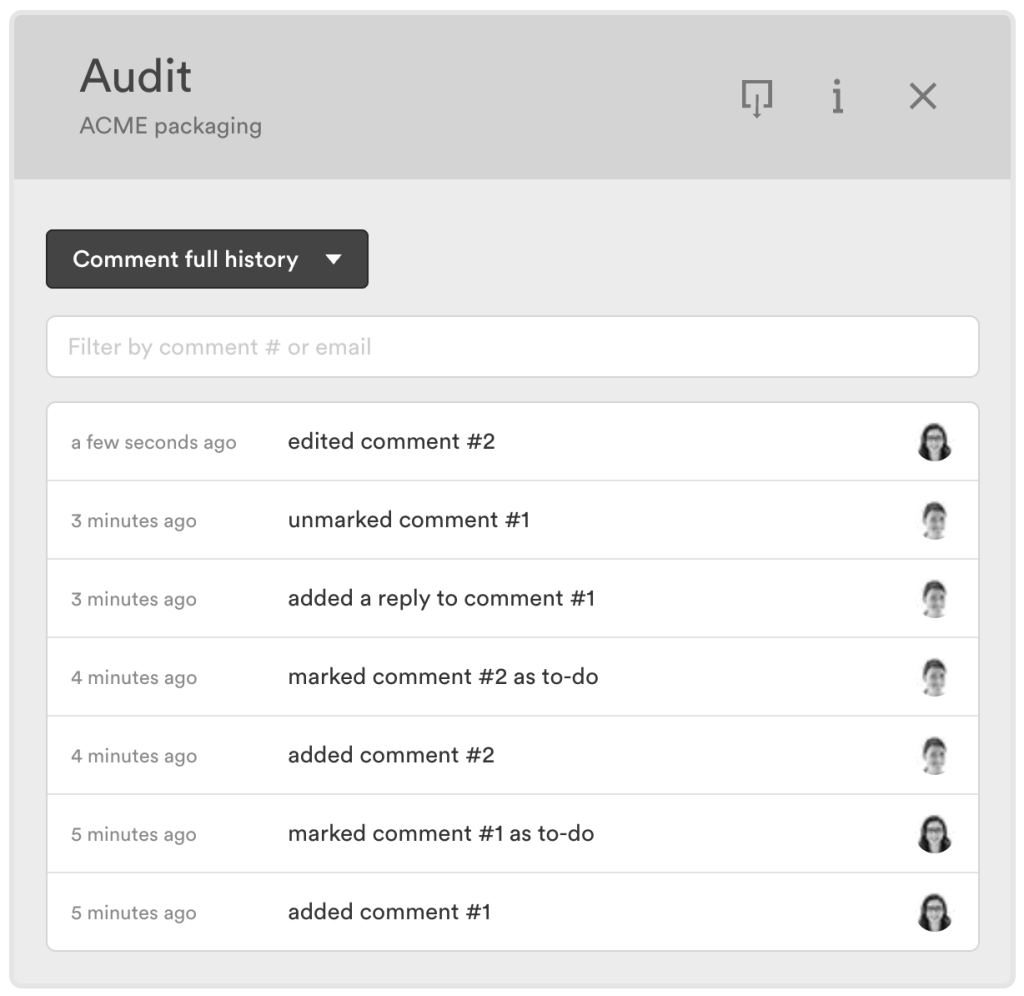
See a full comment history for every proof.
That means every comment and reply added, edited, or deleted, plus every label applied or removed, is captured in one detailed audit trail, giving Enterprise teams the level of detail needed for compliance, governance, troubleshooting, or reporting.
What’s recorded:
- Comments — added, edited, and deleted
- Replies — added, edited, and deleted
- Comment labels — added or removed from a comment, or from a reply on a comment
To view it, open a proof’s info pane, click the audit icon, and select Comment full history. From there, you can filter by comment number or email address to jump straight to a specific event, and click any relative timestamp (like “5 days ago”) to see the exact date and time instead.
This is available now for Enterprise teams, and as PageProof continues to evolve, expect additional comment-related events to be captured here too.
Introducing PreProof™: Better first proofs. Fewer revision rounds.
The biggest release of the quarter, PreProof™ brings quality checks into the design process before a proof is even created.
Powered by PageProof Intelligence®, PreProof™ analyzes your work while you’re still designing and provides PI insights: AI suggested changes that help improve your design before it’s shared for review. By resolving issues before a proof exists, teams create a stronger, more accurate first proof from the very start.
Some of the things PreProof™ can check include:
- Spelling and grammar
- Brand guidelines
- Packaging specifications
- Accessibility requirements
- Content and design standards
- Legal or regulatory requirements
- Any other custom requirements defined through a PI Agent.
The insights are grouped into three categories — Critical, Important and Minor — so you know exactly what to prioritize.
PreProof™ is available now in the PageProof plugin for Adobe InDesign, with support for additional design plugins coming soon.
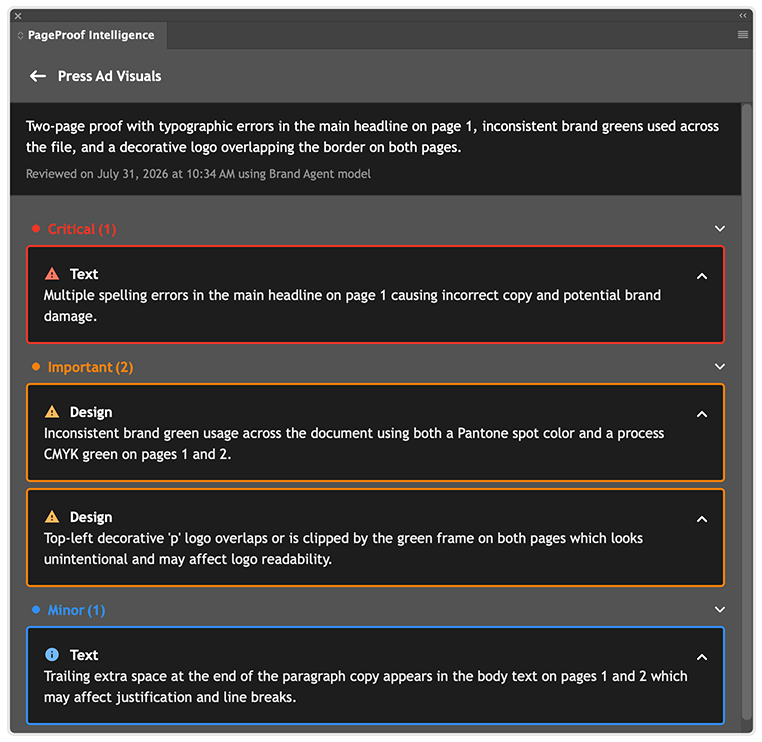
The insights picked up by PreProof™ are grouped into 3 categories: Critical, Important, and Minor.
Marked-up video frames added to print sheets
Print sheets are a great way to capture a proof’s feedback and this quarter they got better for video.
Video proof print sheets now display the marked-up frame alongside each comment and timecode, giving editors the full visual context they need to work through feedback. Rather than reading a comment and a timecode in isolation, you can see exactly what the feedback refers to, right there on the page.
It also creates a clearer, more complete record of the review, one that captures not just what was said, but the exact timeframe it related to.
Every video comment, shown in context.
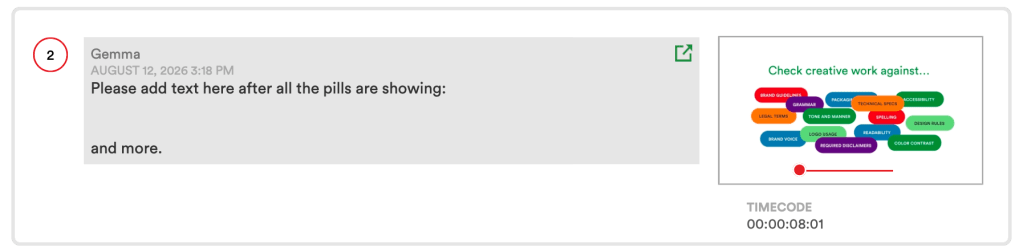
The comment and the timecode are clearly marked up.
Smart Check now available for video
Next up, Smart Check brings the full picture to every video proof.
Smart Check lets you quickly compare video metadata between versions, so you can spot technical differences at a glance, from frame rate and bitrate to codecs, audio channels, and more.
Rather than digging through file properties to work out what’s changed between one version and the next, you get a clear, side-by-side view of the technical details, making it easy to confirm a new version meets the specs it should before it moves through review.
Every technical detail, checked in a glance.
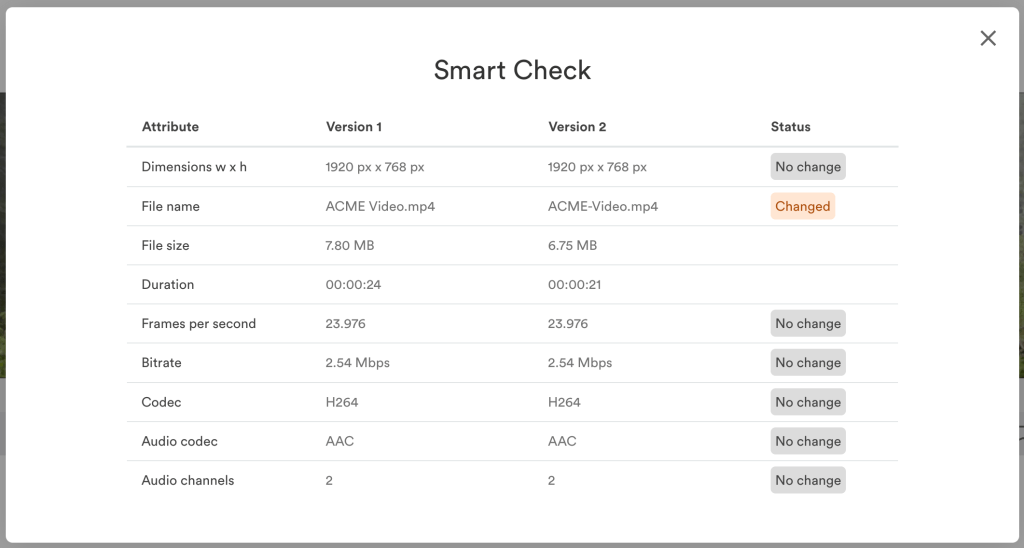
Smart Check compares video metadata side by side, highlighting technical changes between versions at a glance.
Proof multiple Photoshop artboards at once
Next up is a handy addition to the PageProof integration for Adobe Photoshop.
You can now select the artboards you want to share and create a single multi-page proof directly from the plugin. Rather than exporting artboards one by one or creating separate proofs for each, you choose exactly which ones to include and send them all together as one multi-page proof, without ever leaving Photoshop.
It’s a small change that makes getting your Photoshop work into review faster and simpler.
PreProof™ comes to Microsoft Office
Following its launch in Adobe InDesign, PreProof™ is now available in the PageProof add-in for Microsoft Word, Excel, and PowerPoint too.
Powered by PageProof Intelligence®, PreProof™ checks your document, spreadsheet, or presentation while you’re still editing, catching preventable issues before you create a proof. Just click the PageProof Intelligence sparkle icon at the bottom of the add-in panel, and your work is checked against spelling, grammar, brand guidelines, accessibility requirements, and any other custom criteria your team has defined.
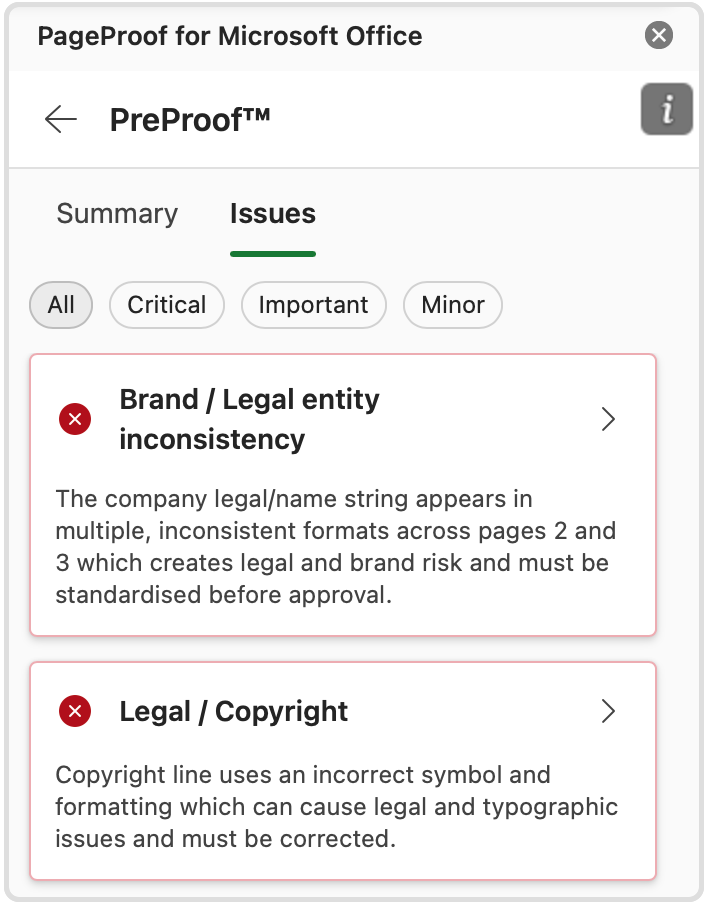
Examples of issues PreProof™ has flagged.
It’s the same benefit PreProof™ brings to design tools, now for the documents, decks, and spreadsheets your team works in every day: better first proofs, fewer review rounds, and faster approvals.
Choose the order of files when combining proofs
Next is a small but welcome improve to how you combine files into a proof.
You can now choose the order of your files before combining them into a single static proof. After selecting your files, simply drag and drop them into the order you want. The order you confirm determines the page order in the combined proof.
No more renaming files with numbers to control their order — just arrange them, confirm, and create your proof.
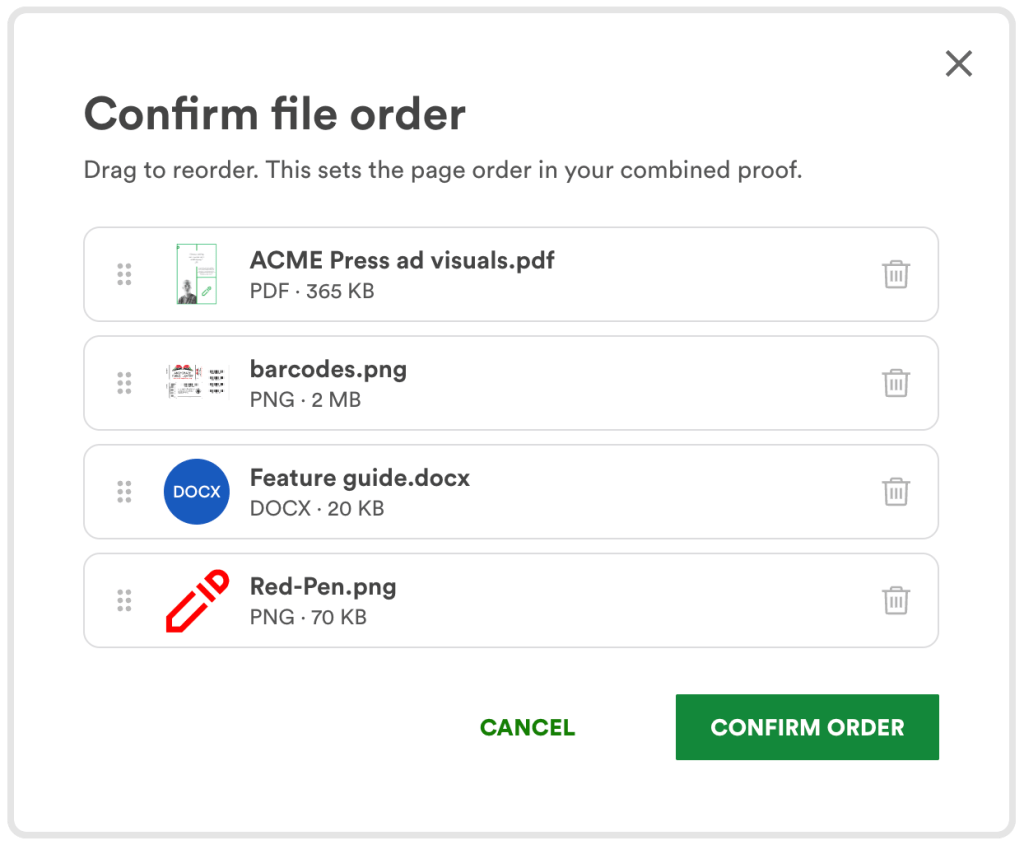
Simply upload your files, and drag them into your desired order.
FinalFile® delivery to Canto
Approval isn’t the end of the workflow — the file still needs to be downloaded, named, and uploaded to your DAM. FinalFile® delivery to Canto removes those manual steps, sending approved files directly to your Canto library as soon as they receive final sign-off.
With FinalFile® delivery, your team can:
- Review and approve creative work in PageProof
- Automatically send the approved final file to Canto
- Avoid downloading and re-uploading files manually
- Reduce the risk of uploading the wrong version
Every delivery is recorded in PageProof’s full audit trail, giving you a clear, traceable record from initial review through to final file storage.
A team admin can connect PageProof to Canto through the integration settings to get started.
FinalFile® delivery to Canto is available on Enterprise plans.
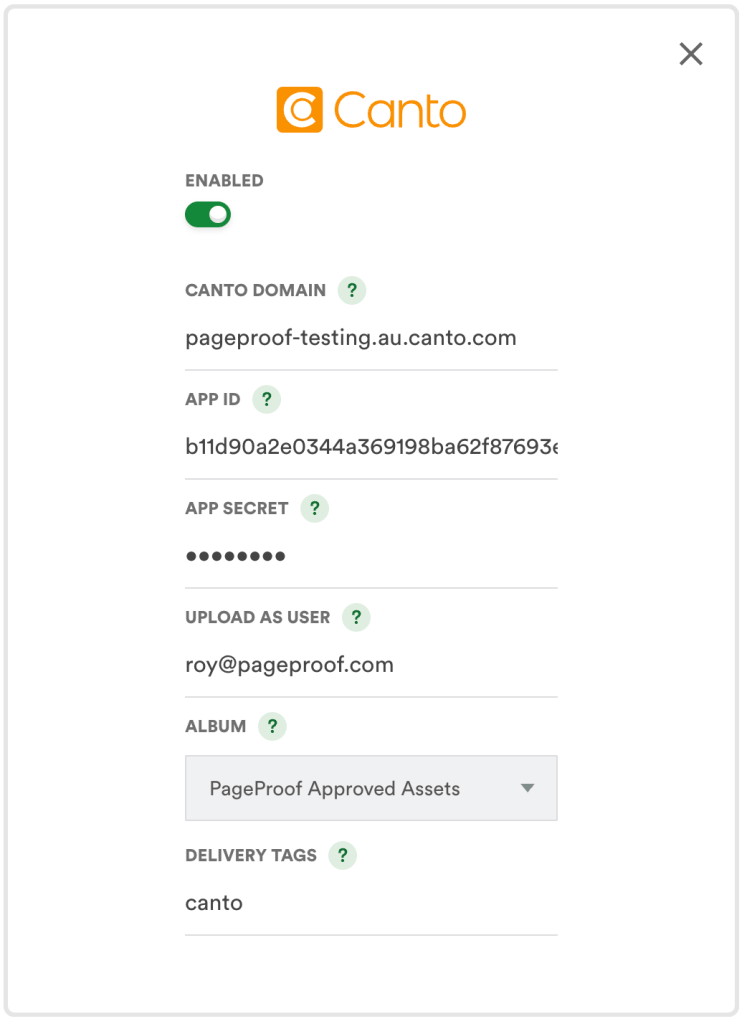
FinalFile® delivery for Canto can be switched on by a team admin.
View audit history across all versions
Reviewing an audit trail one version at a time can mean piecing the full story together yourself. Now you can select All versions when viewing a proof’s audit to see the audit history across every version at once.
Proof owners can view all versions they own, while team admins can view all versions within their team.
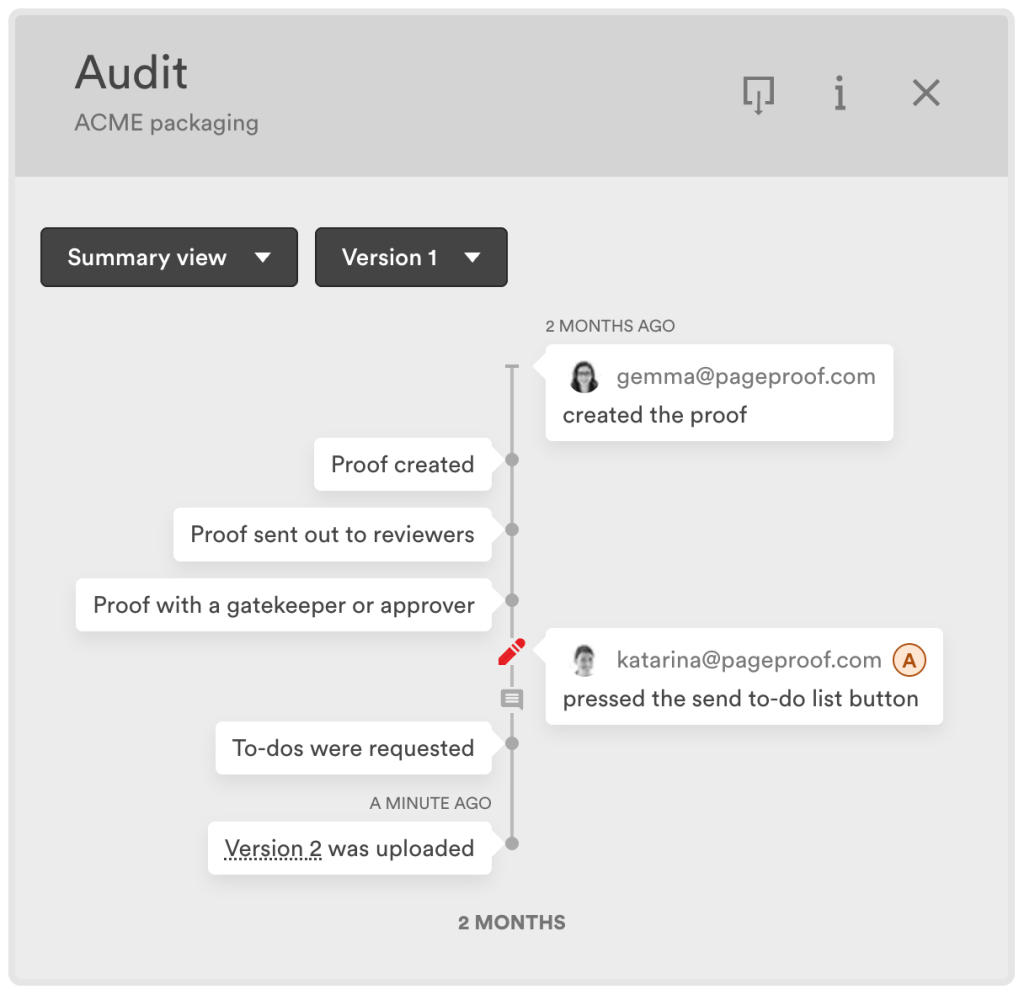
A full audit trail, from proof creation to version upload.
What’s next
Feature Friday continues every week. Follow along to discover the PageProof features helping creative and marketing teams review faster, stay aligned, and approve with confidence.
Follow us on LinkedIn
Keep up to date with the latest PageProof features helping teams speed up approvals and simplify creative reviews.