Adobe Max 2024: 5 exciting updates to look forward to

Mike McHugh | Published on Nov 8, 2024
Having been closely involved with Adobe, I always find it exciting to see what they reveal at the Adobe Max creativity conference, and this year was no exception. I was excited to see the announcements at Adobe Max last month, where Adobe showcased how they’re continuing to evolve given the widespread adoption of artificial intelligence (AI) across design verticals.
In this article, I’ll share some key takeaways and insights from the PageProof team on what to expect next.
Insights from Adobe Max 2024
The focus of the conference was the impact of AI technology on marketing, design, content creation, and more. This includes not only streamlining creative processes but also offering a way to generate content at speed. Tools like Adobe’s Firefly have become essential for marketing and creative teams, helping to scale their content production.
However, with the resulting surge in content production, it’s more important than ever to ensure collateral is on-brand, compliant, and fully approved by internal teams before going live.
As a result of this, a central focus of the event was content authenticity, especially in light of AI’s growing role in design. With enhancements to tools like Adobe InDesign and Premiere Pro, Adobe is expanding its generative AI capabilities, but with a clear emphasis on transparency.
Movements such as the Content Authenticity Initiative (CAI), founded by Adobe in 2019, are helping to ensure transparency of creative content and maintaining integrity from creation through to publishing. Adobe’s message is clear – AI can be a powerful addition to the creative toolkit, but transparency should be upheld at every step.
I’m excited to see how Adobe’s thoughtful innovations will continue to empower creatives and marketing teams across the Adobe Creative Cloud ecosystem.
Our 5 favorite updates from Adobe Max
With themes of AI, authenticity, and transparency guiding the discussions, Adobe showcased several innovative features that will significantly enhance creative workflows.
Here are five features our team are excited to try out:
1. Firefly video model announcement
The standout moment from the conference for me was the enhancement to Adobe’s Firefly model, which now supports generative AI video creation. This groundbreaking feature is the first of its kind and is currently in limited public beta.
With this new capability, Firefly takes a significant step beyond its impressive success in image generation, which has already seen 13 billion images produced since its launch in early 2024.
In my opinion, applying this technology to video will revolutionize the way content creators approach their projects – as being able to generate dynamic video content based on simple text prompts will significantly reduce the time spent on content creation and editing. Video editors working in Adobe Premiere Pro will likely see substantial improvements to their creative workflows.
The ability to produce high-quality videos faster and with fewer bottlenecks along the way means that teams can focus more on the creative aspects of their projects rather than getting bogged down by tedious production tasks.

A fun AI-generated video by Adobe Firefly.
2. Generative AI in InDesign
Another exciting development showcased is the introduction of generative AI within InDesign. This enhancement comes in the form of the new ‘Text to Image’ feature, which allows users to create stunning images from simple text prompts directly within the app.
By simply typing what you imagine, InDesign generates multiple image options based on your description. This functionality not only saves time but also opens up possibilities for designers looking to incorporate unique visuals into their projects without relying solely on stock images or extensive graphic design skills.
Additionally, InDesign’s new ‘Generative Expand’ feature offers even greater flexibility, enabling designers to customize aspect ratios to perfectly fit their layouts. This allows for greater creativity and adaptability when working on projects that require specific dimensions or orientations.
Whether you’re designing a print advertisement, digital publication, or social media post, this feature allows creatives to repurpose any of your creative assets – making it easier to iterate on ideas and produce engaging content.
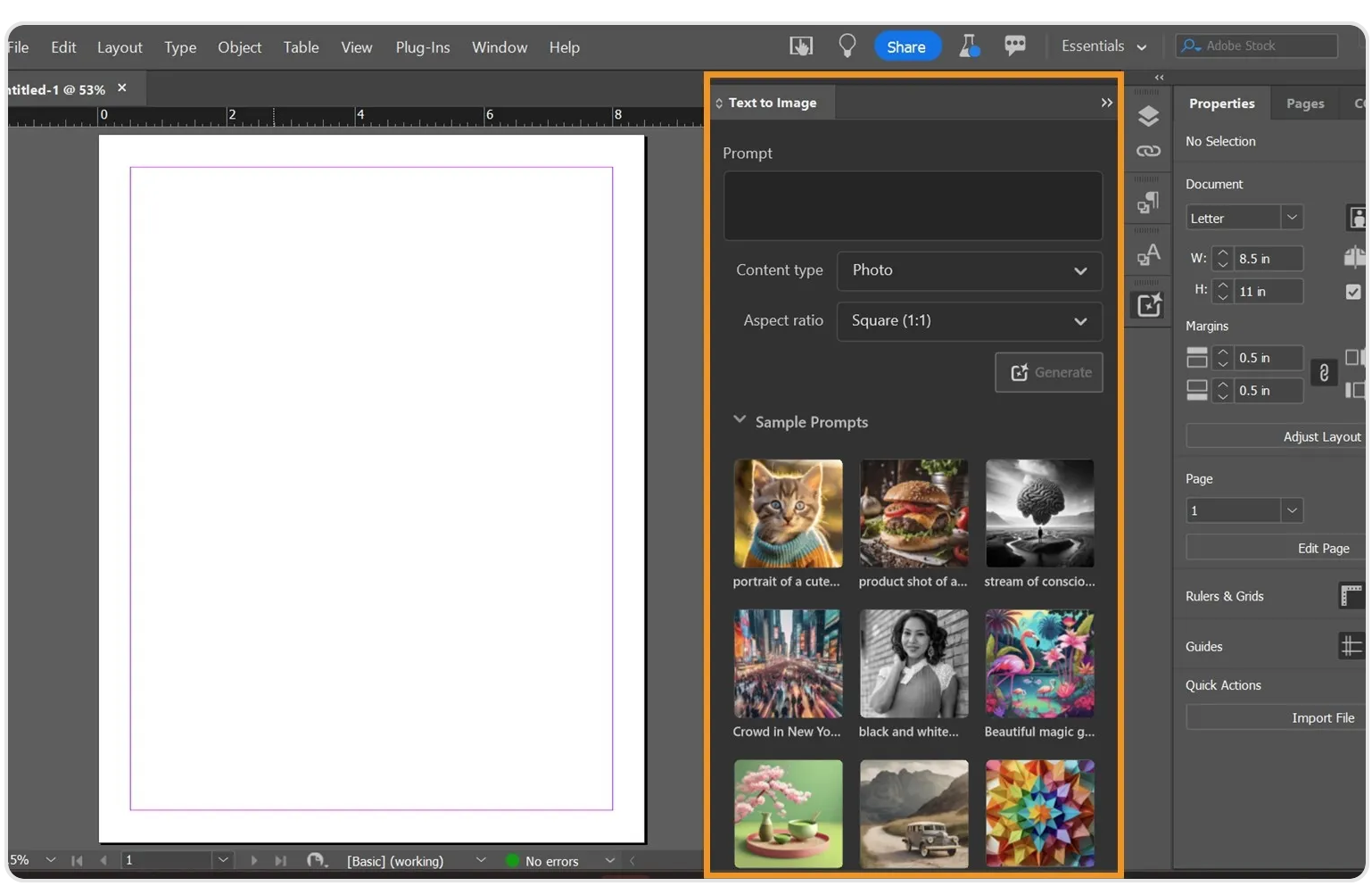
The new ‘Text to image’ feature within the Adobe InDesign dashboard.
3. Enhanced photo editing with Lightroom
Professional photographers will be excited to see significant enhancements to Adobe Lightroom, particularly with the introduction of the Generative Remove tool. This feature, previously available on other Adobe platforms, allows users to eliminate distractions from images with impressive precision. Whether it’s an unwanted object in the background or an inconsistency in lighting, the Generative Remove tool provides a seamless way to refine images.
In addition to the Generative Remove tool, Lightroom now features Quick Actions, which tailor edits based on the unique aspects of your photos – analyzing images and suggesting specific adjustments, such as lighting, color balance, and composition.
Speeding up the editing process will allow photographers to achieve their creative vision more effectively, allowing them to spend less time on touching up photographs and more time on the artistic aspects of their work.
Lastly, addressing the crucial issue of creator attribution, Lightroom now integrates Content Credentials to promote authenticity in photography. This allows photographers to attach their names and a comprehensive list of any edits made to their images, providing an essential layer of transparency.

The new ‘Quick Actions’ feature for Adobe Lightroom.
4. Content Credentials Web App coming soon
The upcoming launch of the Adobe Content Authenticity web app is a feature I’m particularly eager to use. Set to debut in early 2025, this free tool aims to empower creators by protecting their work and ensuring proper attribution. Much like a “nutrition label” for digital content, it provides essential information about the origin and context of creative pieces, enabling users to understand every touchpoint along a piece of work’s journey.
This app will be invaluable for creators and companies who wish to showcase their authenticity and provide transparency to meet audiences’ increasing concerns about AI generated content. With features that allow users to embed detailed information about their projects – such as the tools used, collaborators involved, and even the creative process – this app will serve as a vital resource for establishing credibility and trust with audiences.
As creators, your work often involves considerable effort, skill, and innovation. The Content Credentials web app will allow you to highlight these aspects effectively, ensuring that our contributions are recognized and valued.

5. Project Know-How
Last but certainly not least is Project Know-How, which made its debut during Adobe’s innovative ‘Sneaks’ segment. This tool is designed to enhance content ownership by attaching credentials directly to images, regardless of whether they are displayed digitally or printed on physical products such as mugs, posters, or merchandise.
Imagine being able to link ownership information to your visuals, enabling viewers to trace the origin of an image back to its creator, even when that image is part of a tangible item. This represents a significant advancement in protecting intellectual property, as it provides a framework for artists and organizations to maintain control over their creative assets.
With Project Know-How, creators can ensure that their work is credited properly, whether it’s seen on social media, on a website, or in the physical world. This not only empowers artists to promote their brand and gain recognition but also supports respect for intellectual property rights across various industries.
Wrap up
As AI continues to shape the creative landscape, Adobe’s innovations around the Content Authenticity Initiative and the Content Credentials web app, emphasize the importance of trust and attribution in digital work.
At PageProof, we share this vision, being the first online proofing software to offer content credential checks on creative assets during the review and approval process. We are strong advocates of the growing trend towards content authenticity that Adobe is spearheading – ensuring that transparency is at the forefront and center of any creative process.