Anthony Costello | Published on March 8, 2024
Document approval can be a major bottleneck in any business, especially in industries like marketing, legal, finance, and product development. If approvals are delayed, it can lead to missed deadlines, lost revenue, and team frustration.
Research conducted by the Project Management Institute (PMI) reveals that 37% of project failures are due to poor time management, with missed deadlines being a major contributing factor. Whether it’s waiting for feedback on a new campaign or struggling with multiple rounds of revisions, the cost of delays can be substantial.
What could help prevent these costs and delays? A streamlined document approval process.
Key takeaways
- Document approval software eliminates delays and disjointed feedback.
- It keeps everyone on the same page with version control and clear approval workflows.
- Automation, real-time collaboration, and audit trails make approvals more efficient and compliant.
- You’ll make decisions faster, with fewer mistakes, and improved collaboration.
Document approval software (also known as online proofing software) simplifies collaboration, centralizes feedback, and tracks document versions with clear approval workflows. With the right software, you can reduce delays, avoid errors, and improve compliance — all of which contribute to faster, more effective document production.
In this blog, we’ll break down how document approval software works, key features that make it indispensable, and best practices for creating a more efficient approval process.
How the document approval process works
Document approval software transforms a chaotic, error-prone manual process into a structured workflow.
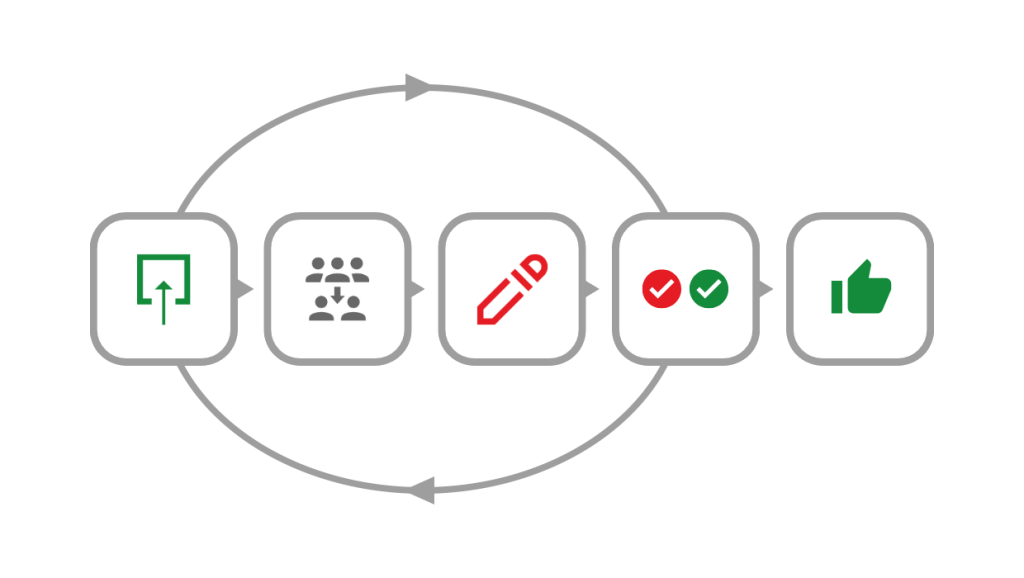
Let’s walk through how it works and how it can benefit your team:
Step 1: Uploading and sharing documents
The process begins with uploading the document into your approval software – such as PageProof.
Once uploaded, the document can be shared via workflows with relevant stakeholders, ensuring the document is routed through the right people or departments at the right time.
Step 2: Assigning roles within your approval workflows
Assign roles to reflect how your organization works and ensure an organized review process. Reviewers provide feedback, while approvers give the final authorization– some tools even allow you to stipulate whether reviewers are mandatory or gatekeepers. Customizable workflows allow for sequential approvals, streamlining collaboration among teams.
Clearly define:
- Reviewers – Individuals responsible for evaluating content, documents, or decisions before approval. They check for quality, accuracy, and compliance with company policies.
- Approvers – The final decision-makers who have the authority to approve or reject submissions. Their role ensures accountability and prevents unauthorized approvals.
By specifying who reviews and who approves, organizations can avoid redundant feedback loops and miscommunication.
Step 3: Collaborative review and feedback
Reviewers can mark up, comment, and suggest edits directly on the same the document at the same time. Automated notifications alert reviewers when their input is needed, while other tools like checklists and version comparison help ensure the accuracy of their review. Real-time collaboration features prevent miscommunication, reducing lengthy email threads and version confusion.
Step 4: Implementing changes and version control
Once feedback is provided, document owners can make revisions and upload a new version while maintaining a clear version history.
Version control ensures that stakeholders always have access to the most recent version, eliminating errors from outdated documents and helping reviewers check that changes were implemented.
Step 5: Final approval and sign-off
After all necessary changes have been implemented, the document moves to the final approval stage. Approvers review the last version and provide final sign-off.
By following these steps, businesses can optimize document approvals, enhance transparency, and maintain compliance with industry regulations with the help of audit trail of approvals and document feedback.
Document approval software ensures that teams stay aligned and projects move forward efficiently.
Key features of document review and approval software
Effective document review and approval software streamlines collaboration, reduces bottlenecks, and ensures compliance across teams.
Below are the essential features that make these platforms indispensable for businesses managing document approvals.
Automated approval workflows
With automated workflows, teams can set predefined approval sequences and user permissions, ensuring documents move seamlessly through each stage of review.
This eliminates manual follow-ups and reduces delays, making the approval process more efficient.
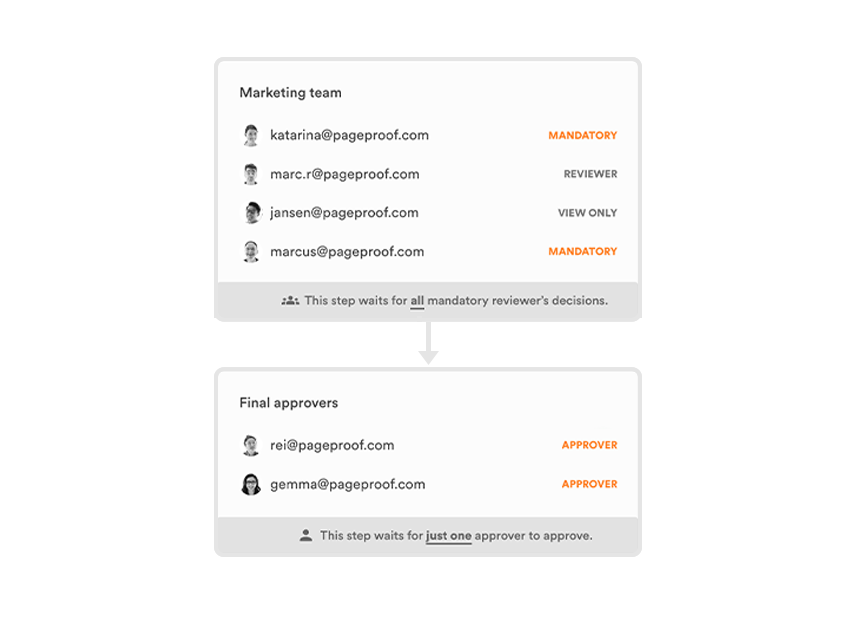
PageProof’s automated workflows route work through groups of reviewers before receiving final approval.
Real-time collaboration
Document review software enables multiple reviewers to provide feedback simultaneously, eliminating the need for back-and-forth emails.
With real-time commenting and annotation tools, teams can discuss changes directly within the document, leading to faster decision-making.
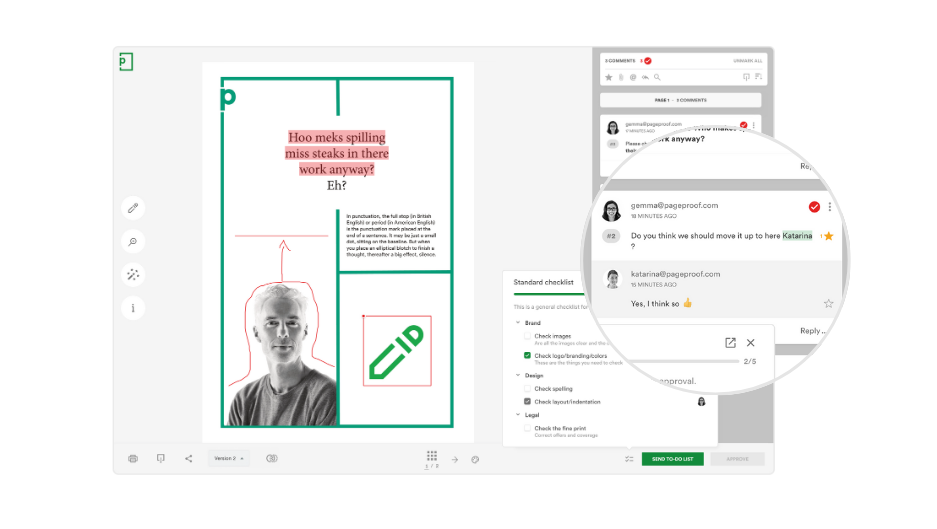
Example of PageProof’s proofing screen where stakeholders collaborate in real-time.
Version control and audit trails
Keeping track of document revisions is crucial for maintaining accuracy and compliance.
Version control ensures that everyone is working on the latest version, while audit trails provide a transparent history of changes, approvals, and feedback.
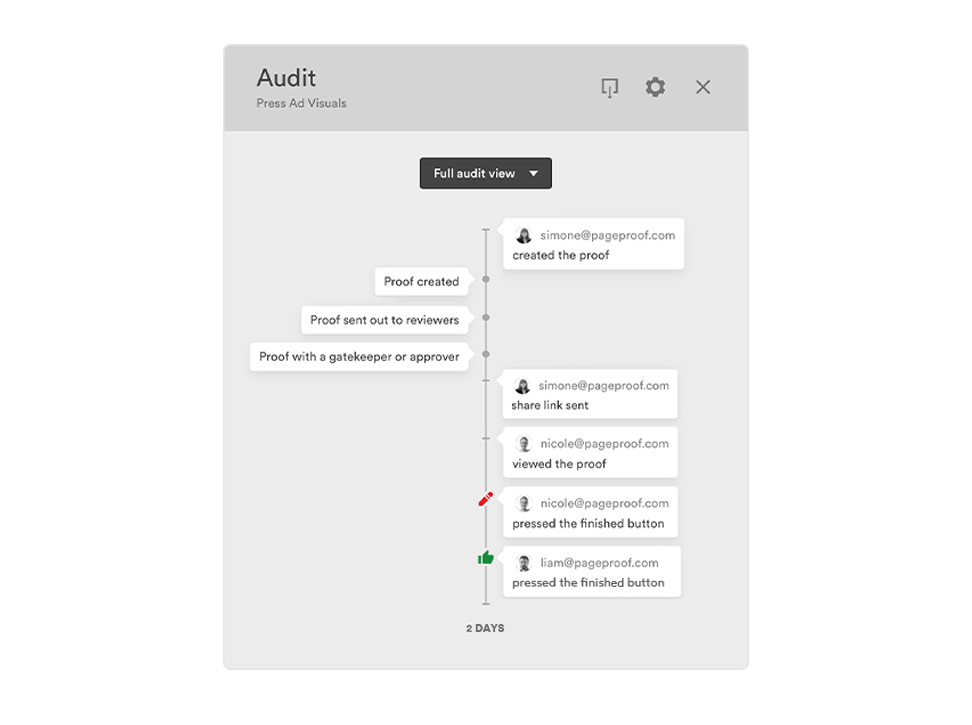
PageProof’s clear audit trail ensures the visibility of decisions throughout the review and approval process.
Security and access control
Sending files via email can pose significant security risks—attachments can be intercepted, mistakenly sent to the wrong recipients, or become outdated versions lost in long email threads.
Document review software offers role-based permissions, ensuring that only authorized users can access, review, or approve documents. This minimizes security risks and maintains confidentiality across teams and stakeholders.
Additionally, online proofing platforms make it easy to securely involve external collaborators without compromising control over document access and workflow.
Making it perfect for businesses for whom protecting sensitive information is a top priority.
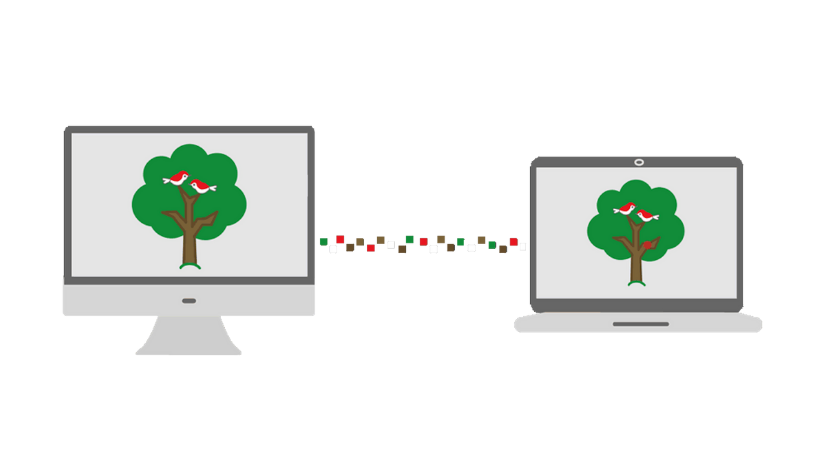
PageProof has unique patented triple-layer encryption to protect your proofs.
Best practices for an efficient approval workflow
By implementing structured processes and leveraging automation, businesses can improve productivity and maintain accountability.
Below are the best practices for creating an optimized approval workflow.
1. Use templates & standardized workflows – Standardized approval templates and workflows reduce manual effort, maintain consistency, and minimize errors. Pre-defined templates ensure uniformity, workflow checklists guide teams through approval steps, and clear approval criteria improve efficiency.
2. Set deadlines for approvals – Without deadlines, workflows can stall. Assign clear due dates for each approval stage, use automated reminders to notify reviewers, and establish escalation procedures to keep processes moving.
3. Automate where possible – Automation eliminates repetitive tasks and speeds up approvals. Auto-routing approvals to the right person, sending instant notifications, and using pre-approved workflows for routine approvals reduce manual intervention.
4. Monitor & optimize continuously – Regularly analyzing approval metrics, gathering feedback, and refining processes help improve efficiency. Identifying bottlenecks and adjusting workflows ensures the process remains agile and aligned with business needs.
By implementing these best practices, organizations can create a seamless, efficient approval workflow that boosts productivity and reduces operational friction.
Approve documents effortlessly with PageProof
With the new PageProof add-in for Microsoft Office, reviewing and approving content in Microsoft Word, Excel, and PowerPoint is now more seamless than ever.
Create proofs, collect feedback, and track approvals — all without leaving your Microsoft Office tools.
Final thoughts
Document approval software simplifies workflows, reduces errors, and boosts collaboration across teams. With the right tools, businesses can streamline approvals and improve efficiency.
PageProof overcomes common challenges in managing the review and approval process for documents and creative assets thanks to smart proofing tools and automation.
FAQs
What is the purpose of document approval software?
Document approval software streamlines your entire review process, centralizing collaboration and automating workflows, so you can approve documents faster, reduce errors, and stay on top of every version.
How does version control work in approval software?
Version control keeps your team on track by tracking every change made to a document, ensuring everyone works with the most up-to-date version, and offering an audit trail for full transparency and compliance.
