FinalFile delivery for MediaValet: Seamless delivery of approved assets to your digital library
Many creative and marketing teams rely on MediaValet to store, organize, and share their digital assets. But even with a structured review and approval process, the final step of getting the approved file into MediaValet is often still manual.
After approval, someone still needs to export the final asset, download it, rename it, upload it into MediaValet, apply the correct metadata, place it in the right folder, and ensure older versions are not mistakenly used.
Because this step is handled manually, there is more room for variation in how files are named, uploaded, and stored – creating unnecessary work, introducing inconsistency, and making it harder to keep everything consistently aligned.
FinalFile delivery removes this entire layer of friction. It delivers the approved file directly from PageProof into MediaValet automatically, accurately, and instantly, triggered by a simple proof tag such as “MediaValet” or “MV”. Nothing else is required.
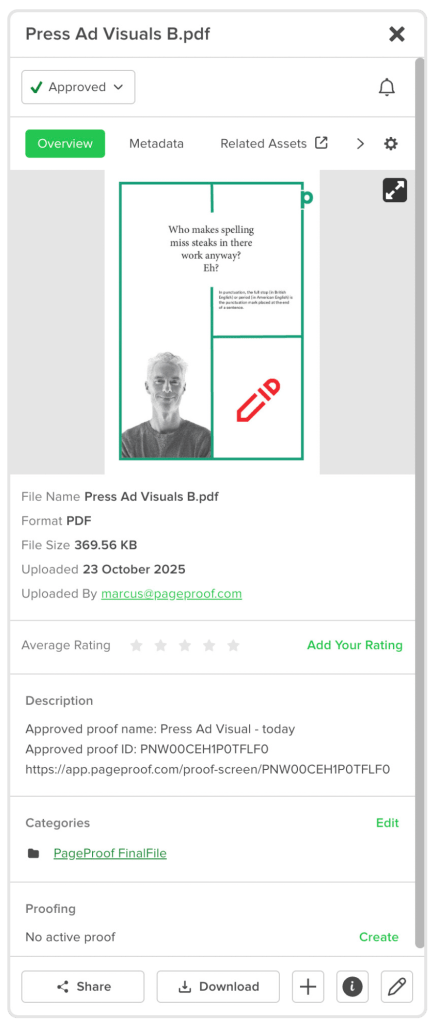
Approved proof details and the final file are automatically delivered into MediaValet.
The benefits FinalFile delivery brings to MediaValet users
FinalFile delivery does more than save time. It automates the last step of placing the approved file into MediaValet, ensuring full traceability, eliminating outdated or misplaced files, strengthening governance, and supporting enterprise-level scale and compliance – all without a single manual step.
No misplaced or outdated files
Delivery is automated, so assets arrive in the correct destination every time, preventing older or incorrectly named files from being uploaded.
Automatic MediaValet delivery, powered by a tag
Adding a tag like “MediaValet” or “MV” tells PageProof that the approved file should be delivered to MediaValet. Tags can be added manually or built into PageProof templates, ensuring teams never forget to add them. Every approved proof with that tag is automatically ingested into MediaValet.
Greater consistency across teams
If a team chooses to use a proof template when setting up proofs, the tag can be applied automatically, ensuring every final asset is handled the same way.
Clear governance and audit trail
Each file delivered to MediaValet has metadata that includes the approved proof name, the proof ID, and a direct link back to the proof in PageProof. This gives teams complete traceability long after the project is finished.
Enterprise scale and compliance
FinalFile delivery removes manual handling at the highest-risk stage of the workflow, making it ideal for high-volume teams, governed processes, regional content production, packaging, and regulated industries.
FinalFile delivery closes the loop: whether a proof begins in MediaValet or PageProof, the workflow ends in MediaValet without a single manual step in between.
How MediaValet and PageProof work together for seamless approvals
Here’s how FinalFile delivery brings PageProof and MediaValet together in one seamless approval workflow:
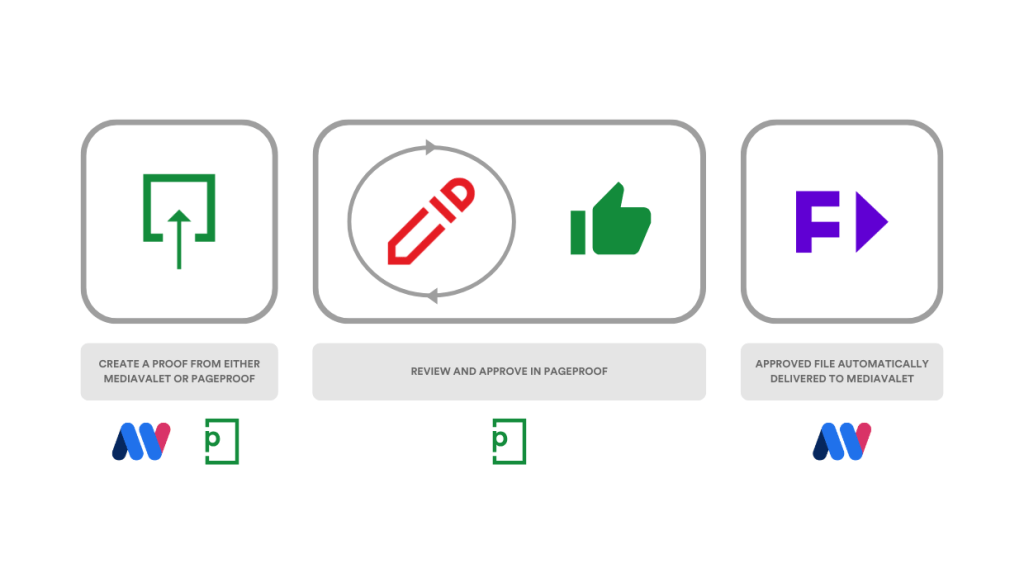
Start a proof in MediaValet or PageProof, review and approve in PageProof, and let the final file return to MediaValet automatically.
1. Start the review inside MediaValet or PageProof
Inside MediaValet, a designer or marketer selects an asset, moves to the Proofing tab, and creates a new proof.
They name the proof, choose the workflow template, adjust reviewers so the final approver sits in the last step, add a message, set a deadline, and apply relevant tags such as “MediaValet” or “MV” before sending the proof.
If the proof is created directly in PageProof instead, the same tags can be added there – ensuring the approved file is delivered back into MediaValet automatically.
2. Feedback is centralized in PageProof
Reviewers receive an email to access the proof in PageProof. It is simple to leave markup and precise comments, add file attachments, time-coded video comments, @mentions to draw attention, and threaded conversations.
They submit their feedback with a decision such as Approved or Changes please. Every comment is timestamped and captured in a clear audit trail.
3. Versions are linked and organized
When updates are ready, the owner or editor uploads the new version into the same proof, keeping all versions linked. Reviewers are automatically notified when a new version is available. Delivery back to MediaValet happens only on final approval, not on interim versions.
4. Technical and brand checks are completed
PageProof’s magic tools help reviewers verify fonts used, color profiles and contrast, linked files, barcodes, and QR codes. Content credentials can also be viewed on supported files, and checklists guide reviewers through brand and compliance checks.
5. Reviewers use compare tools to confirm updates
Reviewers can instantly confirm updates using PageProof’s compare tools using the side-by-side view, Smart Compare to automatically highlight changes, or the slider view for visual blending. This speeds up decisions and prevents unnecessary back-and-forth.
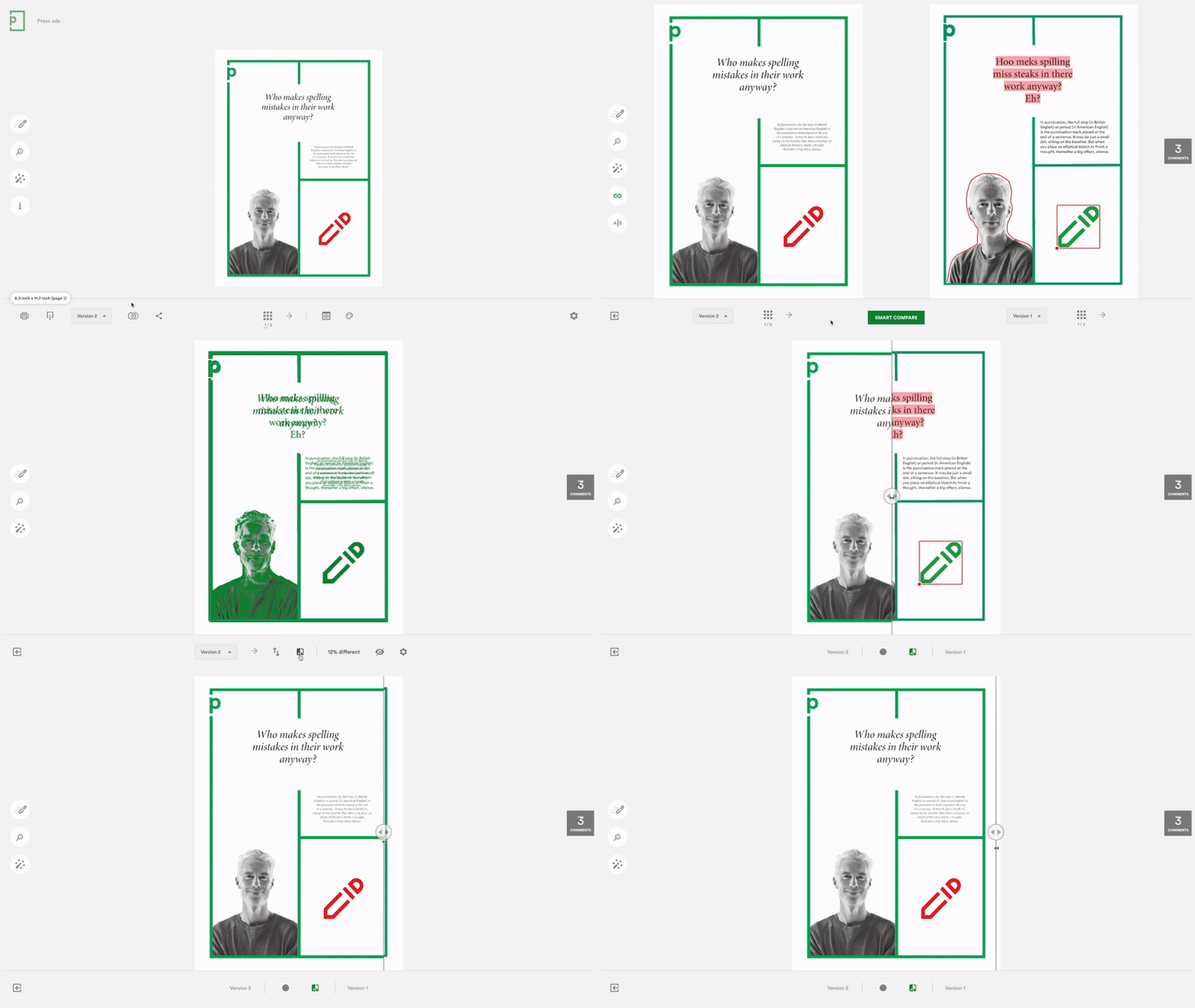
Smart Compare provides the insight needed to review and approve work with confidence.
6. Final approval is given
The approver confirms all the changes and updates are complete and clicks Approved – signaling that the proof is finalized and ready for delivery.
7. FinalFile delivery completes the job
As soon as the proof receives final approval, PageProof sends the approved file directly into MediaValet as the next version of the asset. The file arrives instantly and accurately, without any exporting, uploading, or manual renaming. It includes the proof’s metadata, and the delivery action is recorded automatically in the audit history. No one has to handle the file manually.
A fully connected proofing and approval workflow
FinalFile delivery completes the MediaValet and PageProof approval workflow. Whether a proof begins in MediaValet or in PageProof, the review and version management take place in PageProof – and once the proof is approved, the final asset is delivered automatically back into MediaValet with the correct metadata and version history.
By removing the manual steps that typically occur at the end of the process, teams maintain a clean, consistent asset library, and can trust that hey’re working with the correct final version.
FinalFile delivery ensures the workflow comes full circle, with every approved asset delivered accurately and automatically to the right place in MediaValet.