How to streamline your creative review and approval process in 2026
Creative review and approval processes continue to evolve in 2026. While creative teams are still focused on getting work approved as accurately and quickly as possible, the environment they operate in has changed.
Content volumes are higher, review cycles involve more stakeholders across more tools, and AI has become a routine part of creative content production rather than an exception.
At the same time, organizations are under growing pressure to maintain creative quality, meet compliance requirements, and demonstrate clear accountability for what was approved, by whom, and when.
Review and approval is no longer just about collecting feedback and sign-off, it’s about governance, traceability, and trust across the entire creative workflow.
To optimize the creative review and approval process in 2026, teams need more than ad-hoc reviews and disconnected tools.
They need a structured, auditable process that supports collaboration at scale, enforces clear ownership and standards, and is backed by purpose-built software that can manage feedback, approvals, version history, and verification without slowing work down.
What is the creative review and approval process?
The creative review and approval process is how organizations ensure creative content meets quality, brand, and compliance expectations before it is published or delivered.
It defines how creative work moves from initial creation through review, feedback, revisions, and final approval, and who is responsible at each stage.
A typical creative review and approval process includes the following steps:
- Creation of a draft creative asset or content piece
- Review by the relevant creative team and project managers
- Feedback from stakeholders, including marketing, legal, or compliance where required
- Revisions based on that feedback
- Approval at defined approval stages, leading to final approval.
This process brings together creative teams and multiple stakeholders to review creative assets, gather feedback, and confirm alignment with project goals and brand guidelines.
When structured clearly, it helps teams manage feedback, maintain version control, and keep projects moving on schedule rather than stalling in endless review cycles.
Why you need an optimized review and approval process
As creative teams scale output and involve more stakeholders, informal or ad-hoc review practices begin to introduce delay, rework, and risk rather than flexibility.
1. Project delays caused by fragmented feedback
When review feedback is spread across email, chat tools, documents, and meetings, teams lose time locating comments and confirming what has already been addressed. Delays occur not because the work is complex, but because decisions and inputs are difficult to track and reconcile.
2. Rework driven by unclear review stages
Without defined review stages and ownership, feedback is raised repeatedly or reintroduced after changes are made. Teams revisit work they believed was resolved, increasing revision cycles without improving the final output.
3. Approval ambiguity and decision breakdown
When approval authority is not explicit, sign-off becomes implied rather than deliberate. Content may move forward without a clear record of who approved it, creating uncertainty and risk, particularly for high-visibility or regulated work.
4. Version confusion across revisions
As creative assets move through multiple iterations, teams often lose clarity on which version is current, what changed between versions, and which version received approval. This increases the likelihood of outdated or incorrect content being shared or published.
5. Increased compliance and governance risk
Informal or undocumented approvals make it difficult to demonstrate that required checks took place. In regulated or brand-sensitive environments, this creates avoidable exposure during audits, disputes, or internal reviews.
6. Operational drag on teams
When review processes rely on individuals to chase feedback, clarify decisions, or manually confirm approvals, effort shifts away from creative work. Over time, this creates friction, slows delivery, and reduces confidence in the review process itself.

A creative review process without online proofing is chaotic, frustrating, and inefficient.
How to design a successful creative review and approval process
Designing a successful creative review and approval process in 2026 is less about adding more checks and more about removing ambiguity.
The goal is to ensure that feedback, decisions, and approvals move through the process in a systematic way, even as projects involve more stakeholders, more revisions, and tighter constraints.
The steps below outline the core decisions that need to be made up front. When these decisions are left undefined, review slows down, accountability blurs, and teams lose confidence in what has actually been approved.
Step 1: Define who gives feedback and who approves
Explicitly define who is responsible for providing feedback, who is responsible for resolving conflicting input, and who has authority to approve work at each stage. These roles should be documented and understood before review begins. Without clear ownership, feedback accumulates without resolution and approval becomes implicit rather than deliberate.
Tips to remember:
- Each review stage should have clearly defined approval responsibility, even when multiple stakeholders are required to approve.
- It should be clear who are reviewers and who has final approval responsibilities
- Approval ownership is confirmed at project setup, not once review is already underway.
Step 2: Decide how review stages are structured
Determine how many review and approval stages are required and what each stage is responsible for validating. Define whether reviews occur sequentially or in parallel, and what criteria must be met before work can progress. This prevents assets from circulating indefinitely without a clear decision point.
Step 3: Centralize how feedback is captured and resolved
Create a single place where feedback is captured, discussed, and resolved. Feedback should be attached directly to the creative asset and visible to all reviewers. The process should also specify how feedback is closed out, so comments are not left open or reintroduced after decisions have been made.
Tips to remember:
- All feedback should be directly on the asset, not via side channels
- Each comment has a clear resolution state, so it is obvious whether it has been addressed
- When a review stage is completed, any remaining feedback is either resolved or explicitly carried forward into the next stage.
Step 4: Establish how versions are managed
Specify how versions are created, reviewed, and approved, including how changes between versions are identified and communicated. Teams should be able to see what changed, why it changed, and which version received approval. Without this, version confusion increases as projects scale.
Tips to remember:
- New versions are created only when meaningful changes are introduced
- Changes between versions are visible and attributable, not implied
- Approval is always tied to a specific version, not a general state of the project.
Step 5: Set expectations for timing and responsiveness
Define realistic review timelines, expected response windows, and what happens when deadlines are missed. Review should progress predictably based on agreed expectations, rather than relying on individuals to chase feedback or confirm status manually.
Tips to remember:
- Review deadlines are agreed upfront and visible to all participants
- There is a defined action when a reviewer does not respond within the expected window, such as an automatic reminder
- Progress does not depend on informal follow-ups or personal escalation.
Step 6: Make approval explicit and traceable
Define how approval is recorded and how it is communicated to the wider team. Approval should be unambiguous, visible, and tied to a specific version of the work. This ensures there is no uncertainty about what has been approved or whether further changes require re-approval.
Tips to remember:
- Approval works best when it’s a clear, intentional action rather than something assumed from silence or comments
- Visibility matters. When approval status is easy for everyone to see, confusion and rework are far less likely
- If changes are made after approval, it’s worth pausing to confirm whether the work needs to go back through review.
Step 7: Decide on what software you’ll use to streamline the process
Once roles, stages, feedback handling, and approval rules are defined, teams need software that can support those decisions consistently. The goal is not to add tooling for its own sake, but to reduce manual coordination, enforce process rules, and provide visibility as review complexity increases.
The software you choose should reinforce the process you’ve designed, not force teams to work around it or recreate structure manually.
In practice, this usually means adding a dedicated proofing software to an existing project or work management system.
Proofing software, such as PageProof, turns review and approval into a controlled, traceable process. Centralizing feedback on the file, maintaining version history, recording approvals, and providing clear audit trails, ensuring that decisions made during review are visible, traceable, and easy to verify.
Project management platforms, on the other hand, are typically used to plan work, assign tasks, manage timelines, and track delivery across multiple projects. Rather than replacing these systems,
PageProof integrates with leading project management tools including Asana, monday.com, ClickUp, Trello, and more. This keeps proofing updates, feedback, and approvals aligned with active projects – eliminating duplicate tasks, manual status updates, and extra admin across tools.
Used together, proofing and project management software allow teams to separate creative decision-making from project coordination, while keeping both aligned.
Optimizing your creative review process with PageProof
PageProof is designed around a simple principle: making it as easy as possible for teams to streamline creative approvals. This principle runs through every stage of review, ensuring feedback remains clear, versions stay controlled, and approvals are unambiguous.
Here’s how it works:
Uploading assets and setting up the review workflow
When creating a proof, the proof owner selects a workflow template and assigns roles like Reviewer, Mandatory Reviewer, Gatekeeper, or Approver to participants in each step. These roles determine who can comment and leave decisions, who gates progression, and who gives final approval or returns to-dos.
This allows teams to reflect real-world review stages, such as early feedback, detailed review, and final approval, without relying on informal coordination or side conversations. Reviewers can contribute feedback, gatekeepers can control progression, and approvers make explicit approval decisions at the final stage.
As new versions are uploaded, the workflow can be reused, adjusted, or started at a specific step (skipping prior reviewers). Teams can move the review forward without re-creating stages manually, while maintaining clear ownership, decision rights, and accountability at each step.
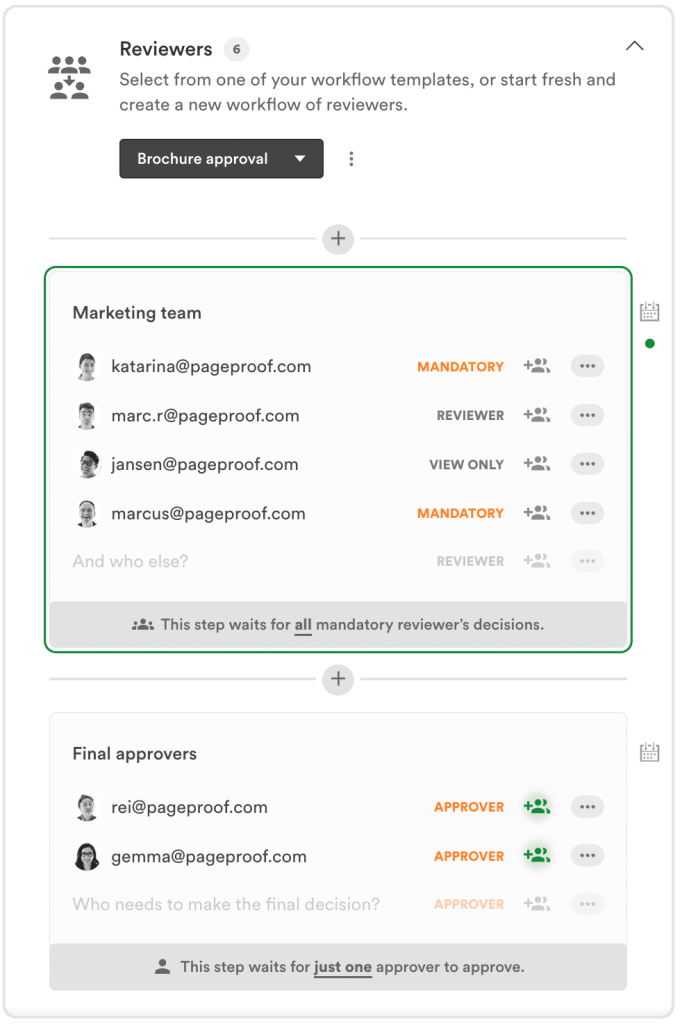
Assigning roles within a workflow template within PageProof.
Centralizing feedback on the asset itself
PageProof keeps all feedback directly on the proof, ensuring comments, markups, replies, and attachments remain tied to the exact asset and version being reviewed. Reviewers add visual feedback using on-proof markup tools, ensuring comments appearing in context on the work rather than in disconnected threads.
Threaded replies, @mentions, and comment states keep discussions focused and actionable, while version-aware comments prevent feedback from being applied to the previous iterations. Supporting files can be attached directly to comments, keeping reference material alongside the feedback it relates to.
Because every comment stays visible, traceable, and linked to a specific version, teams avoid fragmented conversations, missed feedback, and rework caused by side channels. The result is clearer decisions, faster resolution, and a single source of truth throughout the review cycle.
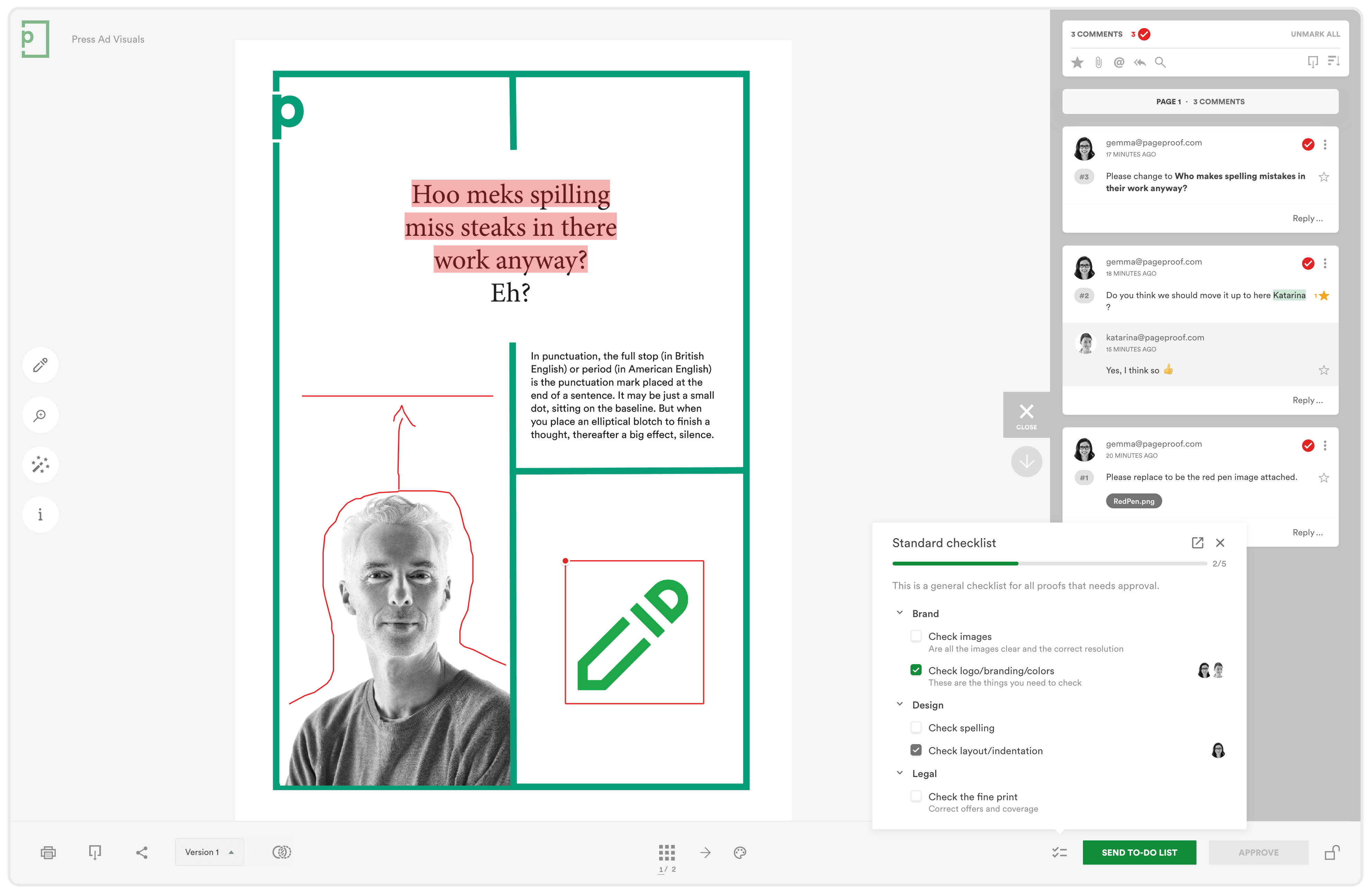
PageProof is ingeniously simple to use.
Maintaining clear version history
Proof owners can edit the current version directly (e.g., mark to-dos as done), then upload a new version against the same proof when ready. Previous versions are then archived.
Older versions remain viewable with their full review and feedback history, making it clear what changed via side-by-side views and Smart Compare. Approvals apply only to the final version reviewed.
Keeping reviews moving without manual chasing
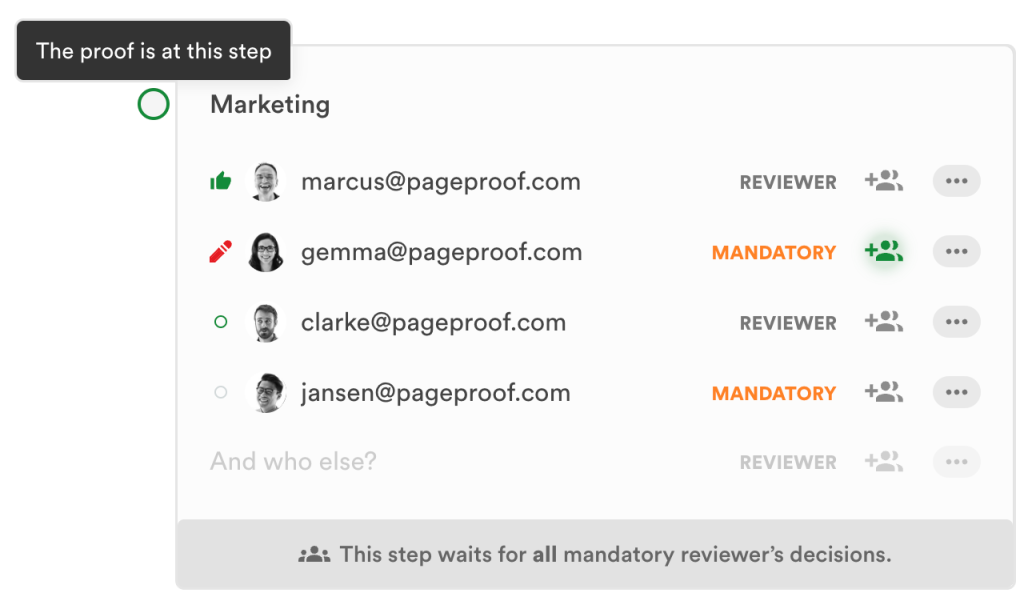
Uploading a proof into a defined workflow gives all participants visibility into review status and remaining steps. Automated or manual reminders can be used to nudge overdue reviewers, while skipping options keep things moving.
Review progress is visible at each stage, reducing reliance on manual follow-ups and making delays easier to identify and address
Supporting compliance and auditability
PageProof records key review events, including uploads, version changes, comments, and approvals.
This creates a clear audit trail that shows what was reviewed, who reviewed it, and when approval occurred, reducing reliance on informal or undocumented sign-off, and improving compliance.
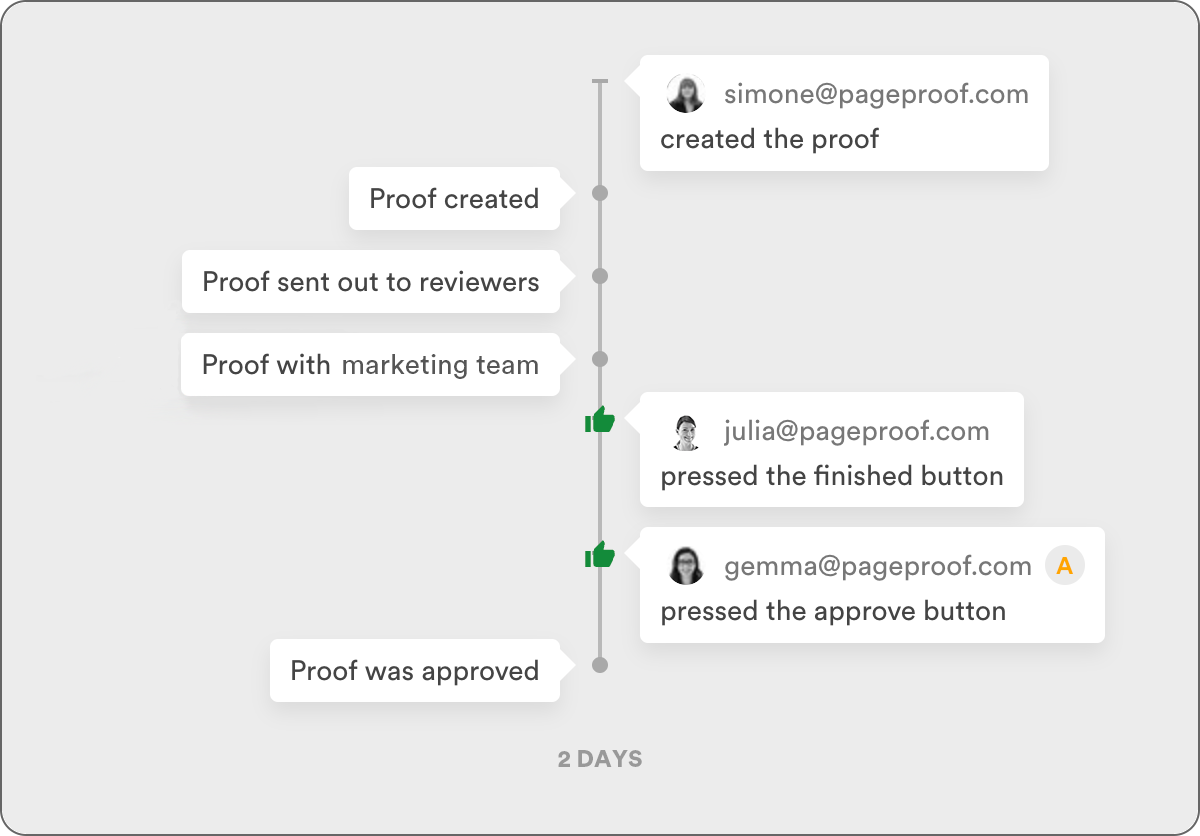
PageProof leaves a clear audit trail on every proof.
Scaling review without increasing friction
Because workflows are applied at upload, the approval process remains consistent as content volumes grow or more stakeholders are involved. Teams can scale review and approval activity without adding administration overhead or losing clarity over what has been approved.
The benefits you can look forward to with PageProof
PageProof isn’t just a digital alternative to fragmented reviews – it transforms them.
It creates a centralized single source of truth for every comment, change, and approval, removing the confusion that comes from fragmented feedback across inboxes, chat messages, and marked-up PDFs.
PageProof also offers a range of powerful tools that help teams catch errors and ensure every asset meets specifications before approval.
By formalizing the review process, organizations operate in a more structured, accurate, accountable, and significantly faster creative environment.
Significant time savings and faster approvals
One of the most immediate impacts teams notice is how much time is reclaimed once the feedback process is structured and centralized.
Creative agency DPRG was able to cut the average proof version from six to four. And save on average 2 hours per proof, 8 hours across each magazine, totalling 128 hours across their review and approval workflow.
While printing services company Modernistic was able to reduce their time for approval from 5 to 3 business days after switching to PageProof, and reduced their proof iterations by 50%.
Elimination of costly errors
PageProof acts as a safeguard against both reputational damage and avoidable costs by ensuring every change is reviewed and approved in context.
Version comparison tools make it easy for reviewers to see exactly what has changed between iterations, so requested edits can be quickly verified before approval. Because all feedback, markups, and approvals remain tied to a specific version, teams avoid the risk of outdated or incorrect content moving forward.
Every comment and decision is recorded, creating a clear, auditable trail of who approved what and when. This reduces reliance on informal sign-off and helps teams demonstrate compliance with brand, legal, or regulatory requirements when needed.
Additional review tools — including rulers, gridlines, color checks, barcode and QR scanning, and link verification — catch issues early, helping teams maintain quality and consistency while avoiding misprints, rework, or reputational damage.
Seamless integration with your existing stack
PageProof fits into the tools your team already relies on, so teams don’t have to switch between systems.
Designers can manage feedback directly within their creative tools, actioning comments and uploading new versions without breaking focus.
At the same time, integrations with leading project management platforms keep proofs and tasks aligned, giving project managers real-time visibility into status changes without manual updates or duplicate tracking.
Clearer collaboration and accountability at scale
Whether you are coordinating a small creative team or hundreds of stakeholders across departments, PageProof scales without adding complexity.
Automated reminders handle follow-ups automatically, keeping reviews moving without awkward chasing. Structured workflows ensure the right people are involved at the right stage, so feedback is gathered in the correct order and approvals reflect the proper decision-making hierarchy.
The result is clearer accountability, smoother collaboration, and confidence that every approval is valid, traceable, and complete.
Final thoughts
Having a structured creative review becomes essential for teams that:
- Manage high volumes of creative assets
- Work with complex assets such as packaging files
- Involve multiple reviewers or approval stages
- Need clear version control and audit trails
- Work with external stakeholders or regulated content
- Are losing time to manual follow-ups and approval ambiguity.
If your review complexity is increasing, then a dedicated online proofing platform like PageProof can give you a clear, scalable review and approval process without adding administrative burden.