PageProof fresh new features: December 2025

PageProof’s December fresh new features update introduces new capabilities designed to reduce friction in creative review while increasing clarity, confidence, and control across approvals.
From deeper integrations in the tools teams already use, to smarter quality checks, enterprise-grade approval controls, and new ways to protect content authenticity, these enhancements help teams move from feedback to final sign-off faster.
Read on to discover what’s new and improved!
Key takeaways
- Create and manage proofs directly inside Adobe Express, keeping reviews where design work happens.
- Surface live proof data inside Asana with custom fields that power automations that fuel Asana AI.
- Apply granular admin permissions to keep growing teams secure and well-structured.
- Review video more accurately with embedded subtitles and surfaced Content Credentials.
- Automate final asset delivery into MediaValet with FinalFile Delivery, no manual hand-offs required.
- Catch link errors instantly with the new Link Scanner for static proofs.
- Add enterprise-grade trust to approvals with cryptographic digital signing.
- Search entire proofs instantly with powerful new text search.
- Add and verify Content Credentials for free with FinalFile.com.
1. Create and review proofs inside Adobe Express
We kicked off December with the new PageProof add-on for Adobe Express.
You can now create proofs, view and reply to comments, and upload new versions directly from inside Adobe Express. That means proofing stays exactly where design work happens, with no exporting, uploading, or context switching.
Designers can stay focused in their creative flow, while reviews continue seamlessly in the background.

2. Asana custom fields for real-time proof visibility
For teams working in Asana, proof visibility just leveled up.
PageProof custom fields surface proof status, workflow step, comment counts, collection links, and more – directly inside Asana tasks. These fields update automatically as proofs progress, giving teams real-time insight without leaving their project boards.
You can also use these fields with Asana rules, automations, and Asana AI to build intelligent workflows. Combined with PageProof triggers, teams can automatically skip mandatory reviewers, archive proofs, or advance work based on approval status.
3. Granular admin permissions for growing teams
Managing access becomes more complex as teams scale. December’s release introduces granular admin permissions to help teams stay secure and organized.
Team admins can now decide exactly who has access to People, Proofs, Templates, and Setup areas. This makes it easier to delegate responsibility, reduce risk, and maintain structure as organizations grow.
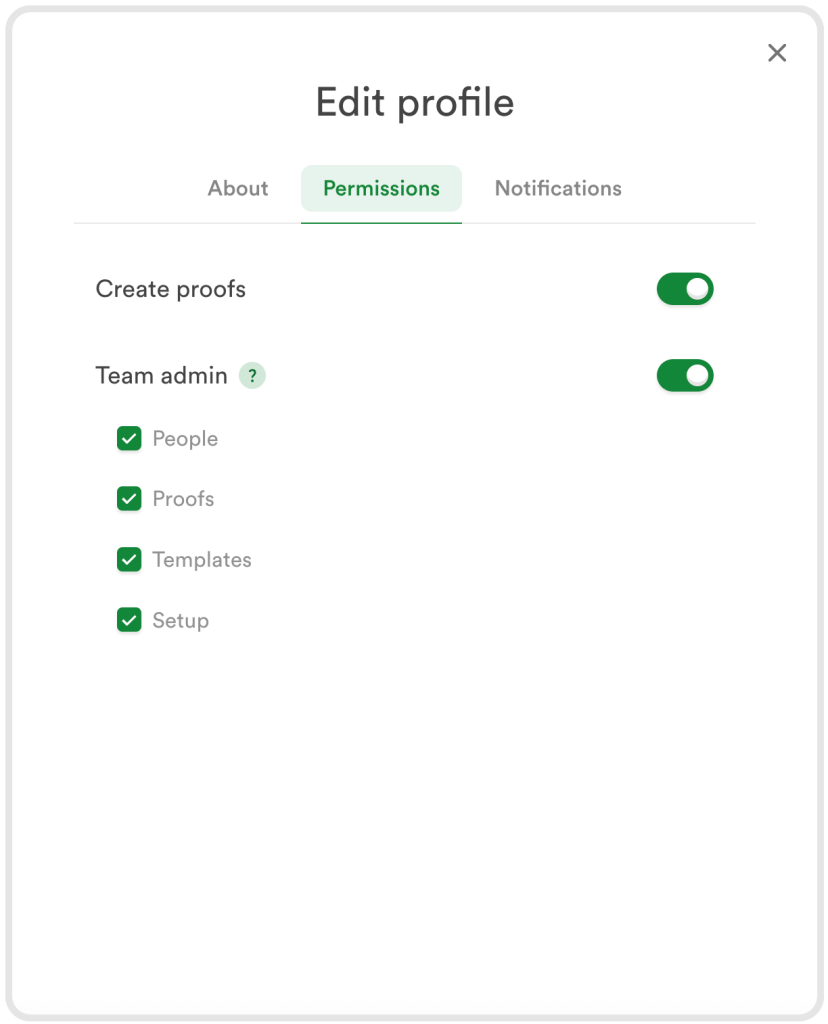
Granular PageProof permissions give team administrators clearer, more precise control.
4. Video proofing enhancements for accuracy and trust
PageProof now displays embedded subtitles during video review, supporting accessibility checks and improving accuracy when reviewing spoken content.
Content Credentials are also surfaced for video files, allowing reviewers to see who created the video, where it came from, and whether AI was involved in its creation. This brings greater transparency and trust to video approvals.
5. Automated FinalFile delivery to MediaValet
Final asset delivery just got effortless.
FinalFile delivery to MediaValet means approved proof files can now be delivered automatically into MediaValet using a proof tag. There’s no need to export, download, upload, or manually hand off files.
Your DAM stays accurate and up to date, while teams save time and eliminate the risk of human error during final delivery.
6. Bulk download original proof files
Need to collect final assets quickly?
Users can now bulk download original proof files directly from the dashboard. It’s ideal for archiving, sharing with external partners, or gathering approved assets after sign-off, all in one action.
7. New language support: Swedish and Italian
PageProof is now available in Swedish and Italian.
Whether your organization is based in Sweden or Italy, or you collaborate across regions, this update delivers a smoother, more inclusive proofing experience for everyone involved in the review process.

8. Catch errors early with the new link scanner
Introducing the new link scanner for static proofs.
The link scanner automatically detects internal links, external URLs, and email addresses inside proofs. You can quickly review links, spot errors before content goes live, and place a comment with a single click.
It’s a simple way to save time, prevent mistakes, and approve with confidence.

9. Clearer instructions with rich text messages
Communication during review just got clearer.
PageProof message fields now support rich text formatting, including bold text, bulleted and numbered lists, links, strikethrough, superscript, and subscript. Instructions are easier to read and expectations are clearer for reviewers.
That clarity extends into Slack and Microsoft Teams too. @mention notifications now include an image preview showing the exact comment context with markup, so reviewers can see what’s being referenced without opening the proof.
10. Enterprise-grade digital signing for final approvals
Enterprise teams can now enable digital signing for final approvals.
When enabled, approvers authenticate themselves before giving final approval. PageProof then creates a cryptographic digital signature tied to the approver, the proof version, and the exact moment of approval.
The experience is seamless for approvers and provides rock-solid accountability and compliance for organizations that require formal sign-off.
11. Find anything instantly with text search
Text search now scans an entire proof to find any word or partial word instantly.
All matches are highlighted, and you can jump through results with the proof automatically moving to the correct page and location. Search whole words only, apply case sensitivity, and add comments directly from search results with a single click.
Perfect for checking terminology, names, and compliance text at speed.
12. Bulk actions for proof owners
High-volume reviews are now easier to manage.
Proof owners can bulk approve multiple proofs directly from the dashboard and bulk add approvers across several proofs. These actions save time and reduce repetitive admin work when managing large volumes of content.
13. Introducing FinalFile.com
December also marked the launch of FinalFile.com.
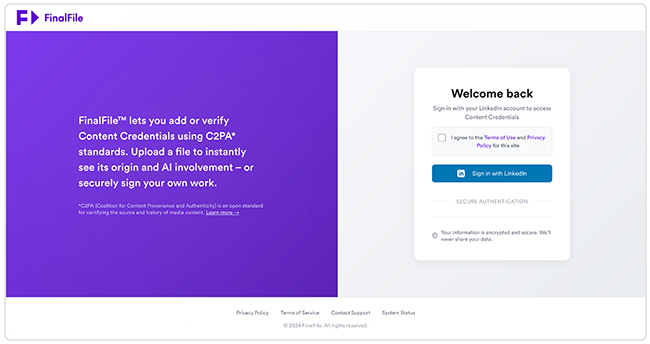
FinalFile.com is a free service that lets you add or verify C2PA Content Credentials on images, video, and audio files. It helps protect authorship, verify authenticity, and build trust in every final asset.
Your five most recent uploads are stored for quick access, making repeat tasks easy. Everything is free to use, offering an open and accessible way to keep creative work trusted from first draft to final delivery and beyond.
More enhancements, every month
That’s a wrap on fresh new features for December 2025.
From powerful integrations and smarter review tools to enterprise-ready controls and content authenticity checks, these updates are designed to help teams move faster with confidence.
PageProof’s fresh new feature videos are posted on YouTube every month. Ensure you’re up-to-date with all the latest enhancements by subscribing to our YouTube channel, or follow us on LinkedIn.
If you’d like a walk-through of these new features and to see how PageProof can help organizations streamline creative approvals, book a demo below.