
Empowering anyone to create beautiful designs at speed comes with challenges, and Adobe Express is rising to meet them. Good design isn’t just about making things look nice or including all the required information, it’s about control, precision, and practicality.
We need to find assets quickly. We need the right resolution, the right fonts, proper alignment, on-brand elements… and heaven forbid we need to print something.
That’s why it’s great to see these design and finished-art essentials making their way into a tool built for the creative masses.
Here are our top 10 picks from the most recent Adobe Express enhancements.
- Create brand kits from uploaded images
- Use rulers and custom guides
- Download PDFs with CMYK color profile
- Creating and organizing templates is now quicker
- Link a brand kit to an Adobe Express project
- Expanded language support for caption writing
- Semantic search in the font picker
- Fine-tuned shape rounding
- Updated Caption Generator
- Smarter resolution control
1. Create brand kits from uploaded images
A huge challenge in opening up design to everyone is keeping everything on brand. With more people creating content, small inconsistencies creep in the almost-right blue, the nearly-matching font, the logo pulled from an old presentation.
Multiply that across teams and channels, and your brand starts to fragment.
Adobe Express now tackles that head-on with the ability to automatically create brand kits from uploaded images.
Simply drop in a JPG or PNG of any branded asset, a social post, a brochure, even a screenshot, and Adobe Express will intelligently extract the essentials:
- Logos
- Fonts
- Color palettes
These are instantly pulled together into a ready-to-use Brand Kit you can apply across any design.
No more digging for assets, correcting colors, or manually setting up brand guidelines – Adobe Express does the setup for you, making it far easier for everyone to stay consistent.
Learn how to create brands from uploaded images ›
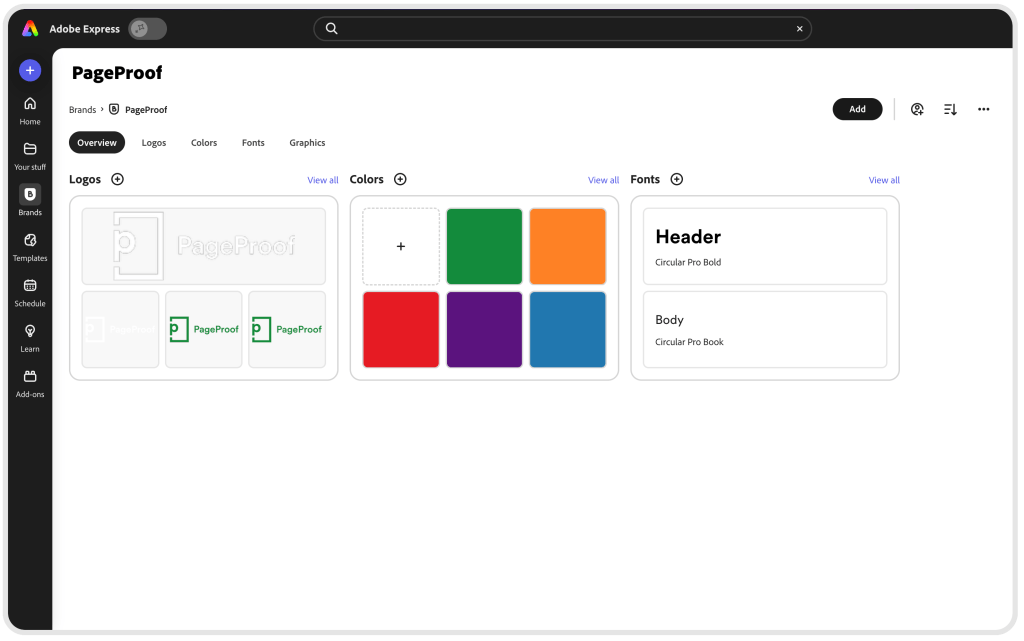
PageProof’s brand kit built in Adobe Express.
2. Use rulers and custom guides
A staple design requirement is alignment. Rulers and custom guides help to align elements within a page or across multiple pages to give your designs a clean and consistent look.
Clean, well-aligned layouts are the backbone of good design. With the addition of rulers and custom guides in Adobe Express, it’s now much easier for anyone to position elements with precision and keep designs looking tidy and consistent.
Whether you’re lining up text, balancing imagery, or working across multiple pages, rulers and guides help remove the guesswork. They give every creator a simple, reliable way to achieve polished, cohesive layouts – the kind that instantly elevate the professionalism of your work.
A subtle enhancement that makes a big impact on the quality and consistency of every design.
Learn how to use rulers and guides ›
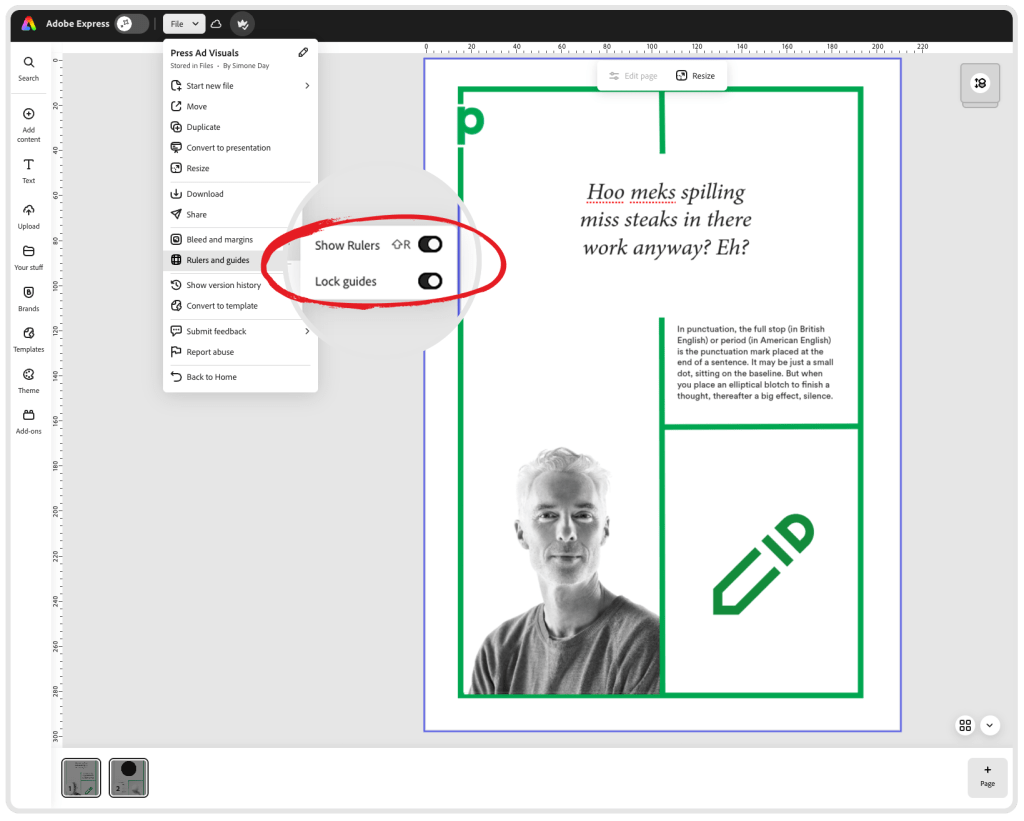
Toggle on rulers and custom guides to align elements within a page.
3. Download PDFs with CMYK color profile
Let’s not leave printing our colors to chance. Download a print-ready PDF with the CMYK color profile of your choice to ensure color accuracy and quality in professional printing.
This enhancement makes it easier to prepare artwork correctly for print, ensuring your exported files deliver consistent, predictable color when they hit the press. You can also include bleed and crop marks, making the handoff to printers smoother and more reliable.
A practical update that brings greater confidence and control to anyone creating designs destined for high-quality printed output.
Learn how to download PDFs with CMYK color profile ›
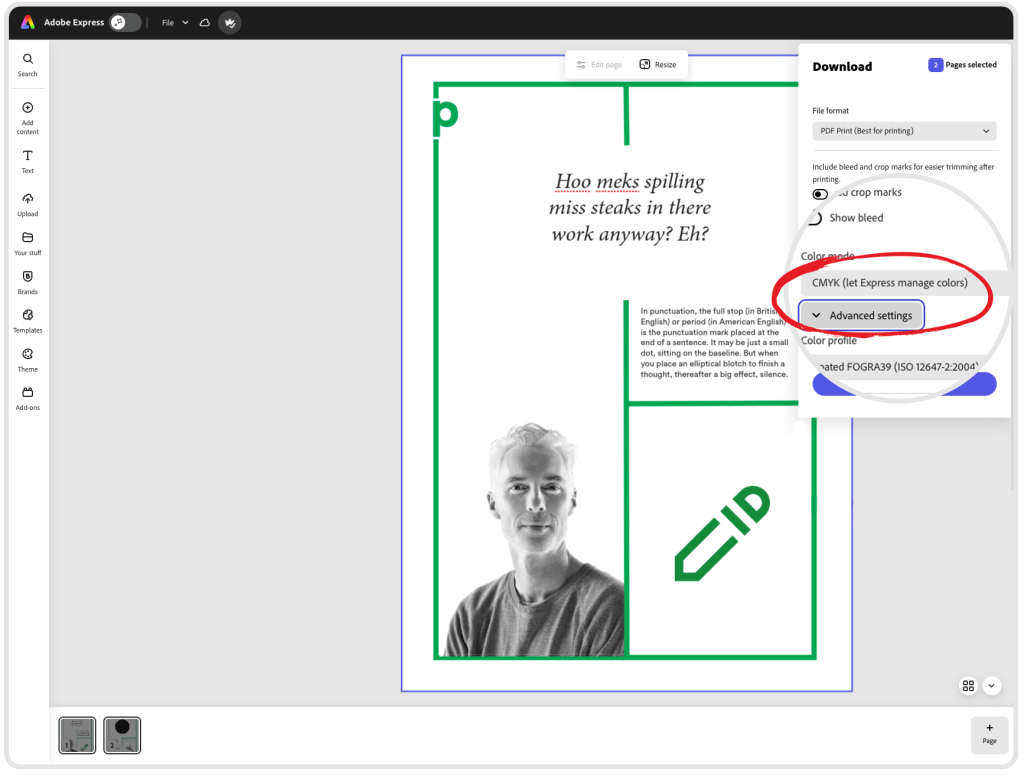
Download a print-ready PDF with the CMYK color profile of your choice.
You can also check CMYK colors right inside PageProof using a range of powerful proofing tools. Color Check lets you sample and verify colors with the eyedropper, Smart Check automatically surfaces every color in your artwork for you, and ColorSep® provides an instant preview of CMYK and spot-color separation plates – perfect for validating dielines, embossing layers, and other print-critical details before going to press.
4. Creating and organizing templates is now quicker
Keeping templates organized – and keeping them up to date – can be a challenge for busy teams. It’s now easier in Adobe Express to create, manage, and maintain templates so your organization can move faster while staying consistently on brand.
You can sort templates into folders by group, department, or initiative, making it far simpler to find what you need.
Previews are clearer, and templates can be re-edited at any time to keep content current. Adobe Express Teams and Enterprise users also gain powerful controls such as brand style restrictions, locked elements, and editing permissions, ensuring that every template stays aligned with your brand while still giving collaborators the flexibility they need.
A smoother, more organized way for teams to create at scale – with branding and structure built in from the start.
Learn more about creating templates ›
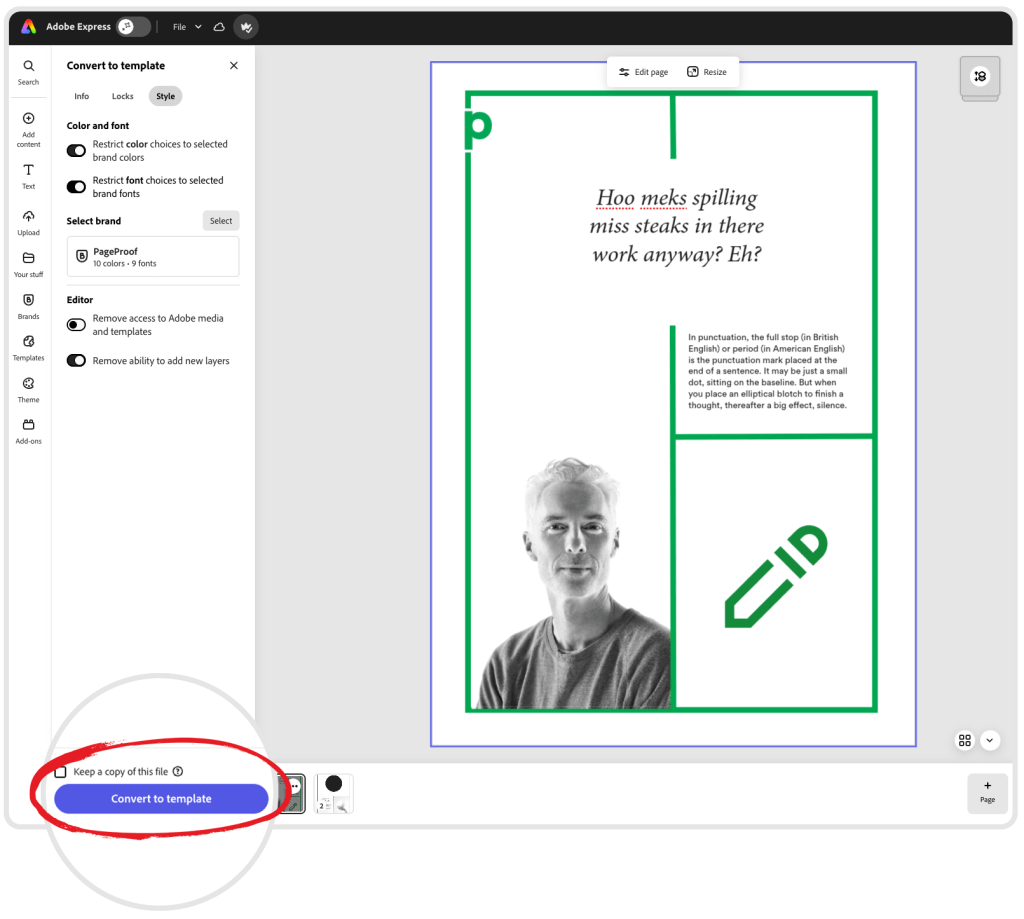
Create a new template and organize your existing ones into folders by group department or initiative.
5. Link a brand kit to an Adobe Express project
You can now link a brand kit directly to an Adobe Express project, a new enhancement that ensures every design in that project automatically stays on-brand.
Once a brand kit is linked, all updates to colors, logos, and fonts flow through instantly. No more outdated palettes, old logo versions, or mismatched type styles hiding in different workspaces.
Whether you’re managing multi-team campaigns or ongoing content production, linked brand kits keep every asset consistent and every collaborator aligned. It’s a simple upgrade that makes maintaining brand integrity effortless at scale.
And if you’re using PageProof’s Adobe Express integration to send out proofs, PageProof’s Smart Check automatically analyzes your proof – from fonts and colors to links and content credentials – ensuring your linked brand kit is followed precisely throughout review.
Learn more about linking brands ›
6. Expanded language support for caption writing
The social media Caption Writer in Adobe Express now supports more than 45 languages, giving teams greater flexibility when creating captions for different regions.
It automatically detects the input language and adapts the generation, whether you’re rewriting, refining, or shortening text, making it easier to produce consistent, on-brand messaging for multiple markets within a single workflow.
7. Semantic search in the font picker
Choosing the right font for a project can send you down a deep rabbit hole.
With the new semantic search in the Adobe Express font picker, you can now use natural language to describe the tone or style you want, and get the most relevant font suggestion instantly.
It’s a faster, more intuitive way to find the perfect typeface while also surfacing more of the Adobe Fonts library you may not have discovered otherwise.
8. Fine-tuned shape rounding
New advanced corner-radius controls let you customize rectangular shapes with aspect-ratio options and rounded-rectangle presets. You can also adjust each corner individually for greater design flexibility.
Composite shapes benefit too, with unified corner-radius controls that keep designs consistent while still giving you room to fine-tune details.
9. Updated Caption Generator
The updated Caption Generator creates AI-powered social captions tailored to your design, helping you produce relevant, ready-to-post copy faster.
If your post includes an image, the Caption Writer automatically analyzes the visual content to generate a caption that fits the context. You can add your own description to guide the output – or let the visual asset speak for itself.
Learn how to create social captions with generative AI ›
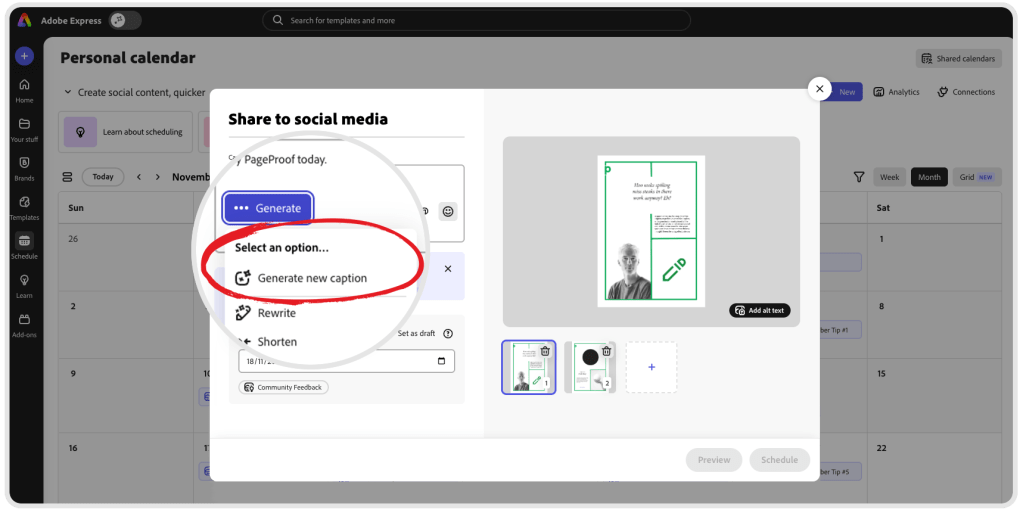
Let AI write your captions inside the updated Caption Generator.
10. Smarter resolution control
Within Adobe Express, you can now adjust your image resolution before exporting using an intuitive slider, giving you full control over sharpness, file size, and final dimensions.
This ensures every asset is built for purpose – no more blurry images, oversized files, or exports that fall apart on different platforms. Your designs look their best wherever they land.
Enhance your Adobe Express experience with PageProof
As Adobe Express continues to level up creative production, it’s still imperative to get feedback and approval on your design. That’s where the PageProof add-on comes in – bringing world-class online proofing directly into your Adobe Express workspace.
Create proofs in a few clicks, send work to reviewers, and track every comment and decision without leaving your project.
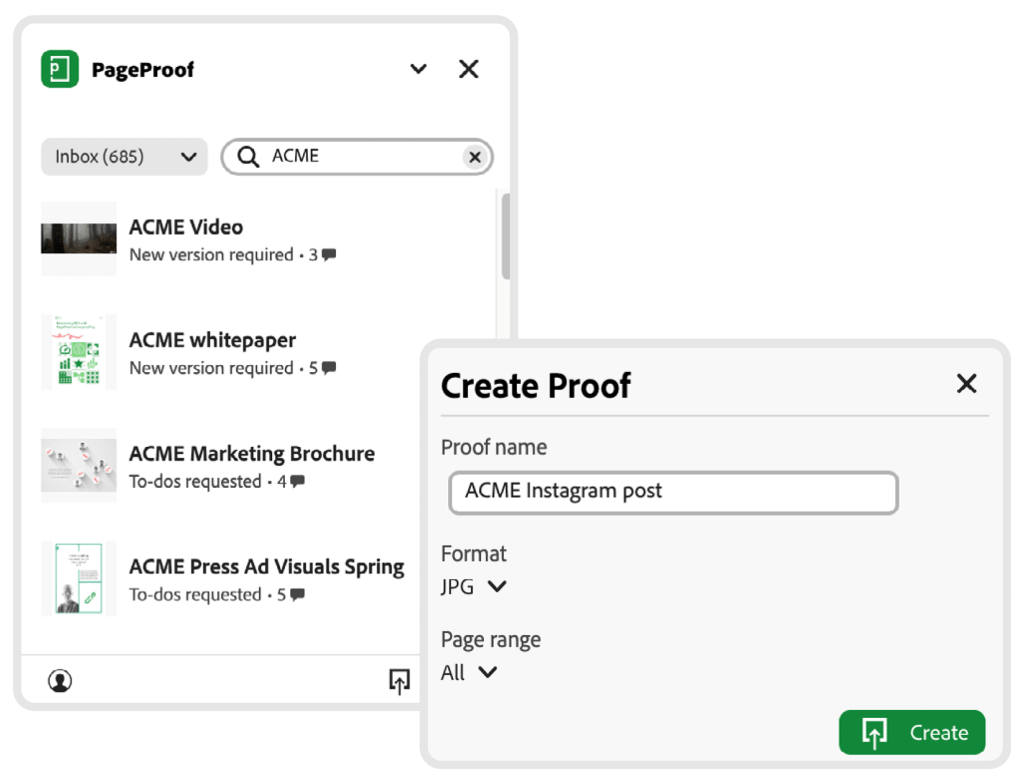
Creating a proof with the PageProof add-on for Adobe Express.
Reviewers can comment, @mention teammates, attach files, and mark up content in real time, while you action feedback and upload new versions seamlessly.
With automated workflows, timely reminders, and a complete audit trail, approvals run on autopilot.
For fast-moving teams, the PageProof add-on for Adobe Express delivers the missing piece: a streamlined, frictionless review process that keeps work flowing and quality high.
