What is online proofing? The comprehensive guide.
Online proofing software has become a must-have tool for businesses working on design projects, marketing campaigns, and other creative endeavors. But especially those dealing with a large volume of content or complex files wonder how they ever managed without it.
But what is online proofing, and how does it work? In essence, the technology is all about streamlining the often complex review and approval process.
In this article, we’ll explore why online proofing has become so popular among marketing teams, creative agencies, and project managers alike.
Whether you’re new to the concept or looking for an alternative to your current tools, you’ll find everything you need to know to get started and collaborate more effectively.
Key takeaways
- Speed up reviews and approvals by eliminating back-and-forth emails and manual feedback collection.
- Collaborate effortlessly in one place, in real-time with feedback from internal and external stakeholders.
- Ensure accuracy and brand compliance with powerful tools that help catch errors and maintain consistency.
- Maintain security and accountability with controlled access, audit trails, and triple-layer encryption.
What is online proofing?
Online proofing is a collaborative process that allows teams to review and approve digital content through a web-based platform. Traditionally, creative work was shared for review by printing hard copies or sharing versions via email.
Feedback would then arrive in any number of ways — scribbles on printouts, email, verbal comments, or annotations scattered across a range of MarTech tools. Moving creative work through review to approval was confusing and time-consuming.
With an online proofing platform, it is easy to share any file type — graphics, images, videos, or documents — online. It is simple for teams to collaborate in real-time using powerful tools that improve the efficiency and accuracy of the creative review and approval process.
Before exploring the benefits of online proofing, it’s important to first understand the common challenges it solves. To do that, let’s take a step back in time and examine the review and approval process prior to online proofing.
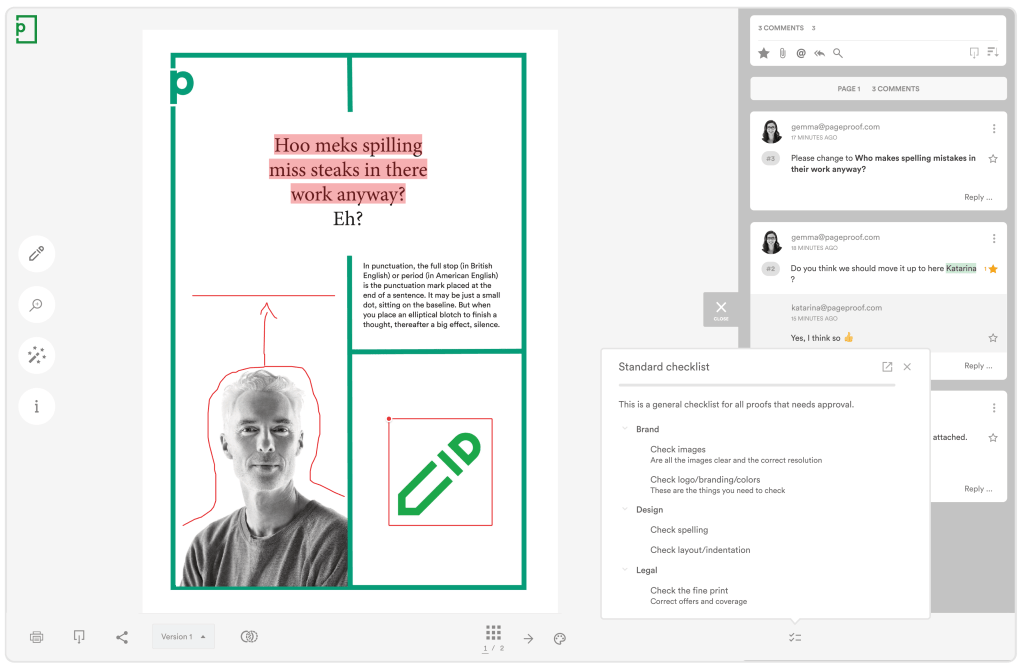
Online proofing software allows teams to review, comment on, compare versions, and approve work.
Problems with traditional proofing methods
Before dedicated proofing software existed, getting feedback and approval on creative work was a slow, manual process.
Physical copies were passed between stakeholders, marked up by hand, and sent back — only to go through the same cycle again. As teams went digital, email was used to get feedback from stakeholders, but the fundamental problems remained.
In both cases, the challenges were the same:
1. Reviewing work is chaotic
With traditional proofing, the approval process to gather sign-offs on creative work is chaotic.
Feedback can be given in a multitude of ways: handwritten notes on printouts, phone calls, emails with attached files or screenshots, scanned images of the requested changes, and more. The result is a jumbled, hard-to-manage collection of feedback, leading to multiple issues:
- Changes are difficult to track
- Feedback is difficult to prioritize
- Comments can be missed, and mistakes made
- The process is cumbersome and time-consuming
- The number of stakeholders involved is often limited to reduce complexity.
So you can see that the traditional way of proofing can be confusing and time-consuming. The lack of structure creates real risk, where missed feedback, miscommunication, and errors can have serious consequences for quality, compliance, and deadlines.

Collaboration before online proofing is chaotic, frustrating, and inefficient.
2. Lack of brand compliance
When the process of reviewing and approving work is disorganized or poorly defined, creative work may be approved without adequate scrutiny and checks — leading to inconsistent messaging, off-brand visuals, and content that fails to meet brand standards.
3. No clear ownership or accountability
Traditional proofing makes it difficult to ensure that the right people have reviewed and formally approved work at each stage of the approval process. Feedback often arrives without clear ownership, approvals may be implied rather than explicitly given, and final sign-off can be ambiguous.
Without a defined approval trail, teams struggle to answer basic questions such as who approved the final version, which feedback was addressed, or whether legal or brand review actually occurred.
This lack of accountability increases risk, particularly for high-visibility campaigns or content subject to regulatory or compliance review.
4. Version confusion and rework
When files are shared via email or shared drives, version control quickly breaks down. Multiple versions circulate at the same time, feedback is applied to outdated files, and reviewers may comment on the wrong iteration.
This leads to duplicated effort, unnecessary rework, and delays as teams try to reconcile which version is correct. In fast-moving environments, version confusion is one of the most common causes of missed changes and last-minute errors. In the worst case, outdated or unapproved work makes it to production.
5. No clear visibility into review status
Traditional proofing offers little to no visibility into how far along the review is in the approval process. Teams often rely on follow-up emails or manual check-ins to find out who has reviewed, who is blocking progress, or what still needs approval.
As the number of reviewers, or complexity of an asset grows, this lack of visibility makes it harder to manage timelines and deadlines. Reviews stall, approvals are delayed, and creative teams spend more time chasing feedback than producing work.
What teams use online proofing software?
Teams rely on online proofing software for different reasons, but all share the same need to manage feedback, versions, and approvals clearly as review complexity increases.
Marketing and creative teams use proofing software to manage high volumes of creative content across campaigns. With multiple reviewers providing input, it helps keep feedback organized, changes traceable, and approvals documented, reducing rework and missed sign-offs.
Creative agencies use proofing to collaborate with clients and internal teams on the same assets. Centralized feedback, version control, and clear approval states help agencies manage multiple projects simultaneously while avoiding conflicting comments and approval ambiguity.
Video and multimedia teams, including those working with animation, motion graphics, or audio-only content, use proofing to collect time-coded feedback, review iterations efficiently, and confirm changes before final delivery.
Print and packaging teams use proofing to verify the critical details that can’t be missed before anything goes to print. Dedicated tools make it possible to check barcodes, color accuracy, and dielines with precision — ensuring every element is correct and approved before production begins.
Brand, legal, and compliance teams in regulated industries depend on proofing to enforce structured approval workflows. Audit trails, version history, and documented sign-off provide accountability and evidence needed to show that content meets all requirements before release.
Dispersed teams and external stakeholders use proofing to collaborate across locations, time zones, and organizations. With all feedback and approvals tied directly to the asset, teams can work asynchronously without losing context or control as more reviewers are added.
Across all these use cases, proofing supports consistent review and approval by bringing structure to complex workflows — helping teams manage multiple stakeholders, catch critical errors before they become costly mistakes, maintain clear version histories, and move work forward with confidence.
What are the key benefits of online proofing?
Online proofing tools transform the way creative work is reviewed and approved, while solving the above challenges.
Gone are the days of tedious and time-consuming back-and-forth between designers, copywriters, and project managers. Feedback and comments are streamlined by bringing everyone together in one place — online.
This makes it easy for reviewers to see, review, comment on, and approve work within a centralized platform, which brings the following benefits:
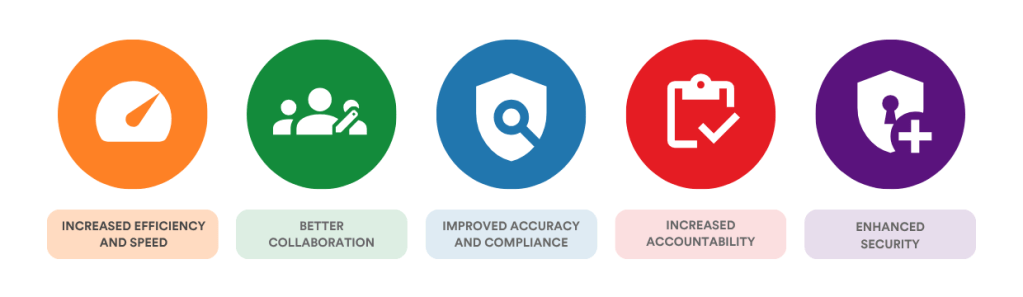
1. Increased efficiency and speed
Online proofing eliminates the need for physical proofs and back-and-forth emails. No more time wasted with manual sharing, trying to decipher scribbles on printouts, or digging through long email threads looking for clear feedback.
When everyone comments on the same file in real-time, using threaded replies and @ mentions, creative work can be reviewed and approved faster.
2. Better collaboration
Online proofing allows multiple stakeholders to access and review the most recent version of a proof simultaneously, making it easier to collaborate and communicate changes in real-time. Reviewers can be internal or external. Access to proofs is available from any device and any location worldwide, eliminating geographical constraints and time zone differences.
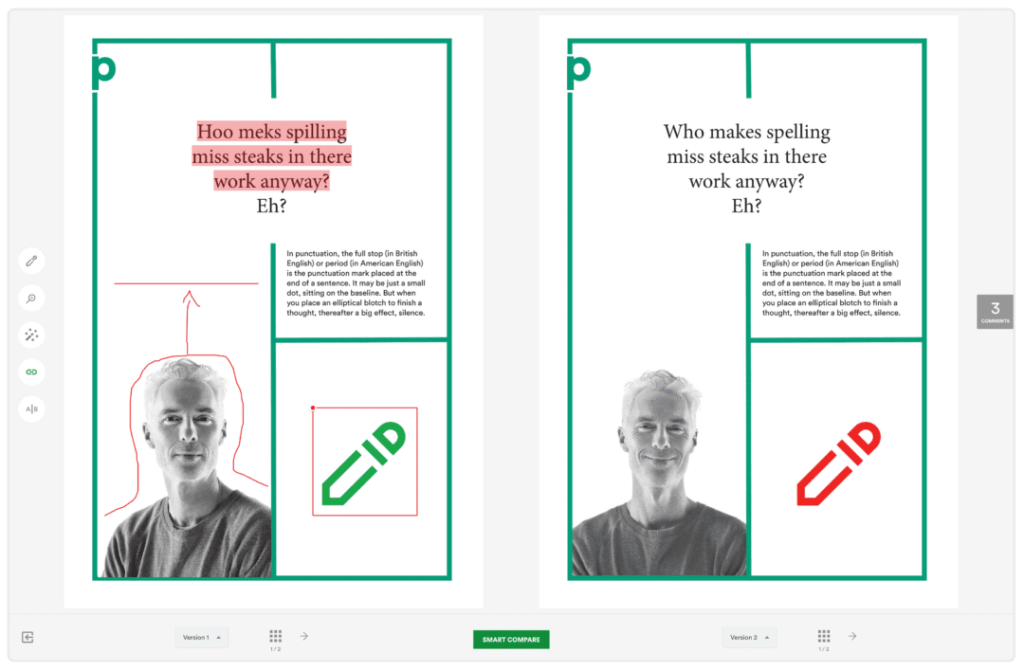
Online proofing tools like PageProof make it easy to collaborate on a proof, and compare versions.
3. Improved accuracy and compliance
With online proofing, there is less risk of errors and miscommunication compared to traditional proofing methods (printing or emailing files, for example). Proofing software, with its specialized tools and checklists, helps catch errors, brand inconsistencies, and issues that might have been overlooked in a traditional proofing process.
4. Increased accountability
Online proofing software solves the accountability issue that manual proofing and approval processes face. Structured workflows define exactly who needs to review and approve work at each stage, with roles and responsibilities clearly assigned — so nothing progresses without the right sign-off.
A reputable tool provides visibility into who requested changes, approved work, and when — creating a permanent audit trail that can be inspected at any point, exported for compliance reviews, and used to verify that brand, legal, and regulatory checks were completed before approval.
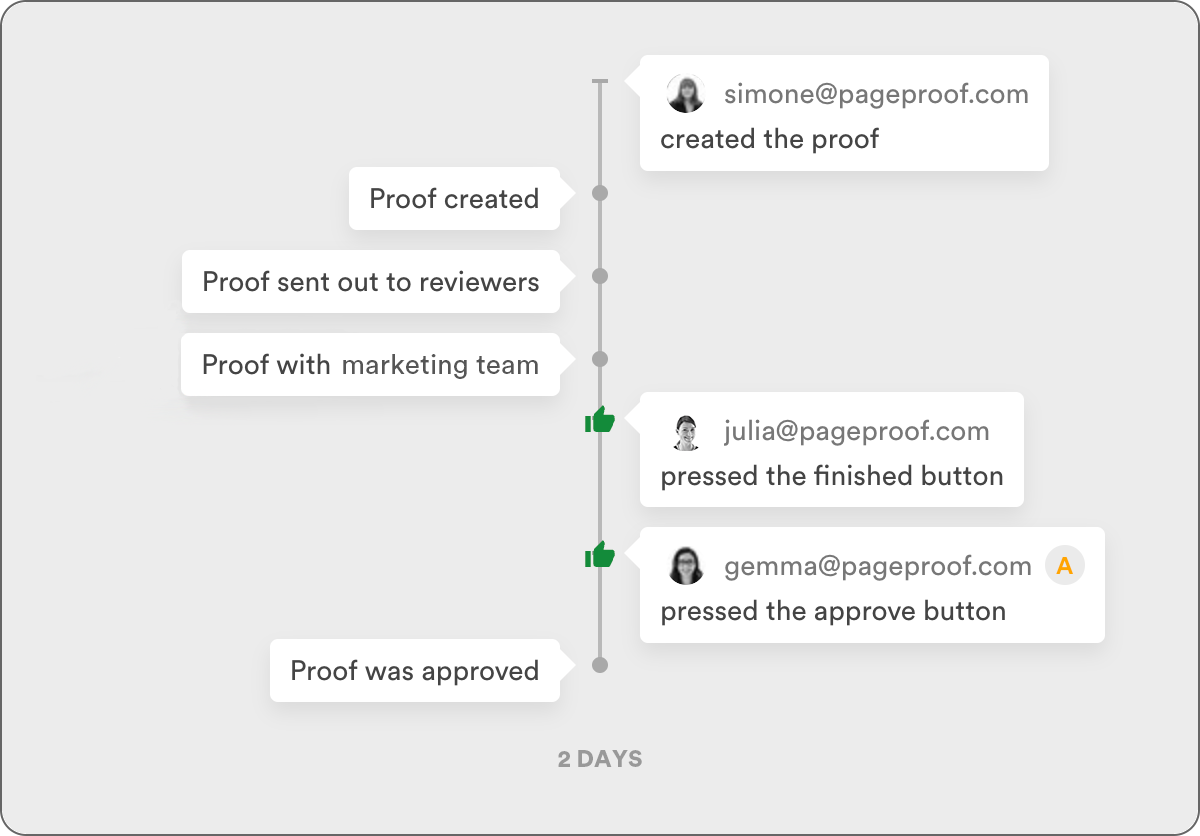
A proofing tool should give you a full audit history of a proof.
5. Enhanced security
Proofing software provides controlled access to proofs, protecting confidential pre-release or sensitive information from being shared outside of the intended audience. Files are stored securely, and data is encrypted both in transit and at rest, giving teams confidence that sensitive creative work stays in the right hands.
Key features of online proofing software
Broad file support
A good proofing platform should let you review and approve all kinds of creative files, rather than switching between tools depending on the file.
At a minimum, file types should include:
- Adobe PDF
- Adobe Photoshop, Illustrator, and InDesign
- HTML websites, web banners, emails
- Microsoft Office – Word, Excel, and PowerPoint
- Videos – mp4, mov, gif, avi
- Audio – mp3, wav
- Imagery – jpeg, tiff, png, svg, webp
Precision markup tools
Precision markup tools let reviewers attach a comment to the exact point in a file it refers to, rather than describing the location in words, e.g. ‘see page 5’.
In practice, this means clicking directly on a spot in an image or document to drop a pin-style comment there, dragging to mark a specific region, clicking on a frame of a video to comment on that exact moment, or clicking a point on an audio waveform to flag something in the sound.
Threaded replies then keep the back-and-forth on that one comment grouped together, and @ mentions notify the specific person whose input is needed. Together, these tools stop feedback from getting lost or misinterpreted, which is one of the biggest issues with email-based reviews.
AI-assisted review
Proofing platforms can use AI to give reviewers a head start with suggested issues, rather than having them start from scratch. Instead of manually scanning every page, AI-assisted review analyzes the proof automatically, flagging things like incorrect colors, inconsistent fonts, or brand guideline violations, before a reviewer even opens the proof.
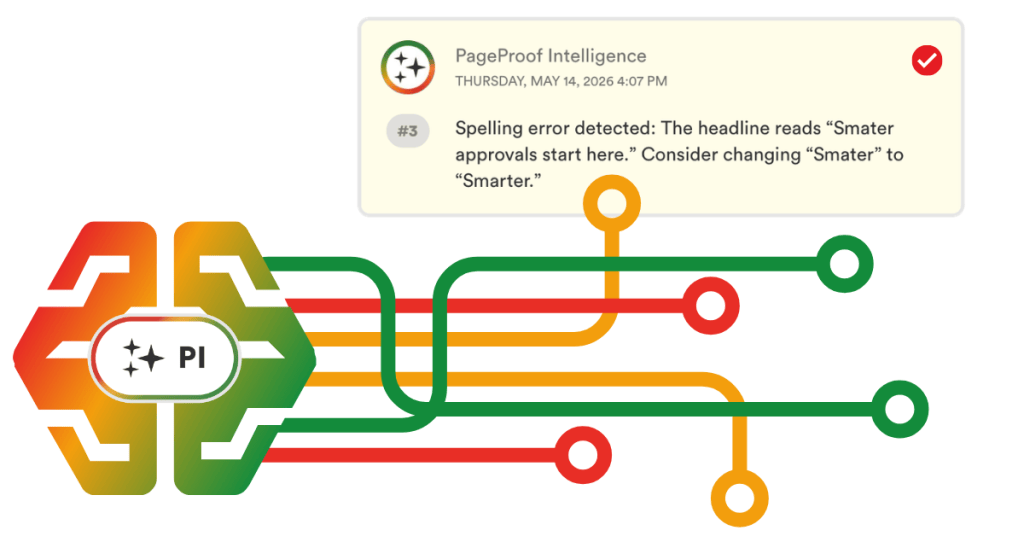
An example of a spelling error picked up by PageProof Intelligence®.
PageProof Intelligence®, for example, helps to do all of the above. It takes things one step further by applying an organization’s own rules, to check a proof against brand guidelines, tone of voice, legal disclaimers, or accessibility requirements, and flagging exactly where the proof falls short.
This shifts the reviewer’s role from hunting for problems to confirming and deciding on ones that have already been surfaced, which speeds up reviews and reduces the chance that something small gets missed.
Version comparison
As files go through multiple rounds of revision, a side-by-side compare view automatically highlights the differences between two versions of a file, so reviewers can immediately see what’s been updated without having to hunt for changes themselves.
Color and print tools
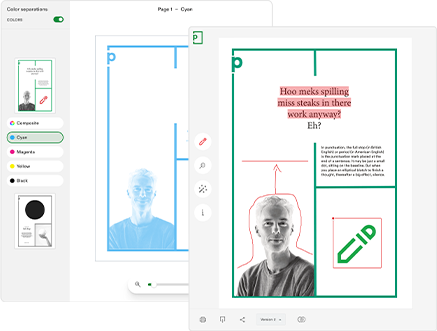
For work that’s headed to print, catching color issues is essential. Features like color separation previews let you see how a file will break down into individual print plates, while ink coverage tools can flag areas that might cause print problems, helping avoid costly reprints.
Checklists and workflows
Checklists and workflows let teams build out repeatable, auditable task lists that show who completed what and when. Automated workflows take this further by routing a proof through the correct sequence of reviewers automatically, so a file might move from the design team, to legal, to a final approver, without anyone needing to manually forward it at each step.
Audit trails
Audit trails make sure every action taken on a proof, from a comment being left to a decision being made, is logged and visible. This creates a clear, traceable record of who did what, and when.
Integrations
Native integrations with your design, project management, storage, DAM, and communication tools mean proofing can slot into existing workflows.
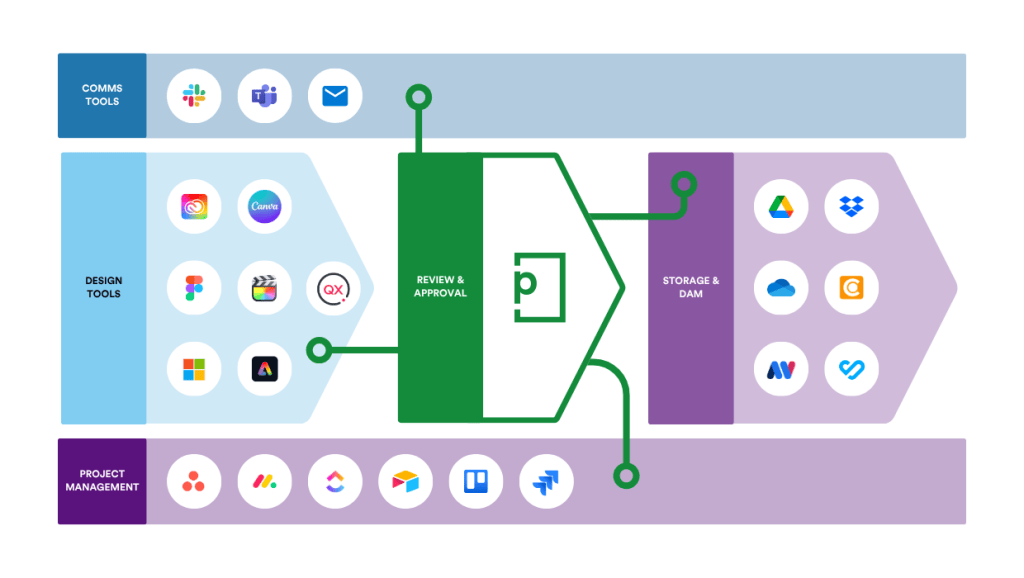
PageProof integrates seamlessly with your existing tech stack.
When should you consider online proofing software?
Online proofing software becomes essential when:
- Reviewing or approving high volumes of content.
- Seeking sign-off for complex files or a range of file types.
- A large number of people are involved in the review and approval process.
- Collaborating with clients or stakeholders outside the immediate team, or even outside the organization.
- Compliance and security are a priority — industries like pharmaceuticals, banking, insurance, food and beverage, telecommunications, government and councils, education, and manufacturing all need a formal, auditable sign-off process, backed by enteprise security.
PageProof supports how we work – making it easier for teams across BHF to collaborate, review, and deliver creative content with confidence.
Bertie Teague, Senior Brand Guardian Executive, British Heart Foundation.
You should now have a clear understanding of what online proofing is and why it transforms the way creative work is reviewed and approved.
Across industries, online proofing helps teams replace from fragmented email threads, manual markups, and version confusion with a structured, transparent review process.
The result? Less rework, faster decisions, and more approvals.
Online proofing tools vary widely, from project management platforms with built-in proofing features to dedicated proofing systems designed specifically for review and approval.
To help you evaluate your options objectively, we’ve created a practical checklist that walks through the key considerations to assess before selecting an online proofing platform — so you can choose with confidence, not guesswork.
Download your free checklist.
Use our step-by-step checklist to discover what to look for in an online proofing platform.