

Marketing and creative teams don’t struggle generating ideas — the challenge is ensuring those ideas move smoothly from concept to completion. And without an efficient workflow, even the most brilliant campaigns can get stuck in endless revisions, miscommunications, and leading to delays.
What if your team could bypass any bottlenecks and streamline collaboration? With an efficient workflow, collecting feedback to final approval happens faster, with fewer mistakes – allowing your team to spend more time doing what they do best: creating.
Key takeaways
- Efficient workflows minimize errors, speed up processes, and ensure smoother task progression.
- Eliminate issues like poor communication, mismanaged resources, and delayed feedback to keep projects moving.
- Map current processes, gather insights, and identify bottlenecks to refine operations.
- Platforms like PageProof, Asana, Zapier, Saleforce, and Make help automate tasks, streamline approvals, and enhance collaboration.
In this post, we’ll explore how refining your workflow can cut through the clutter, improve collaboration, and help your team deliver better results with less friction.
What makes a workflow efficient?
An efficient workflow is a well-organized sequence of tasks that allows for the smooth progression of a process from start to finish.
It clearly defines each stage, outlining the responsibilities of team members and the necessary tools or resources for success.
By structuring tasks in a logical and streamlined manner, an efficient workflow minimizes delays, enhances productivity, and ensures consistent results.
To better understand how an efficient workflow works in practice, let’s explore examples across various departments.
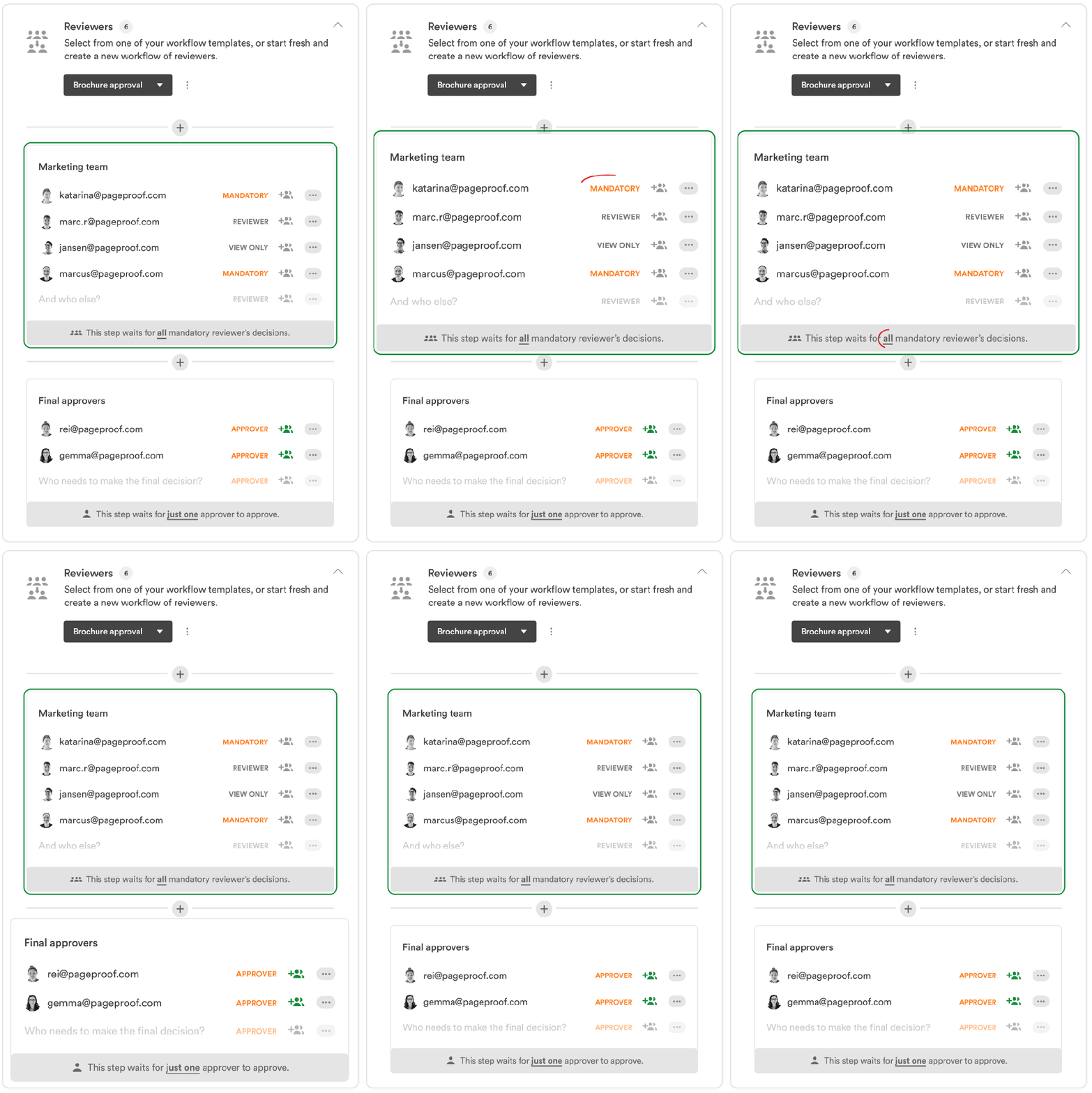
PageProof’s workflows route proofs through groups of reviewers automatically right up until final approval.
Workflows examples across departments
Workflows are essential for streamlining processes across various departments. For example, a product launch campaign requires collaboration between the design team to develop promotional materials, the marketing team for campaign execution, and other wider teams such as legal to ensure a successful and compliant rollout.
These examples illustrate how different departments can implement effective workflows to drive results and maintain consistency.
1. Content creation and approval workflow
- Define content goals and key messaging.
- Develop initial drafts, incorporating brand voice and SEO best practices.
- Submit content for review by stakeholders, including marketing leads and legal teams.
- Revise based on feedback and finalize content.
- Publish and distribute across relevant channels.
2. Social media campaign workflow
- Establish campaign objectives and target audience.
- Create a content calendar with posts, visuals, and captions.
- Review and approve posts to ensure brand consistency and compliance.
- Schedule and publish content across social platforms.
- Monitor engagement, respond to interactions, and adjust strategy as needed.
3. Email marketing campaign workflow
- Define campaign goals and audience segmentation.
- Draft email content, ensuring personalization and strong calls to action.
- Design email templates that align with brand aesthetics.
- Conduct internal reviews and A/B testing.
- Deploy the campaign and track key performance metrics.
4. Product launch Marketing Workflow
- Develop a go-to-market strategy, defining key messages and launch channels.
- Create promotional assets, including ads, social media posts, and landing pages.
- Coordinate cross-functional teams for alignment.
- Execute pre-launch teasers, launch events, and post-launch promotions.
- Analyze campaign performance and adjust future efforts accordingly.
5. Influencer marketing workflow
- Identify influencers aligned with brand values and audience.
- Reach out and negotiate partnerships, setting clear expectations.
- Provide campaign guidelines and creative direction.
- Review influencer content before publication.
- Measure engagement, reach, and ROI to assess impact.
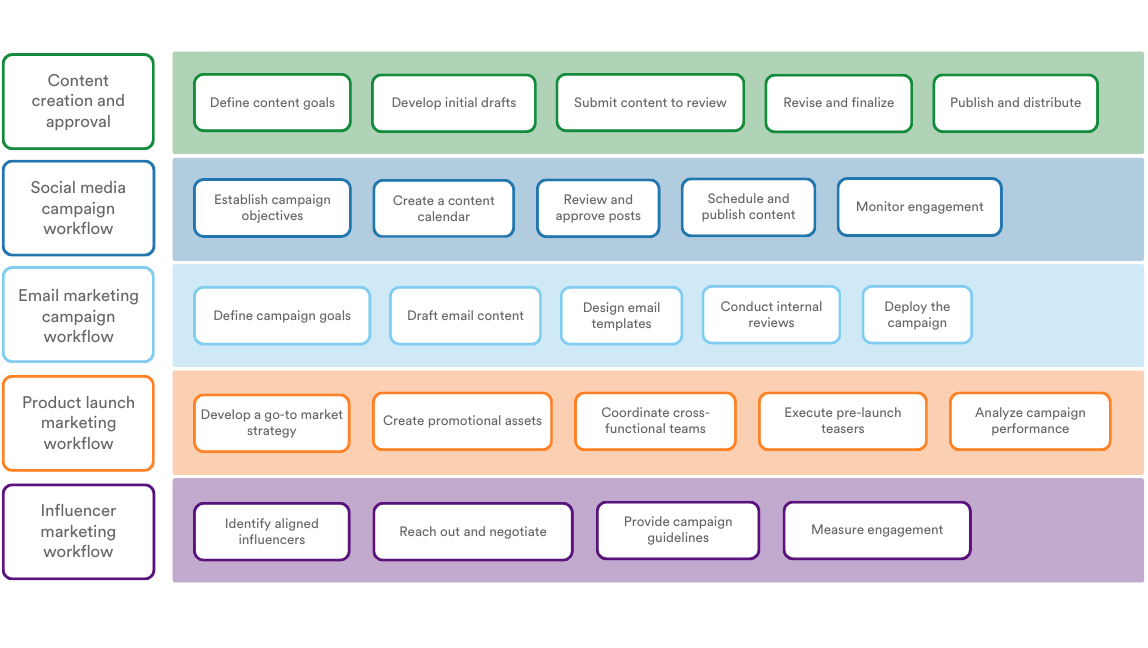
Workflow examples across marketing and creative departments.
Workflow challenges
Workflows are crucial, but obstacles can make them inefficient. When workflows break down, it leads to lost time, increased costs, and frustrated teams.
Here are some common challenges that hinder workflow efficiency:
- Poor communication: Misunderstandings or a lack of communication can result in confusion, delays, and mistakes. Clear lines of communication are essential for smooth collaboration.
- Unclear roles and responsibilities: When roles are not clearly defined, multiple people may end up working on the same tasks, missing tasks altogether, or making conflicting decisions, resulting in inefficiencies and frustration.
- Poor planning: Inadequate resource allocation or poor planning can cause bottlenecks, reducing productivity and slowing progress.
- Delays in feedback: Delays in gathering feedback during marketing campaigns or design reviews can stall projects, result in missing deadlines, and lead to wasted time and budgets.
These inefficiencies not only slow progress but could also have a negative impact on employee satisfaction.

How to optimize your workflow
To enhance the efficiency and effectiveness of your workflow, follow these key steps:
1. Map out current workflows
Start by breaking down your workflow into core processes or stages, like project initiation, review, and approval. This helps clarify the key touchpoints in the process.
Next, document who’s responsible for each task — make sure to identify editors, decision-makers, or approvers. Understanding everyone’s role is essential for a smoother operation.
Visualize the workflow using flowcharts or diagrams. This provides a clear overview and helps highlight any bottlenecks, redundancies, or inefficiencies that might be slowing things down.
Tip: Miro and Canva are great tools for building out flowcharts and diagrams.
2. Collect data and feedback
Observe the workflow in action. You can do this by shadowing team members or conducting interviews to understand the actual flow of work and its challenges.
Don’t forget to gather input from those who interact with the workflow regularly. Their insights will help pinpoint frustrations, delays, or gaps that may not be immediately obvious.
Dive into performance metrics like cycle times, approval delays, and error rates. These numbers can give you a concrete understanding of where improvements are needed.
Tip: Use surveys or feedback forms to gather input from your team. Tools like Google Forms or Typeform make this process easy.
3. Identify improvement opportunities
Look closely for bottlenecks — those areas where tasks get delayed or pile up, preventing smooth progress.
Consider leveraging technology to automate or streamline certain parts of the workflow. Tools like approval software or task management platforms can help reduce manual work and speed things up.
Finally, recommend adjustments to the process or roles. Implementing best practices can greatly improve communication, efficiency, and overall workflow performance.
Tip: Regularly revisit your workflow after implementing changes to track progress and fine-tune further.
5 top tools for workflow efficiency
Optimizing workflows requires the right tools. Here are five popular options to enhance your team’s productivity:
1) PageProof
Streamline the review and approval process with online proofing software from PageProof. Helping teams to collaborate on creative projects by providing clear feedback and quick approvals, ensuring faster turnaround times.
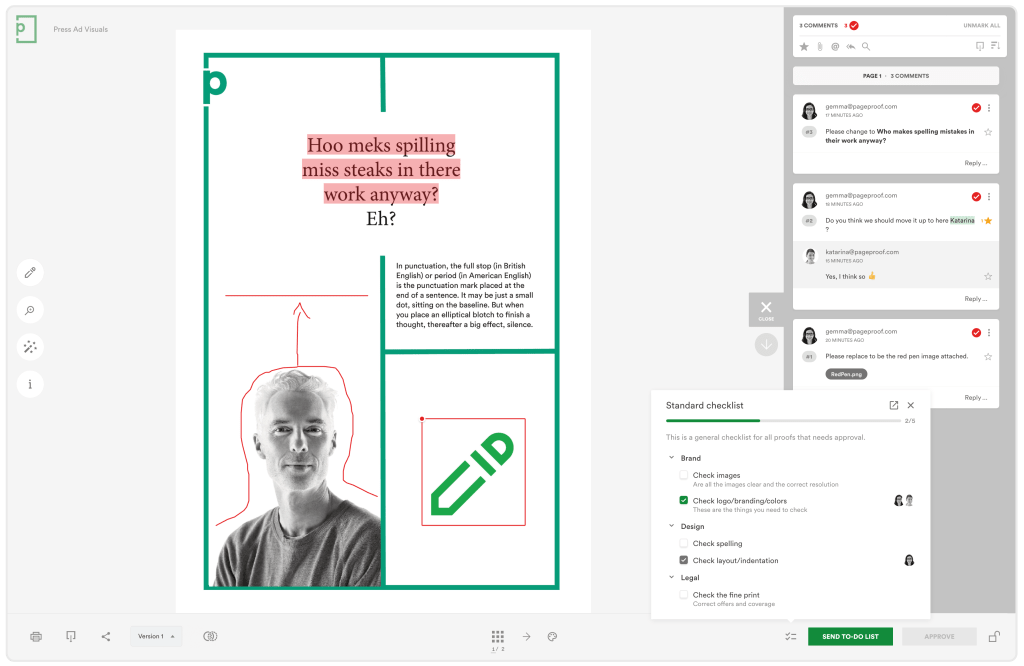
PageProof’s in-app proofing screen showcasing collaborative checklists and markup.
Boost workflow efficiency with Groups in PageProof
Adding the right stakeholders to your workflow just got easier. With Groups, marketing teams and creative agencies can quickly add multiple internal and external reviewers — complete with default permissions — without the repetitive setup.
Simply use a hashtag to add an entire group in one click, ensuring no key decision-makers are overlooked. By streamlining approvals and reducing manual steps, Groups keeps projects moving faster and more efficiently than ever.

Add user groups into your workflow easily with a simple hashtag.
2) Asana
A project management tool that keeps tasks organized and on track. It enables teams to manage projects, track progress, and communicate seamlessly.

The Asana dashboard showcasing the project status of a website launch.
3) Zapier
An integration tool that connects over 5,000 apps, automating repetitive tasks and ensuring seamless data transfer between your favorite software.

The Zapier dashboard showcasing some of the integrations the software supports.
4) Salesforce
A powerful platform for managing workflows and customer relationships. It allows teams to automate processes, track interactions, and streamline tasks, ensuring smooth project execution and effective communication across departments.
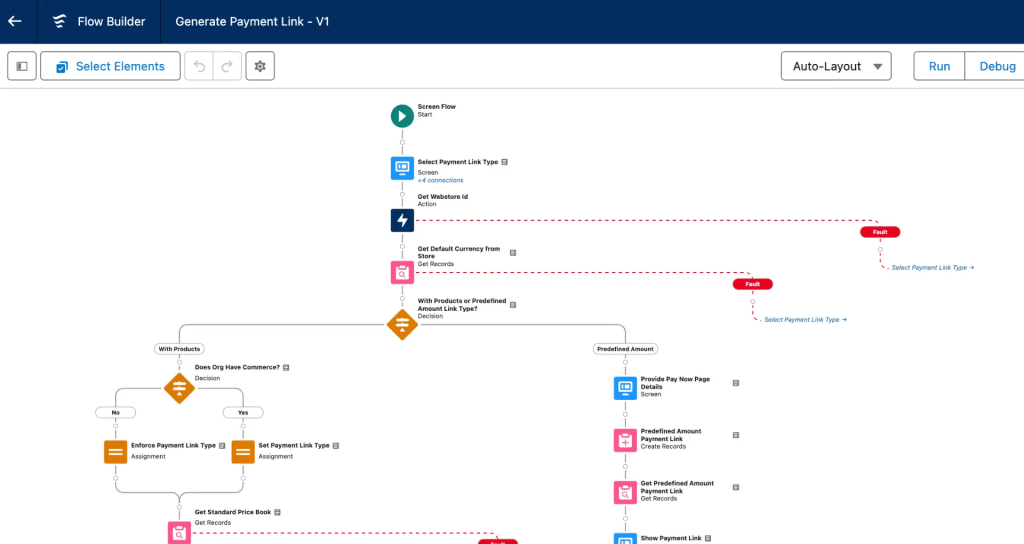
A Salesforce workflow that helps to automate tasks throughout the sales lifecycle.
5) Make
An automation platform that connects apps and services to automate workflows without coding. It enables businesses to create powerful integrations between various tools, reducing manual effort and ensuring data consistency across systems.

A Make scenario showcasing how the platform can connect your tech stack together.
Final thoughts
Optimizing workflows is crucial for boosting productivity and minimizing delays. By tackling communication issues and using popular tools like PageProof, Asana, and Zapier, teams can streamline processes and deliver faster, more consistent results.
Focusing on workflow efficiency enables businesses to work smarter and drive success.
FAQs
What is workflow efficiency?
Workflow efficiency refers to how effectively tasks and processes are completed with minimal waste of time and resources. It involves streamlining workflows by reducing bottlenecks, clarifying responsibilities, and leveraging automation to enhance speed, consistency, and overall productivity.
What are the best tools for automating workflows?
Top tools for automating workflows include PageProof, which streamlines the review and approval process for creative teams, and Asana, a project management tool that helps organize tasks and track progress. Zapier automates repetitive tasks by connecting apps, while Trello and Make allow for visual task management and custom workflow automations.
