Feature Friday: Q4 2026 roundup

Welcome to Q4! Our Feature Friday series continues, with a new PageProof feature in the spotlight each week to help your team review and approve work faster.
We’ll be covering updates big and small, because even the smallest change can make a real difference to your review and approval process.
Collections and folders, redesigned
First up this quarter is a fresh look at how you organize and manage collections.
Collections now have a refreshed look in the dashboard sidebar, with support for folders and subfolders nested up to five levels deep. That gives your team more room to structure collections around projects, clients, brands, or whatever suits the way you work.
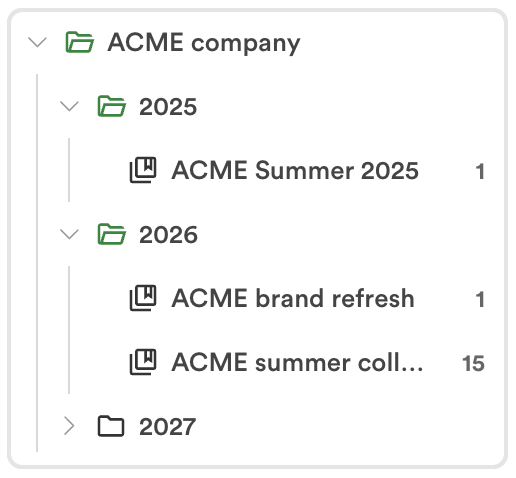
What’s new:
- Nested folders — organize collections up to five levels deep, so related work stays grouped together.
- A new Team Collections page — Team Administrators with Proofs access can see where each collection sits in the folder structure, check its sharing and access settings, and view a status breakdown of the proofs inside.
- Bulk actions for admins — archive multiple collections at once, or delete multiple empty collections in one go.
- Simpler collection management — setup takes fewer clicks, and you can move a collection to another folder whenever your work or structure changes.
Together, these updates make it easier to keep collections tidy over time, no matter how much work your team has on the go.
PageProof MCP: Your proofing data in your AI assistant
Next up, PageProof MCP lets you connect PageProof to AI assistants like Claude and ChatGPT, so you can ask about your proofs, reviews, and approvals in plain language and get answers drawn from your live PageProof data.
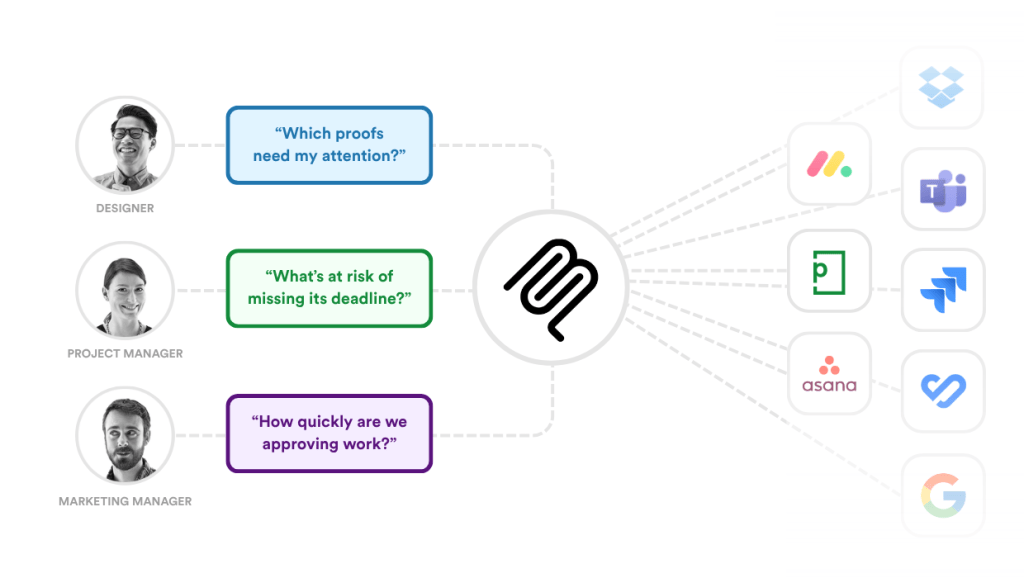
Get answers about your PageProof data from your AI assistant, alongside other tools in your creative tech stack.
What’s new:
- Answers on demand — ask what’s waiting on your approval, what’s overdue, or how approval times are trending.
- Follow-up questions — your assistant keeps the context of the conversation, so you can narrow in on a client, team, date range, or campaign.
- Data alongside your other tools — combine PageProof insights with your connected project management tools, calendars, and team chat.
- Quick setup — in Claude, add PageProof from the connectors directory. In other AI assistants, add a custom connector using the PageProof MCP URL.
PageProof MCP is available on all plans for members of a PageProof team. Team Administrators can also ask about their team’s proofing data. Find full instructions in our PageProof MCP setup guide.
PageProof for Jira: Creative approvals inside your project workflows
Next, the new PageProof app for Jira brings creative review and approval into the tool where your team tracks its work. Create proofs from Jira issues, follow their progress, and receive approved files, all from the issue itself.
What’s new:
- Proofs from Jira issues — turn any Jira issue attachment into a proof in a few clicks, then finish setting it up and send it for review in PageProof.
- Linked proofs and issues — link any proof to its Jira issue from PageProof, with a Jira integration pill on the proof so the connection is always visible.
- Proof details at a glance — add a PageProof card to a Jira issue to see each linked proof’s status, version, workflow step, due date, comment and to-do counts, and reviewer decisions.
- Approved files delivered automatically — when a proof reaches final approval, the approved file can be attached to the linked Jira issue.
To get started, a Jira admin can install the app from the Atlassian Marketplace, then a PageProof team admin who is also a Jira admin connects the two from Team > Integrations.
Learn more in our PageProof for Jira blog post.
Email notifications in your language
This week, PageProof email notifications are going multilingual. When you set your language preference to French, German, Dutch, Spanish, or Italian, your PageProof emails now follow it too.
What’s new:
- Notifications in your chosen language — proof invites, reminders, and updates now arrive in French, German, Dutch, Spanish, or Italian, matching your language preference.
- One setting for everything — your language preference applies to both the PageProof interface and your email notifications, so there’s nothing extra to set up.
- A consistent experience for every reviewer — reviewers in different markets each receive emails in the language they’ve chosen.
To set your language preference, click your avatar, select the globe icon, and choose your language from the list.
Reviewer Skipped webhook
The new Reviewer Skipped webhook gives your connected tools more visibility into what’s happening in your PageProof workflows.
What’s new:
- Instant updates when a reviewer is skipped — your connected tools are notified as soon as a reviewer is skipped on a proof.
- Workflows that stay in sync — use the webhook to update a project board, trigger a notification, or keep records in step with each proof’s progress.
- Simple setup — create the webhook, select Reviewer skipped as the event, and add your webhook URL.
Team Administrators can set up the Reviewer Skipped webhook alongside PageProof’s other webhooks from the team webhook settings.
FinalFile® delivery to SharePoint
FinalFile® delivery now supports SharePoint, so approved files move from PageProof straight into the right SharePoint location, with no exporting, downloading, renaming, or uploading.
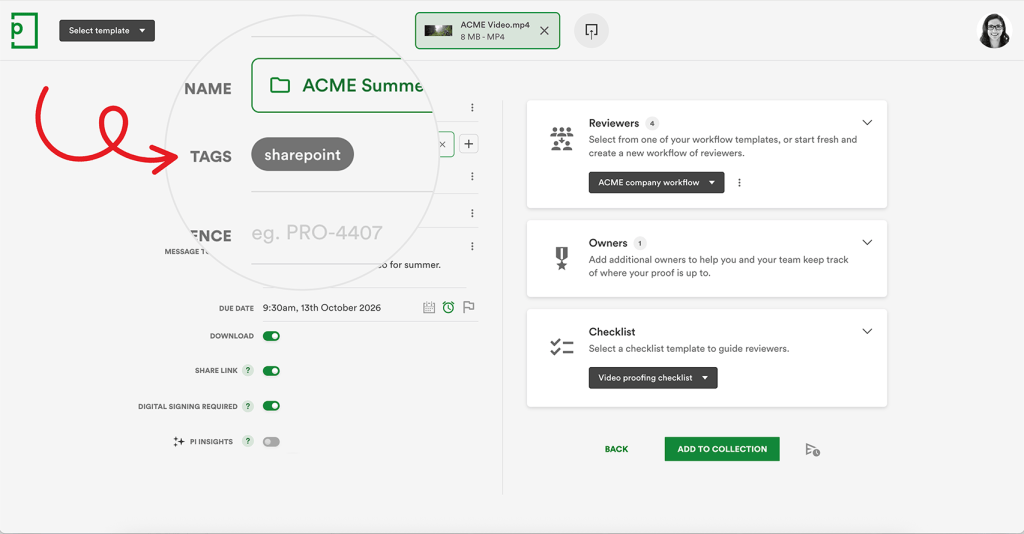
What’s new:
- Automatic delivery on final approval — as soon as a proof receives final approval, PageProof sends the approved file directly to SharePoint.
- Delivery set with a simple tag — add a SharePoint delivery tag to a proof, manually or built into a proof template, to set the delivery path before review begins. Nothing about how your team reviews work changes.
- The right version, every time — each delivered file carries its proof name, proof ID, and a link back to its full approval history in PageProof, keeping your SharePoint libraries accurate and up to date.
FinalFile® delivery for SharePoint is available on the PageProof Teams Plus and Enterprise plans. Learn more on our SharePoint integration page.
What’s next
Feature Friday continues every week. Follow along to discover the PageProof features helping creative and marketing teams review faster, stay aligned, and approve with confidence.
Follow us on LinkedIn
Keep up to date with the latest PageProof features helping teams speed up approvals and simplify creative reviews.