PageProof integration for monday.com: flexible and powerful

One of the keys to productivity and job satisfaction lies in the ability to work the way you want to. As professionals, you thrive when your work aligns with your preferences and methodologies – especially through the integration of your favorite tools. In this blog, we delve into the importance of empowering individuals to shape their own workflows, and how the seamless integration of two of their favorite tools – monday.com, and PageProof – does just that, highlighting the latest features that deepen this flagship integration even further.
Benefits of flexible tools
Embracing flexible tools that align with individuals’ work preferences brings about a host of advantages for businesses. This approach not only enhances overall productivity by allowing employees to leverage tools that resonate with their unique strengths but also significantly boosts job satisfaction, fostering a more engaged workforce. The appeal of offering such flexibility extends beyond the workplace, positioning the organization as an attractive destination for top talent and contributing to the retention of valuable team members.
The PageProof native integration for monday.com
The most seamless integrations are those that integrate natively with one another. Because native integrations expand the functionality of another app, users cannot tell where one ends and another begins. Resulting in a deeply embedded, frictionless experience. PageProof’s integration for monday.com takes this a step further by being a two-way, native integration.
Both PageProof and monday.com offer flexibility to match the way your team works. Let’s take a look at how teams can leverage the PageProof integration for monday.com to work even better together around creative content, saving hours of time.
Create proofs of any type
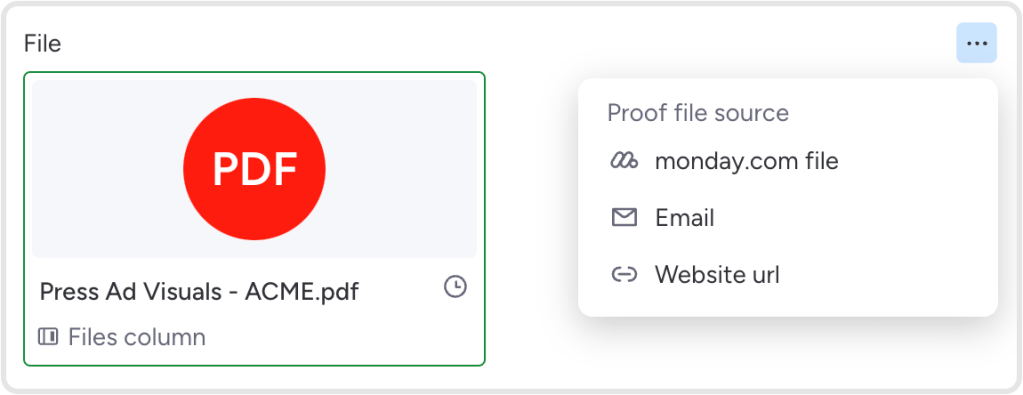
With the integration, you can create a proof of any file type. Imagery, artwork, presentations, emails, videos, and more. You can gather feedback and approvals with ease – no matter what the creative campaign. The latest feature release means it is now simple to create a proof of a website by adding a URL.
Many ways to create proofs
To support the range of different ways users prefer to work, there are multiple options for creating proofs when working with PageProof and monday.com You can either create a proof in PageProof or create a proof directly from the monday.com project management dashboard.
Create a proof in PageProof
When creating proofs in PageProof, you can reference the proof to a board, group, item, or subitem – matching the way you and your team work in monday.com.
Create a proof directly from monday.com
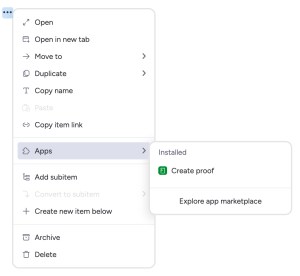
From monday.com, you can create proofs directly from the item or subitem’s view (file attachments, monday.com file, email, or website URL). The latest feature release offers a new way to create a proof – open the Board Item Menu (click the 3 dots icon next to the item) and select apps, then create proof.
Proof information is synched automatically
The PageProof integration for monday.com displays proof information in monday.com that is automatically updated without you lifting a finger as the proof goes through its lifecycle. This is a huge time saver for teams requiring high visibility for the review and approval of large volumes of work. Set up columns to match the information you and your team would like to see about the proof’s progress. Examples include:
- The status of the proof
- Number of to-dos requested
- A quick access URL link to a proof or collection
- The version number of the proof
- The workflow step the proof is at –‘creative director’, ‘marketing team review’, ‘legal team’ for example.
- The number of decisions gathered so far
You can effortlessly map the proof information you’d like to see to your item and sub-item columns, keeping everyone on the board in the loop.
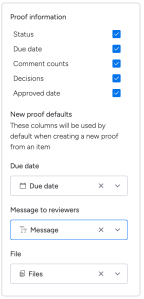
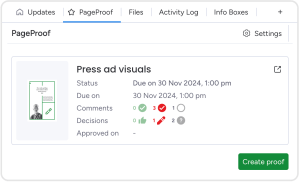
The latest updates to the integration offer an enhanced PageProof Item View with additional information that can be displayed from proofs referencing the monday.com item: Status, due date, comment counts, decisions, and the approved date. Select which proof information to show under settings for the item view.
Brand new user interface
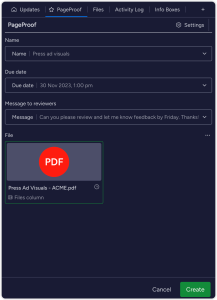
Offering a range of themes across various devices and software to meet users’ preferences has become increasingly popular. Hence, we are excited to share that the PageProof integration has a brand new look that matches your monday.com preference of light, dark, or night theme across all areas of the integration.
The PageProof integration offers powerful benefits
There are many more benefits to the PageProof and monday.com integration, powering up your creative workflows.
- Advanced proofing tools with PageProof
- PageProof integration recipes
- PageProof custom automation triggers for monday.com actions
- A seamless experience for designers on projects with PageProof Adobe add-on
Read more about these features here.
Summary
It is essential for digital solutions to support a range of work preferences. Resulting in numerous advantages for businesses. The latest enhancements to the PageProof integration create even more flexibility for users. There are new ways to create proofs, the ability to create a proof of a URL, and last but not least, a new user interface. Providing power and flexibility to work the way you prefer to work. We love how teams can fly through approvals on autopilot, and keep projects updated along the way.