
The lead-up to Christmas always brings sparkle and delight – snowflakes swirling through the air, twinkling lights on every corner, and of course, PageProof’s 12 days of Christmas feature release.
This year, each feature is as unique and brilliant as a snowflake – designed to help creative and marketing teams work faster, smarter, and with a little extra magic. ❄️❄️❄️
Across twelve festive days, we’re unveiling a new feature each day to make your workflows shimmer with efficiency and collaboration.
Day 1: Proofing magic, now inside Adobe Express.
Today’s festive feature unwraps our brand-new PageProof add-on for Adobe Express – bringing effortless review and approval right where designers create.

With the new add-on, designers can:
- Create proofs directly from Express
- See feedback and comments appear back inside their designs
- Upload new versions without switching tools
It’s a streamlined workflow end-to-end, helping creative teams move from first draft to approval faster – all without ever leaving Adobe Express.
Day 2: PageProof custom fields for Asana
Add PageProof custom fields to your Asana projects to enhance visibility – and power Asana AI.
Marketing, brand, and creative teams can now bring deeper proof visibility directly into Asana. With PageProof custom fields in Asana, key proof details sync automatically to your project – giving everyone a clearer, real-time picture of where each asset sits in the review and approval process.
Add fields such as proof status, current workflow step, collection name and URL, comment counts, approval date, …and more. No manual updating. No missing context. Just up-to-date proof information surfaced where work happens – including richer data for Asana AI to reference.
What this means for your team:
- Less manual work: No more copying status or workflow notes into Asana tasks.
- Smarter orchestration: Asana rules and AI can use PageProof fields to prioritise work and guide next steps.
- Faster decisions: Stakeholders see the exact review stage at a glance – without leaving Asana.
- Better visibility: Each task tells the complete story from brief → review → approval.
Keep your Asana projects structured. Keep your PageProof workflow moving. One seamless path from work to final sign-off. Find out more
Day 3: New granular permissions for team admins
Today’s Day 3 update introduces granular permissions for team administrators, giving you clearer control over who can access People, Proofs, Templates, and Setup.
With these improved controls, you can:
- See access at a glance – the team members list now clearly shows who can access key admin areas.
- Assign the right level of control – choose exactly which areas each admin can manage.
- Protect sensitive configuration – limit access to the Setup area which controls integrations, webhooks, and feature settings.
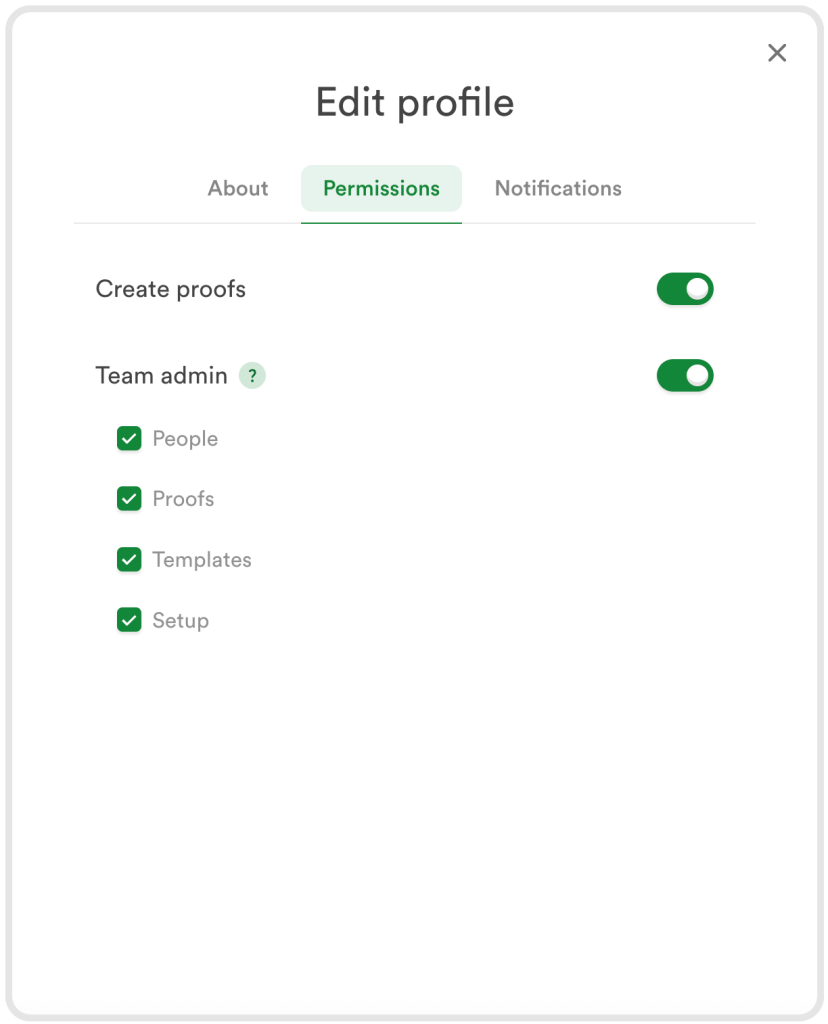
Granular PageProof permissions give team administrators clearer, more precise control.
A simple, secure way to keep responsibilities clear and your approval environment governed and efficient.
Day 4: Smarter, more trustworthy video reviews
Today’s update introduces two enhancements to video proofing in PageProof: subtitle support and Content Credentials for video files.
Subtitle support for videos
PageProof now displays subtitles when they’re embedded in the video file, making it easier for reviewers to check subtitle copy for accuracy and support accessibility needs.
Content Credentials for videos
We now surface Content Credentials on video files, giving reviewers clearer insight into the video’s source and creation details. See who created the video, understand where it came from, and quickly spot when content has been AI-generated.
These updates bring greater clarity and trust to the video review process – ideal for creative, marketing, and compliance teams.
Day 5: FinalFile delivery to MediaValet: your approved assets, exactly where they need to be
Day 5 brings a feature creative, and marketing teams will love – automatic FinalFile delivery straight into MediaValet.
Once a proof is approved, PageProof can send the final file directly into your MediaValet library using a simple proof tag. No exporting, downloading, uploading, or manual hand-offs. Your DAM stays accurate and up to date without anyone needing to take extra steps.
PageProof and MediaValet can streamline enterprise workflows and reinforce a governed, end-to-end creative process. Another festive feature helping teams move from approval to storage with ease. ✨
Day 6: All your originals – all at once.
On today’s 12-days reveal, we’re introducing a highly requested productivity boost: bulk download of original proof files right from your dashboard.
Select multiple proofs, choose Download, and PageProof will download the original proof files neatly for you into a zip file. Perfect for archiving, sharing with external parties, or collecting final assets after sign-off.
Fast, tidy, and oh-so-satisfying.
Day 7: Hej Sweden, Ciao Italy!
Today’s festive feature brings two brand-new language options to PageProof: Swedish and Italian.
Users can now use the PageProof interface in the language that feels most natural to them. Whether your organization is based in Sweden or Italy, or you collaborate internationally, this update delivers a smoother, more inclusive proofing experience for everyone.
God jul! Buone feste! And welcome to a more localized PageProof.

Day 8: A gift for every detail-checker.
Introducing our new link scanner – a smarter, faster way to catch link issues before they ever reach your audience.
It scans internal document links, text hyperlinks, and email addresses in an instant, delivering the same smooth experience as the barcode scanner, now designed specifically for link accuracy across static creative files.
Ideal for brochures, PDFs, catalogues, magazines, presentations, and more – anything with a link that must be spot-on.
Save time. Prevent mistakes. Approve with confidence.

Day 9: Clarity, everywhere
PageProof message fields now support rich text formatting, making instructions easier to read. Use bold, bulleted and numbered lists, links, strikethrough, superscript, and subscript to clearly communicate expectations.
And when feedback moves into Slack or Microsoft Teams, clarity follows. @mention notifications now include an image preview of the exact comment context, with markup – so you can see what’s being referenced without opening the proof.
Clear instructions in PageProof. Visual context in your notifications. Faster approvals. 🎄✨
Day 10: A new era of trusted approvals.
For today’s festive reveal, we’re launching Digital Signing – a powerful new capability for enterprise teams who need formal, verifiable sign-off.
When enabled, approvers authenticate themselves before giving final approval. PageProof then creates a cryptographic digital signature tied to the approver, the proof version, and the exact moment of approval.
It’s seamless for approvers and rock-solid for compliance teams – bringing enterprise-grade trust to every final approval.
Day 11: Find words fast with Text Search
Today’s festive update makes reviewing static proofs faster and more precise.
Text search scans an entire proof to instantly find any word or partial word you’re looking for. All matches are highlighted, and you can jump through results as the proof automatically moves to the right page and highlights the location.
Need extra accuracy? You can match whole words only, or make the search case-sensitive – perfect for checking terminology, names, or compliance text.
And when you spot an issue, you can add a comment right from the search result with a single click.
Less scrolling. Faster checks. Smoother approvals. 🎁
Day 12: Add and verify Content Credentials with FinalFile.com
Today’s festive feature brings authenticity to the forefront. FinalFile.com, powered by PageProof, lets you easily add C2PA Content Credentials to your creative files – a simple way to protect authorship, prove originality, and carry trust wherever your work goes.
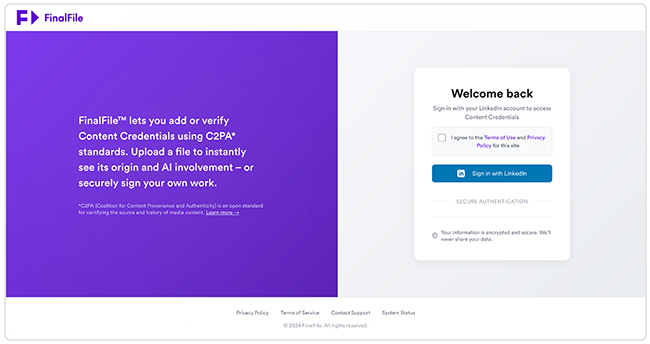
And if you’re curious about a file you’ve received, FinalFile.com can verify whether it already contains Content Credentials, showing its origin, its authorship, and any AI involvement.

You can upload a file to apply official, tamper-evident credentials that travel with your work, or check an existing file to understand exactly where it came from and how it was created.
FinalFile.com works seamlessly with images, video, and audio files, giving you flexibility across your creative workflow.
Your five most recent uploads are stored for quick access, making it easy to reuse files and streamline repeat tasks. Everything is free to use, offering a simple, open, and accessible way to keep creative work trusted from first draft to final sign-off and beyond.
From our team to yours
We’d like to take a moment to thank all our users, customers, partners, and resellers. We hope you’ve enjoyed our special 12 Days of Christmas feature release. Wishing you all joy and fun festivities leading into the holidays and beyond.
