PageProof MCP: Bringing online proofing data into your AI assistant
Creative work moves through many tools, and finding the right information can mean jumping between apps, dashboards, and email threads just to answer a simple question. PageProof MCP lets you connect PageProof to compatible AI assistants, such as Claude and ChatGPT, so you can bring PageProof into the AI workflows you already use.
Once connected you can ask questions about your proofs, reviews, and approvals in plain language and get answers grounded in your PageProof data.
That means no more searching through proof records or pulling reports together by hand — just faster answers that help you spot patterns, prioritize what matters, and keep reviews and approvals moving.
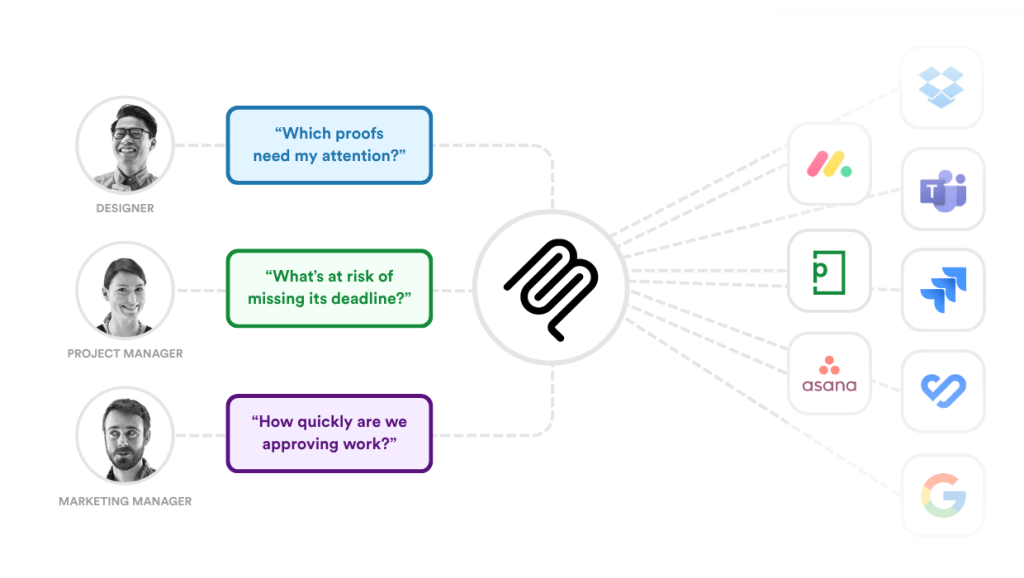
Get PageProof insights from your AI assistant, alongside your other tools.
What is MCP?
The Model Context Protocol (MCP) is an open standard that lets AI assistants connect securely to external tools and data sources.
Instead of building a custom integration for every AI platform, a service can offer a single MCP server that any compatible assistant can use, including Claude, ChatGPT, and a growing list of other MCP-compatible tools.
For PageProof customers, this means your AI assistant of choice can work with your live proofing data. The PageProof MCP gives your AI assistant access to your proofing metadata, such as proof status, versions and approvals. If you are a Team Administrator, this widens to your team’s metadata.
See the full picture across your connected tools
PageProof already gives teams detailed insights into their proofs, from approval times and version counts to where each proof is in its workflow. The PageProof MCP brings those insights, and more, into the AI assistant your team uses every day, right alongside the rest of your work.
Many teams already connect their AI assistant to their project management tools, calendars, and team chat. Add PageProof, and your proofing data can sit in the same conversation as your project plans, deadlines, and messages.
Ask a one-off question as it comes up, combine PageProof data with information from your other connected tools, and turn the answer into a summary or status update, all without switching apps.
What can you do with PageProof MCP?
Connect PageProof to an MCP-compatible AI assistant, and you can ask about your review and approval work in plain language. Your assistant uses the PageProof tools available in your account to find proof and team data, so you get answers without logging in, filtering dashboards, or pulling reports.
Know what needs your attention
Start each day with a clear picture of what’s overdue, what’s waiting on you, and where to look first.
Try asking: “Which proofs are currently waiting on my approval?”
Spot bottlenecks before they slow you down
See where work is getting held up and which reviewers have the heaviest load, so you can follow up before deadlines slip.
Try asking: “Which reviewers have the most proofs waiting on them?”
Understand how your team is performing
Track how your proofing process is changing over time, and back up process changes with real data.
Try asking: “Are our proof approval times improving?”
Report without the admin
Turn proofing data into updates you can share. You get a ready-to-use starting point for your next report, without pulling the numbers together yourself.
Try asking: “What proofing trends should I share with the leadership team?”
How to get deeper insights from your proofing data with an AI assistant
With PageProof MCP, the first answer is just the start. Your assistant keeps the context of the conversation, so you can drill into the detail, change the angle, or narrow the focus without starting again.
A conversation might go like this:
- “Which proofs are overdue this week?”
- “Which workflow step is each one stuck on?”
- “Which reviewers are holding them up?”
- “Write a short update for the project team on which proofs should be worked on next.”
Each question builds on the last, and you can tailor it to exactly what you need: a specific client, team, date range, or campaign.
No more export, upload, repeat
Without MCP, getting proofing data into an AI assistant means exporting a report, cleaning it up, uploading it, and hoping it has the fields you need. A very manual process.
With PageProof MCP, your assistant pulls the information it needs from PageProof when you ask. There are no files to manage and no reformatting, and your answers are based on your current proofing data rather than a snapshot from last week.
Instead of a one-off report, you get answers you can question, refine, and act on, all in one place.
How to set up the PageProof MCP
Connecting PageProof to your AI assistant only takes a couple of minutes.
Start by opening your AI tool’s settings and finding the place where you add connectors or MCP servers, then choose Add connector (or the equivalent option).
If you’re using Claude, search for PageProof in the Connectors Marketplace and add it from there.
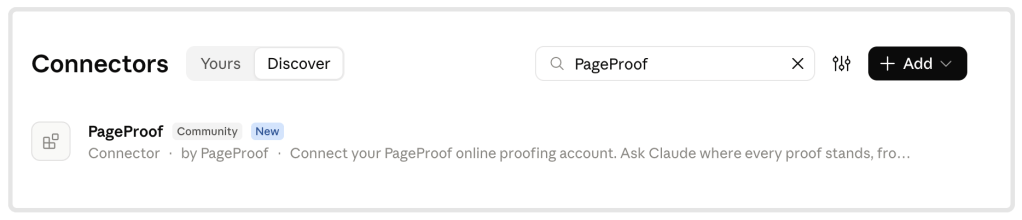
Find and add PageProof from the connectors marketplace in Claude.
In other AI assistants, create a custom connector named PageProof and paste the PageProof MCP URL into the URL field.
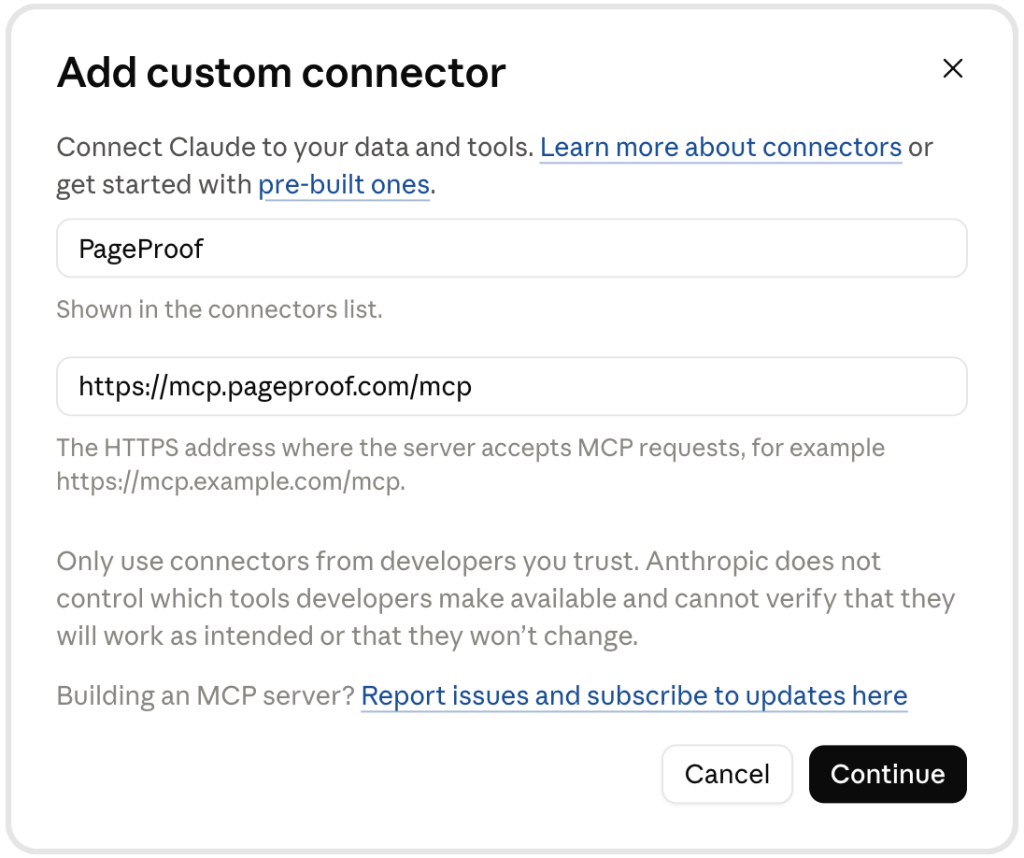
Add PageProof as a custom connector using the PageProof MCP URL.
You’ll then be prompted to sign in to PageProof.
If your tool asks how to handle tool permissions, we recommend choosing Always allow for PageProof tools so you won’t need to approve each request as you go.
You can find full instructions on how to connect your AI assistant in our setup guide.
Get started today
The PageProof MCP is available on all plans for members of a PageProof team. If you’re new to PageProof, book a demo below to see how PageProof MCP can help your team find answers faster.
Like what you see?
Learn how leading teams speed up approvals, simplify creative reviews, and collaborate securely at scale.