The top 10 marketing and design apps for Mac
macOS has long been a favorite among designers, and for good reason. Historically, Apple’s operating system has offered superior design software, excelling in tasks like logo creation and vector image processing. While Windows has made strides in design capabilities, macOS has maintained its reputation as the go-to platform for creatives.
This affinity for Macs extends beyond designers to marketers, whose work often involves design elements. The widespread use of Apple devices contributes to this preference, as many are already familiar with the Mac interface. Research shows that 72% of macOS users are loyal to the platform.
In this article, we’ve compiled our top 10 marketing and design apps for Mac that are perfect for both designers and marketers. Plus, we’re excited to introduce a new tool for creative work review and approval: the PageProof Desktop app, now available on the Mac App Store!
Top 5 must-have Mac apps for designers
These five apps serve as crucial resources that designers can utilize daily, enabling them to streamline workflows and unleash creativity.



Adobe Creative Cloud
The industry standard in design, Adobe Creative Cloud is a suite of design and editing applications from Adobe Inc. Being the premier creative applications and services provider globally, this is the platform where designers can bring to life their vision from any corner of the world.
Figma
Figma is widely regarded as one of the best design apps for web designers and developers. From designing wireframes to app concepts, Figma offers a ton of different components and styles. Unlike traditional design tools, Figma enables multiple team members to collaborate and view designs concurrently. This real-time collaboration feature facilitates immediate feedback and iterative design processes, expediting decision-making.
Canva
Canva is a powerful design platform that enables users to create beautiful visuals for their work in marketing and social media. Canva is user-friendly. With its uncomplicated drag-and-drop interface and an array of ready-made templates, it serves as an ideal solution for designers seeking to generate custom graphics swiftly.
ColorSlurp
ColorSlurp is the go-to color picker tool for designers, offering swift color selection directly from your screen with an outstanding magnifier. It assists designers in accurately and effortlessly assessing color contrast and ensuring optimal accessibility.
Affinity Designer
Positioned as a premier design app, Affinity Designer stands out as an industry favorite, excelling in crafting logos, icons, UI mockups, web interfaces, and beyond. It operates in real-time, responds promptly, and offers comprehensive features—even for the most intricate documents. Providing designers with genuine creative freedom and achieving pixel perfection.
Top 5 must-have Mac apps for marketers
These five apps are our preferred selection for marketers, enabling them to ensure creative collaboration is secure and seamless.





1Password
The 1Password native Mac app lets you automatically enter passwords in browsers and anywhere on your system. It’s a great option for marketers who tend to have a range of apps in which they need to keep data private.
monday.com
monday.com is a popular project management tool that makes it easy for users to plan, organize, and track a team’s work in one place. It is designed to improve team coordination, efficiency, and productivity by customizing any workflow to meet your needs.
Slack
Slack is a powerful collaboration platform that revolutionizes communication within businesses. Whether it’s messaging, file sharing, screen sharing, or seamless collaboration, Slack provides an efficient and organized alternative to email.
Trello
Trello is a visual work management tool designed to elevate team collaboration and organization. It provides a dynamic platform for teams to ideate, plan, manage, and celebrate their collective efforts seamlessly on easy-to-use kanban-style boards with cards.
Dropbox
Dropbox offers effortless cloud storage, which is ideal for Mac-using marketers. Dropbox’s user-friendly app ensures seamless file synchronization across teams.
New PageProof Desktop app for Mac
PageProof – the online proofing platform that is ingeniously simple to use yet powerful, making reviewing and approving work feel effortless, is now available as a Mac app. Users will experience the same simple, smart, seamless, and secure browser online proofing experience, now on the Mac.
Simple
PageProof has been designed with the customer in mind providing a User Interface (UI) experience that is both simple to use, yet layered with powerful features. Use the red pen to place feedback directly on the work with pinpoint precision. When a lot of people are involved in the sign-off process, @ mentioning draws attention. It is simple to attach files to support your feedback if you need to as well.
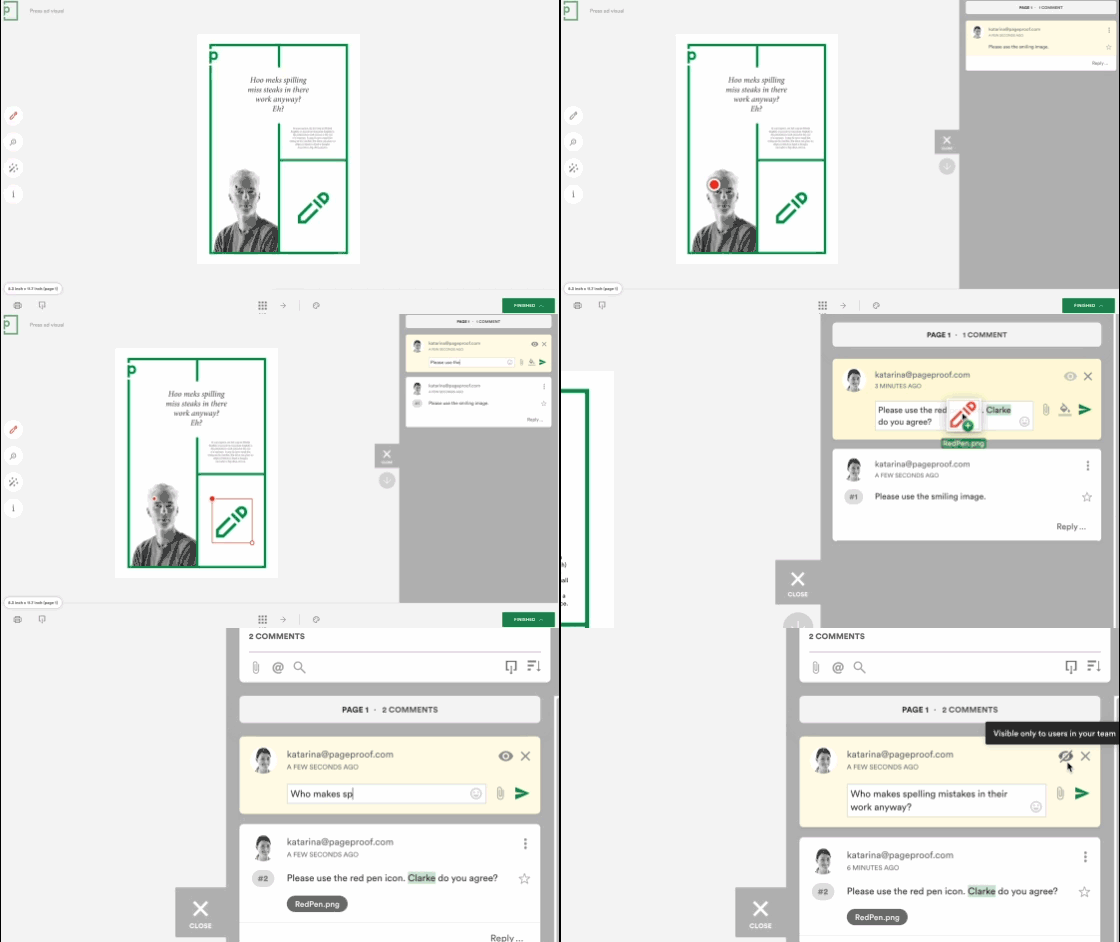
PageProof has been voted time and time again as the platform with the best usability in the G2 online proofing category report with latest results of:
- highest ease of use rating (95%),
- highest ease of admin score (96%),
- and the highest meets requirements score (95%).
And if you ever need assistance, the team from PageProof is there every step of the way. It is no wonder PageProof continuously receives the Best Support vote for the online proofing category.
File support for all creative
PageProof has the most comprehensive spectrum of files and native app support in the market to cater to the ever-expanding needs of marketing teams, and creative organizations globally.
- Adobe PDF proofing – PDFs are a common output designers make for artwork designs, including packaging and print.
- Static image artwork proofing – PageProof supports all other static artwork files too: jpeg, png, tif, eps, heic, webp, etc.
- Microsoft Office, Google Docs, and Apple built-in apps proofing – Microsoft Word, Excel, and PowerPoint, as well as Office 365 links to documents, spreadsheets, and presentations. For Google users, there is support for Google Docs, Google Sheets, and Google Slides. Proofing Apple built-in app files is as easy as pie with support for Apple Keynote, Pages, and Numbers.
- Video proofing – Easily share proofs of video formats including mp4, m4v, avi, mkv, mov, and gif. Reviewers can markup comments directly on video frames, even span comments over time, move through the video frame-by-frame, and control playback speeds.
- Design proofing – PageProof’s Adobe add-on lets you create proofs directly from your designs in Adobe Creative Cloud. It is simple to bring comments and markup layered over your creative files too saving time and ensuring clarity when working through changes. Adobe InDesign, InCopy, Photoshop, Illustrator, Premiere Pro, and After Effects are all supported.
- Audio proofing – Music, podcasts, radio ads, and more, can be proofed with markup and comments placed directly on the waveform. Mp3 and wav are all supported. You can span comments over time, and each comment clearly states the timecode.
- Website proofing – Zipped HTML files, and live website URLs – all sites supported including password-protected sites, basic authentication, staging server sites, and popular website design tool sites such as WordPress, Shopify, Squarespace, Wix, and more. Revolutionize your website proofing with PageProof.
- UX and UI prototype design proofing – UX prototyping design tools such as Sketch, Figma, Adobe XD, and InVision – UX designers simply add shared links to PageProof to begin gathering feedback and approval.
- Email proofing – PageProof’s unique approach to email proofing means a test email from any email marketing tool can be sent to PageProof to create a proof. All content can be easily reviewed and a link checker automatically scans through all links in the email and highlights any issues for reviewers. Even check for email responsiveness on mobile devices.
- 3D content – Simply share your 3D content link to PageProof to enable reviewers to interact with the 3D design, turning it to review it at different zooms and eye levels rather than leaving a 2D view to the imagination.

Smart features
PageProof offers an endless range of powerful and innovative features that are ingeniously simple to use. In fact, PageProof is the innovation leader in this space. A few favorites are highlighted below:
- Magic tools: Smart features to ensure your documents are pixel-perfect. These include a ruler, gridlines, focus mode, an automatic link checker, font and color analysis, and linked files, just to name a few.
- ColorSep®: Users can preview the color separation plates, optimizing the proofing process for printed artwork and packaging. And see the ink coverage breakdown easily.
- Smart compare: Users can view and compare different versions of a document side-by-side, with differences automatically highlighted for easy identification. Customize the way differences are displayed with options like color, opacity, and a strobe effect.
- Checklists: Fully audited, collaborative checklists enable users to monitor who completed a task and when, thus ensuring compliance with marketing and brand guidelines throughout the proofing process.
- PageProof X-Tools: Users can add custom tools to the proofing screen on a proof-by-proof basis, such as a unit conversion tool, calculator, word counter, or calendar. Or one of your own.

Seamless collaboration
PageProof offers a flat pricing plan that gives unlimited team members a voice, unlimited storage, and unlimited proofs – no limits to collaborate seamlessly.
Automated workflows give you control and flexibility to reflect the way your team really reviews work. Regardless of whether they are internal or external reviewers, based in the office, working remotely, or elsewhere in the world, with automated workflows, users have complete control and flexibility to ensure that key stakeholders see work at the right time. It is simple to customize access levels, notifications, and deadlines. Route your proof from marketing, to sales, to legal, and then for final sign-off by the marketing director.
Wherever you work, so does PageProof. PageProof offers native integrations into all your favorite design, communication, and project management tools like Adobe, Canva, monday.com, Asana, ClickUp, Airtable, Trello, Slack, MS Teams, and more. And of course, now an app for the Mac. Meaning you can continue the way you are used to, with the added power of PageProof.

Security of platform
PageProof takes the security of your creative work seriously, offering a world-first triple-layer patented encryption technology. This encryption approach ensures that your data is encrypted prior to transmission from your device, during transmission, and post-transmission. This means that your proofs cannot be accessed by anyone else. In addition, PageProof sits on top of a highly secure and rigorously tested platform with ISO 27001 certification.
Summary
In the realm of design and marketing, macOS stands out as the preferred operating system. Its powerful hardware and software facilitate seamless collaboration with a comprehensive range of apps. Elevating creative workflows is simple with solutions such as PageProof, which is now conveniently available on the Mac App Store. PageProof is renowned as a simple, smart, and secure solution, making the review and approval of creative work effortless. With seamless integrations with popular design and project management tools, PageProof ensures a collaborative experience without boundaries. Regardless of whether you’re a marketer or designer, add it to your preferred stack of Mac apps today.