
Across the entirety of the Adobe suite, there’s a tool for everything, but perhaps none as versatile to designers as InDesign. But why is InDesign such a great tool? It’s super versatile and works smoothly with other Adobe software. If you’re dealing with lots of text or images, InDesign has you covered as the go-to tool for making eye-catching layouts. Using Adobe InDesign is a great choice for creating all kinds of publications, from traditional print media like newspapers and magazines to digital assets such as eBooks and online documents.
Whether you’re a seasoned graphic designer, a budding entrepreneur, or a marketer looking to enhance your design skills, understanding InDesign can elevate your projects to new heights of creativity and efficiency. Read on to learn how InDesign can add value to your creative projects.
Key takeaways
- Adobe InDesign is perfect for creating both print and digital designs with versatile tools.
- InDesign’s advanced typography and layout tools ensure professional, polished results.
- Stay ahead with AI-powered features and seamless integration with Adobe Creative Cloud.
- PageProof’s plugin for InDesign saves time by streamlining feedback and approval workflows.
Key features of Adobe InDesign
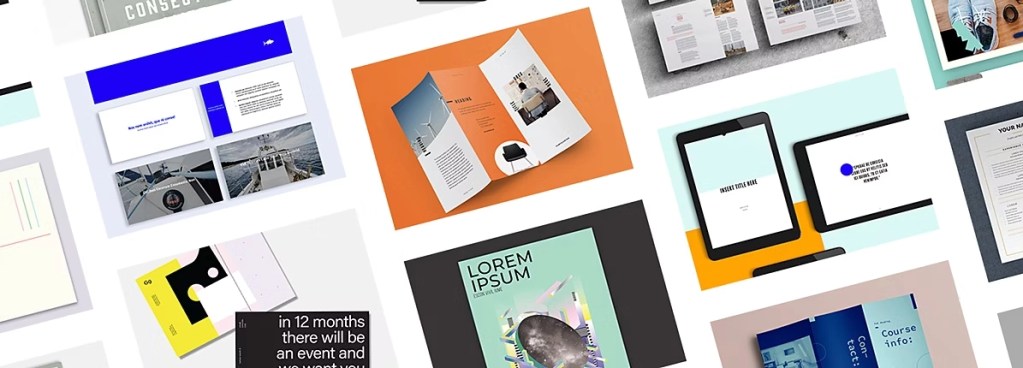
Adobe InDesign offers a diverse toolkit, tailored for crafting polished layouts for both print and digital projects. From fine-tuning text styles to innovative design options, InDesign equips users with a range of features to bring their creative visions to life.
Versatile layouts
InDesign makes design layout a breeze by offering a variety of tools that boost efficiency and accuracy. With features like grid systems and alignment tools, designers can effortlessly arrange text, images, and graphics for visually stunning compositions.
Whether it’s for print or digital media, InDesign’s user-friendly interface ensures a smooth workflow, allowing designers to bring their creative ideas to fruition with precision and style.
Other key features include:
- High-quality templates downloadable from Adobe Stock.
- Adjust the layout feature for the automatic adaptation of elements.
- Easy page rearrangement using the page panel.
- Simplified section numbering for large documents.
- Precise layout design with the measure tool.
- Efficient asset management with Creative Cloud libraries.
Typography tools
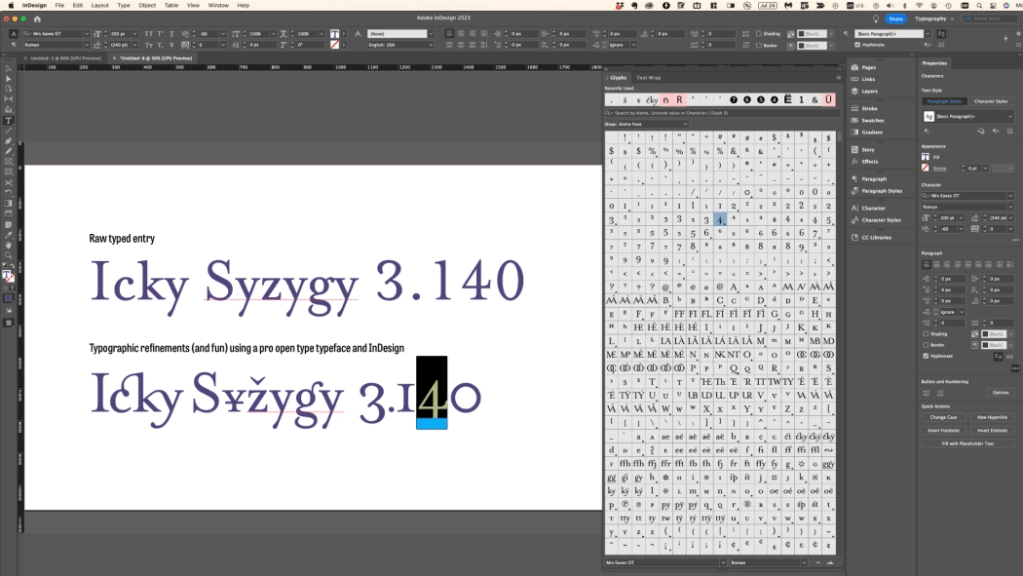
Adobe InDesign provides designers with a wide range of typography tools to enhance their design projects. With features for advanced text formatting and control over spacing and alignment, InDesign enables users to create visually appealing layouts that effectively convey their message.
Whether it’s crafting elegant typographic compositions or ensuring consistency across different text elements, InDesign equips designers with the necessary tools to elevate the quality of their work. Other features include:
- Find and customize the perfect font with ease.
- Apply presets and style packs for instant layout stylization.
- Bend type along shapes or paths for dynamic designs.
- Utilize over 20,000 pro fonts from Adobe Fonts.
- Modify type precisely with kerning, tracking, and character/paragraph styles.
- Customize font appearance with variable fonts.
- Easily organize and access preferred fonts for efficient workflow.
Sharing and publishing
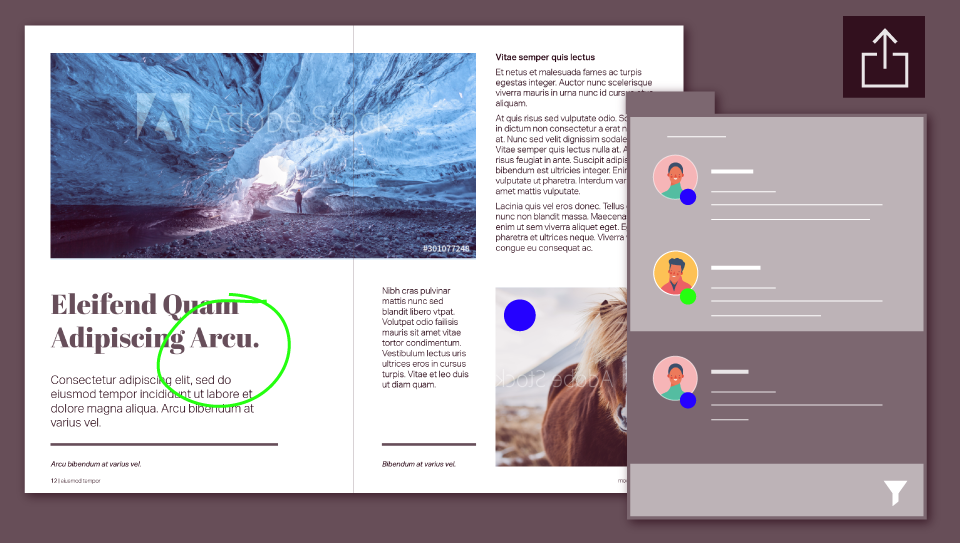
With InDesign’s user-friendly interface, you can effortlessly distribute your projects across various platforms, from print to digital media. Collaborate seamlessly with team members, review feedback, and make revisions in real time. From design conception to final output, InDesign empowers you to deliver professional-grade publications tailored to your audience’s preferences. Other features include:
- Share your work directly within the app and receive feedback effortlessly.
- Create a shareable link for collaborators to provide feedback and seamlessly update the same document.
- Ensure error-free printing with the preflight panel, which detects issues like missing files, fonts, low-resolution images, and overset text before printing.
- Make your PDFs accessible to everyone by optimizing documents for screen readers and assistive devices within InDesign and Adobe Acrobat.
- Create countless design variations by merging data sources with your InDesign documents, streamlining your workflow.
New Adobe InDesign features
The entire Adobe suite, including InDesign, has seen some recent improvements – many of which are powered by AI. These include:
- Create images using Adobe Firefly models from text prompts.
- Access cloud documents with autosave capabilities.
- Improve text formatting across various languages using HarfBuzz.
- Automatically stylize text and seamlessly publish online with searchable content and Google Analytics integration.

Supported print and digital media
InDesign is incredibly versatile in its ability to tackle a wide range of design projects with ease. Whether you’re creating eye-catching print materials like magazines or brochures or digital assets like ebooks, and interactive PDFs, InDesign has you covered.
Creating books
InDesign makes laying out books easy. It has features like master pages for keeping design elements consistent, paragraph styles for uniform text formatting, and text threading for smooth transitions between pages. Plus, it’s great for digital books with interactive features like hyperlinks and multimedia content, and it ensures top-notch print quality for physical copies.
Creating brochures
Designing brochures is straightforward with InDesign. It offers customizable templates and works seamlessly with Adobe Illustrator and Photoshop for adding graphics and photos. Whether you’re creating for print or digital distribution, InDesign’s flexibility lets you adapt layouts to fit your needs.
Easy catalog creation
InDesign speeds up catalog creation by importing product information and maintaining consistency. Its grid-based layout tools keep designs organized, and clickable links enhance the digital browsing experience, making it easy to create visually appealing catalogs.
eBook creation
InDesign is perfect for eBook creation, offering fixed-layout support for consistent design across devices. Interactive elements like pop-up footnotes engage readers, and accessibility features ensure compatibility with screen readers, allowing designers to craft immersive reading experiences.
Creating flyers
InDesign provides robust typography tools for creating attention-grabbing headlines and body text. Integration with Illustrator ensures quality for vector graphics, and print-ready PDFs guarantee professional-quality flyers.
Creating magazines
InDesign is tailored for magazine production, with support for multi-page layouts and collaborative workflows. Integration with Adobe Creative Cloud services facilitates seamless collaboration, ensuring a professional final product.
Creating posters
InDesign offers templates and supports high-resolution images and vector graphics for creating impactful posters. Its typography tools help design eye-catching headlines, making your posters stand out.
Creating presentations
InDesign allows for dynamic presentation layouts with customizable slides and interactive elements. Integration with Illustrator and Photoshop maintains design consistency, and export options cater to various sharing platforms and devices, making presentations engaging and versatile.
What industries use InDesign?
InDesign is a flexible piece of software used in many fields because it’s great for designing and organizing creative projects. Let’s see some examples of what industries it works best in:
- Publishing: widely embraced in publishing for crafting newspapers, magazines, books, and printed materials. Its robust layout and typography tools enable the creation of polished, professional publications.
- Advertising and Marketing: trusted by advertising agencies and marketing teams to develop captivating brochures, flyers, posters, and ads. Its adaptability fosters the crafting of visually stunning designs that effectively communicate brand messages.
- Education: embraced by educational institutions to produce textbooks, workbooks, manuals, and teaching aids. Teachers leverage its capabilities to design visually engaging resources that enrich students’ learning journeys.
- Communications: businesses rely on InDesign to design corporate documents like annual reports, newsletters, presentations, and internal materials. It aids in maintaining brand coherence and professionalism in corporate communication.
- Graphic Design: a staple in the graphic design process across diverse sectors, empowering them to unleash creativity in logos, branding materials, packaging, and visual assets.
- Fashion and Retail: InDesign finds utility in the fashion and retail realms for crafting catalogs, lookbooks, product packaging, and promotional materials. Its precise layout tools ensure products are showcased attractively and systematically.
Alternatives to Adobe InDesign
Looking for alternatives to Adobe InDesign? While InDesign is still king in the publishing world, there are some great options out there worth considering. Here’s a breakdown of some popular ones:
- Affinity Publisher: easy to use with powerful features, it’s gaining popularity among designers and publishers.
- Scribus: this free, open-source software is loved by those who prefer community-supported tools and offers professional-grade features.
- Canva: known for its online design platform, Canva also has a desktop publishing tool that’s super user-friendly.
- Swift Publisher: perfect for small businesses, it comes with lots of templates and design tools for making marketing materials.
- Microsoft Publisher: if you’re already comfortable with Microsoft Office, Publisher is a familiar choice with a range of templates.
- Marq: new kid on the block focusing on collaborative publishing, allowing multiple users to work together on projects.
- iStudio Publisher: balanced simplicity and power for Mac users, offering versatility in desktop publishing.
While these alternatives have their perks, Adobe InDesign’s long-standing reputation and seamless integration with other Adobe tools keep it at the top for many pros. But exploring these options can help you find the perfect fit for your publishing needs, whether you’re a seasoned designer or just starting out.
Incorporating feedback into designs – made easy with PageProof
PageProof recently unveiled a brand-new plugin for Adobe InDesign. This plugin is a huge efficiency driver for designers working with PageProof and Adobe InDesign. It addresses the disjointed process of incorporating feedback from reviewers into their designs – ensuring that feedback is implemented correctly, saving hours.
PageProof’s time-saving features include:
- Swiftly create a new proof directly from Adobe InDesign.
- Send the proof through a PageProof automated workflow, assign proof owners, and add a checklist to guide reviewers and meet compliance requirements.
- Upload a new version of the proof in a click – version control is automatic.
- Access a comprehensive proof dashboard to monitor the status and details of all your proofs from a single location.
- View comments and markup directly on your artwork file, presented as a convenient to-do list for easy action.
- To avoid manual keying of the text, select and replace text with suggested wording left in the comments using the text replace feature.
- Files attached to comments by reviewers in PageProof can be placed seamlessly into the Adobe InDesign artwork.
- Quickly cycle through multiple files and place them onto the correct page of the artwork at the click of a button.
- Reply to comments to clarify change requests – even create private replies.
- Mark comments as done once addressed, ensuring no feedback is missed.
- Be alerted if the open artwork file does not match the proof version to ensure you are making changes to the correct artwork.
Adobe InDesign in summary
Adobe InDesign has proven itself as a go-to tool for designers across different fields. Its easy-to-use interface and wide range of features make designing a breeze. Plus, its seamless integration with Adobe Creative Cloud makes teamwork seamless, ensuring top-quality results every time.
Recent upgrades, like AI-powered features, show that Adobe is dedicated to keeping InDesign cutting-edge. And the new PageProof plugin is a game-changer, making the review and approval of creative work smoother than ever.
Utilizing both Adobe InDesign and PageProof, designers can save time, work smarter, and create with confidence. Book a demo with PageProof today and see how we can help optimize your creative workflows.
Book a demo of PageProof today.
FAQs
What is Adobe InDesign?
Adobe InDesign is a software tool widely used for creating various types of publications, including print media like newspapers and magazines, as well as digital assets like eBooks and online documents. It’s important for designers because of its versatility and its ability to create eye-catching layouts efficiently.
Can Adobe InDesign be used for both print and digital media?
Yes, Adobe InDesign is suitable for creating both print and digital media. It offers various export options tailored to different publishing formats, allowing designers to produce content for a wide range of platforms.
